Using the Borescope
ADJUSTMENTS AND SETTINGS
6
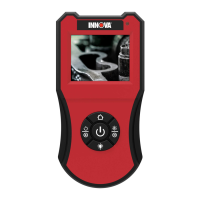
2. Adjust the display brightness as desired:
Press the LEFT/DECREASE button to decrease display
brightness.
Press the RIGHT/INCREASE button to increase display
brightness.
3. When the desired display brightness is obtained, press the HOME
button to save your changes and exit the “setting” mode.
Adjusting the Color Balance
1. With the Borescope powered ON, press the HOME
button.
The Borescope enters the “setting” mode.
2. Adjust the color balance as desired:
Press the LEFT/DECREASE button to decrease the color
balance.
Press the RIGHT/INCREASE button to increase the color
balance.
3. When the desired color balance is obtained, press the HOME
button to save your changes and exit the “setting” mode.
Adjusting Image Orientation
1. With the Borescope powered ON, press the ROTATE IMAGE
button.
The Borescope enters the “setting” mode.
2. Adjust the image orientation as desired:
Press the LEFT/DECREASE button to rotate the displayed
image to the left.
Press the RIGHT/INCREASE button to rotate the displayed
image to the right.
3. When the desired image orientation is obtained, press the HOME
button to save your changes and exit the “setting” mode.


 To Next Page