EasyManua.ls Logo

Innovative Technology ITVS-750 - User Manual

Innovative Technology ITVS-750
20 pages
Print Icon
To Next Page IconTo Next Page
Loading...
1
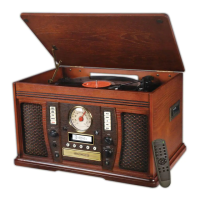
MODEL: ITVS-750
WOODEN MUSIC CENTRE
WITH RECORDABLE CD PLAYER
IMPORTANT SAFETY INSTRUCTIONS ....................................................................................................... 2
PRODUCT OVERVIEW ................................................................................................................................ 3
SETUP / BASIC OPERATION ....................................................................................................................... 6
REMOTE CONTROL .................................................................................................................................... 6
LISTENING TO A VINYL RECORD ............................................................................................................... 7
LISTENING TO A CD .................................................................................................................................... 8
LISTENING TO THE RADIO ....................................................................................................................... 10
LISTENING TO AN EXTERNAL AUDIO DEVICE (AUX MODE) ................................................................. 10
LISTENING TO A CASSETTE TAPE........................................................................................................... 11
RECORDING TO A CD-R / CD-RW ............................................................................................................ 11
MAINTENANCE / PROPER HANDLING..................................................................................................... 14
SPECIFICATIONS....................................................................................................................................... 16
TROUBLESHOOTING GUIDE .................................................................................................................... 17

Other manuals for Innovative Technology ITVS-750

Questions and Answers

  • K
    Kathy BauerAug 17, 2025
    Why is there noise or distortion in the sound output of my Innovative Technology ITVS-750?
    • A
      Adam FoxAug 17, 2025
      Noise or distortion can occur if the unit is too close to a TV or another device causing interference. Try turning off the TV or other appliance and relocate the unit.
  • A
    Andrew HicksAug 20, 2025
    What to do if my Innovative Technology ITVS-750 Stereo System CD playback is noisy or skips?
    • C
      Cheyenne MurphyAug 20, 2025
      Noisy or skipping CD playback can happen if the CD is scratched, damaged, or warped. Try replacing the CD with an undamaged one. Also, a very dirty disc can cause this issue, so carefully clean the CD.
  • C
    Caleb ValentineAug 22, 2025
    What to do if my Innovative Technology ITVS-750 will not power on?
    • L
      larry18Aug 22, 2025
      If your unit won't power on, ensure it is properly connected to the AC power supply.
  • A
    annagutierrezAug 25, 2025
    What to do if there is no sound from my Innovative Technology Stereo System speakers?
    • M
      Michael BowenAug 26, 2025
      If there's no sound, first adjust the volume to a suitable level. Also, ensure the input selector matches your playback source.
  • A
    Andrew HansenAug 27, 2025
    Why is my Innovative Technology ITVS-750 Stereo System CD stopping or pausing during play?
    • T
      Tonya StanleyAug 27, 2025
      This can occur if the CD is inserted upside down; make sure to insert it with the printed side facing up. Also, the CD might be dusty, dirty, or have condensation. In this case, carefully clean and dry the CD.
  • L
    Leonard GriffinAug 30, 2025
    What to do if my Innovative Technology ITVS-750 is not responding?
    • D
      Dawn EvansAug 30, 2025
      If the system isn't responding, disconnect the power cord and any external audio devices. After one minute, plug the power cord back in.
  • T
    Tristan WillisSep 1, 2025
    Why can't I listen to any station on my Innovative Technology Stereo System, or why is the signal weak?
    • L
      Linda ParkerSep 1, 2025
      If you can't tune into any stations or the signal is weak, ensure you properly tune in the desired station. Also, a nearby TV set might interfere with the radio reception; try turning off any interfering TV sets.
  • J
    James WiseSep 4, 2025
    What to do if the tape does not play on Innovative Technology Stereo System?
    • M
      Maria WilliamsSep 4, 2025
      If the tape isn't playing, make sure the cassette tape is inserted correctly. If the tape has reached the end, flip the cassette.
  • M
    Michele WallaceSep 6, 2025
    What to do if my Innovative Technology ITVS-750 CD tray will not open?
    • J
      Jared ClarkSep 7, 2025
      If the CD tray won't open, select AUX, PHONO, CD, or TAPE mode. It will not open if FM/AM mode is selected.
  • L
    Lauren RamirezSep 9, 2025
    Why are the buttons not functioning correctly on my Innovative Technology ITVS-750?
    • A
      Amy HallSep 9, 2025
      If the buttons aren't functioning, it could be that the unit is processing information (displaying “--- Busy”). Wait until the unit finishes processing. Alternatively, try turning the unit off, then on again.

Summary

Important Safety Instructions

Product Overview

Turntable Operation and Parts

Turntable Components

Identifies key parts of the turntable mechanism.

Connection Ports

Details for FM antenna, AUX jacks, and AC power cord.

Setup, Basic Operation, and Remote Control

Initial Setup Steps

Steps for initial setup of the unit.

Basic Controls and Remote Usage

How to operate the unit and its remote control.

Battery Precautions and Remote Functions

Battery Precautions

Safety guidelines for battery usage and disposal.

Remote Control Button Functions

Explains the function of each button on the remote control.

Listening to a Vinyl Record

Vinyl Record Playback

How to place and play a vinyl record on the turntable.

Listening to a CD

CD Playback Steps

Detailed steps for playing a CD.

Important CD Handling Notes

Critical information regarding CD handling and playback.

CD Playback Features

Display Modes and Repeat Playback

Explains display options and how to set repeat modes.

Shuffle and Programmed Playback

How to play tracks randomly or in a custom order.

Radio and External Audio Playback

Listening to the Radio

How to tune radio stations and improve reception.

AUX Mode Operation

How to connect and play external devices via AUX input.

Cassette Tape and CD Recording

Listening to a Cassette Tape

How to insert, play, fast forward, and eject a cassette tape.

Recording to CD-R;CD-RW

Information and preparation for recording to CDs.

Recording Process Details

Auto Tracking and Recording Steps

How auto tracking works and the main recording steps.

Recording Modes

How to use auto track selection and enter pause mode.

Finalizing and Unfinalizing CDs

Finalizing a CD

Steps to finalize a CD for playback on other devices.

Unfinalizing CD-RW Discs

How to unfinalize a CD-RW to add more recordings.

Erasing CD-RW and Disc Handling

Erasing CD-RW Tracks

How to erase the last track or all tracks from a CD-RW.

Compact Disc Handling

Guidelines for handling and caring for CDs.

Vinyl Record, Unit Care, and Stylus Replacement

Handling Records and Unit Care

Best practices for handling records and caring for the unit.

Turntable Stylus Replacement

Instructions for removing and installing the turntable stylus.

Product Specifications

Troubleshooting Guide

General and Tape Issues

Solutions for common general operational and tape playback problems.

Radio and CD Player Issues

Solutions for radio reception and CD player errors.

AUX;Phono and Response Issues

Solutions for AUX/Phono audio and unit response problems.

Regulatory Information

FCC Compliance

Regulatory statements regarding FCC rules and interference.

California Prop 65 Warning

Warning about chemicals present in the product.

Warranty and Service Information

Limited Warranty Details

Details about the product's warranty coverage and terms.

How to Obtain Service

Instructions on how to get warranty service for the product.

Innovative Technology ITVS-750 Specifications

General IconGeneral
TypeStereo System
BluetoothYes
CD PlayerYes
FM RadioYes
USB PortYes
AUX InputYes
ConnectivityBluetooth, USB, AUX
MediaCD, USB
SpeakersYes, included

Related product manuals