18
my.innuos.com my.innuos.com
Settings
1
2
3
4
5
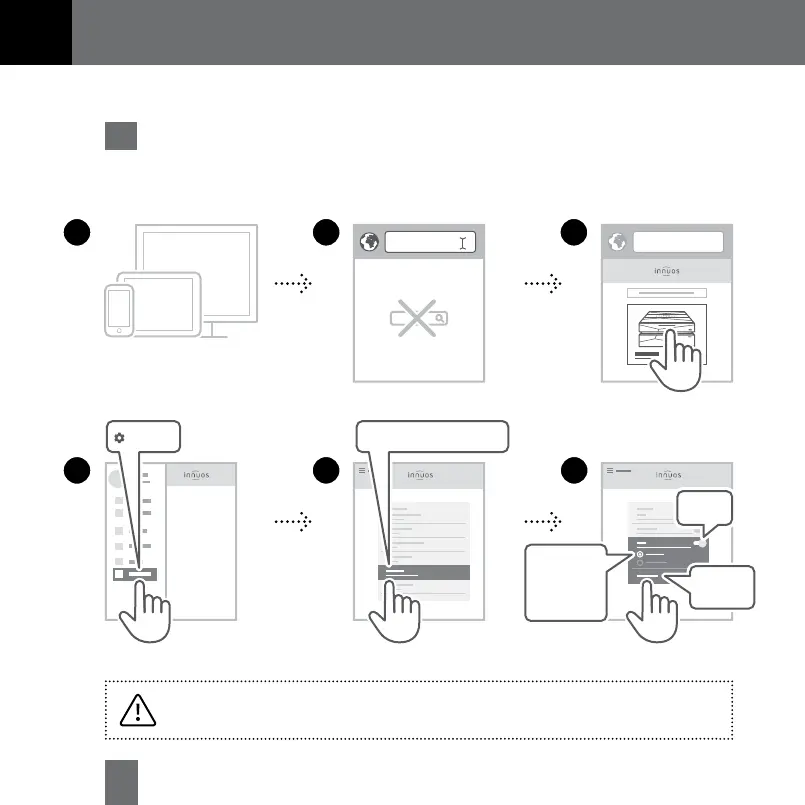
Choose Server Integration
6
Roon
Apply
Changes
Access my.innuos.com
on web browser
Enable Roon
Mobile / Tablet / Desktop
Roon Core
1
or
Roon as
Player only
2
1 Enable Roon on innuOS �����������������������������������������������������������������������������������
13
Using your System with Roon
1
Roon Core: Select if you want to use this server as Roon Server and Player.
2
Roon as Player only: Select if you are running Roon Core on another system.


 To Next Page