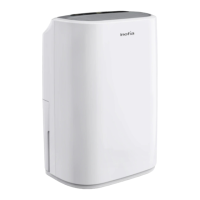
This document is the user manual for the Inofia Dehumidifier, Model No.: HD161A. It provides essential information for safe operation, maintenance, and troubleshooting of the device.
Function Description:
The Inofia Dehumidifier is designed to remove excess moisture from the air, helping to prevent issues like mold, mildew, and dampness in enclosed spaces. It operates by drawing in humid air, passing it over cooling coils to condense the moisture, and then releasing drier air back into the room. The collected water is stored in a removable bucket or can be continuously drained via an attached hose. The device features a control panel for setting desired humidity levels, fan speeds, and timer functions. It also includes smart functions such as auto shut-off when the water bucket is full or the set humidity is reached, a 3-minute delay before resuming operation to protect internal components, and auto defrost to prevent frost buildup on evaporator coils. An auto-restart function ensures the dehumidifier resumes operation with previous settings after a power interruption.
Important Technical Specifications:
- Model No.: HD161A
- Power Source: AC 110-120V, 60 Hz
- Rated Power: 205W
- Rated Current: 1.9A
- Moisture Removal (65°F, RH 60%): 9.0 Pints/Day
- Moisture Removal (80°F, RH 60%): 13.5 Pints/Day
- Moisture Removal (86°F, RH 80%): 25.9 Pints/Day
- Moisture Removal (95°F, RH 90%): 30.7 Pints/Day
- Input Power (65°F, RH 60%): 125W
- Input Current (65°F, RH 60%): 1.1A
- IEF (65°F, RH 60%): 1.3 Liters/kWh
- Noise Level: Low Fan: 42 dB (A), High Fan: 46 dB (A)
- Refrigerant: R134a (3.7 oz.)
- Protection Type of Preventing Electric Shock: I
- IP Level: IP20
- Motor FLA: 0.19A
- Motor Compressor: RLA:1.75A; LRA:11A
- High Pressure: 232 PSIG (1.6MPa)
- Low Pressure: 90 PSIG (0.62MPa)
- Water Tank Capacity: 1.8 L (0.48 Gallons)
- Dimension: 12.2 x 8.3 x 17.3 inches
- Weight: 23.8 lbs
- Recommended Ambient Operating Temperature: 5°C (41°F) to 35°C (95°F)
- Humidity Setting Range: 30-80% in 5% increments
Usage Features:
- Control Panel: Features a POWER button, TIMER button, SETTING button (for humidity adjustment), and SPEED button (for fan speed).
- LED Display: Shows ambient humidity, set humidity, timer settings, and error codes. The ambient humidity reading is accurate within +/- 5%.
- Power Button: Turns the dehumidifier on/off. An indicator light above the button flashes when the compressor is off and turns solid green when it's on.
- Timer Function: Allows users to set a delay start or delay stop for the dehumidifier, ranging from 1 to 24 hours. This is a one-shot function and does not cycle indefinitely.
- Humidity Setting: Adjustable between 30% and 80% Relative Humidity (RH) in 5% increments. For continuous mode, the display reads 30. The set humidity should be at least 10% lower than the ambient humidity for effective operation.
- Fan Speed: Two settings: Low and High. A higher fan speed results in quicker moisture removal.
- Water Bucket: A removable 1.8 L (0.48 Gallons) water tank for collecting condensed water. The "FULL" indicator light illuminates and an E7 error message appears when the bucket is full, triggering an automatic shut-off.
- Continuous Draining: The dehumidifier can be set up for continuous drainage by attaching the included drain hose to a suitable floor drain or external bucket. The drain outlet must be lower than the dehumidifier for proper flow.
- Auto Shut Off: Automatically turns off when the water bucket is full or the desired humidity level is reached.
- Auto Defrost: Automatically cycles off the compressor and runs the fan to melt frost buildup on the evaporator coils, especially in colder ambient temperatures.
- Auto-Restart: Restarts the dehumidifier with previous settings (set humidity and fan speed) after a power outage.
- Placement Guidelines: Requires a minimum clearance of 20 cm (8 inches) on the sides and back, and 40 cm (16 inches) on top for proper air circulation. Should be placed on a smooth, level floor strong enough to support it when the water bucket is full.
Maintenance Features:
- Before First Use: It is crucial to leave the dehumidifier standing upright for 24 hours after transport before plugging it in to prevent internal damage to refrigeration components.
- Vent and Case Cleaning: Clean with water and a mild detergent. Avoid bleach, abrasives, or direct water splashing. Use a vacuum attachment or brush for air intake and outlet vents.
- Reservoir Cleaning: Clean every few weeks to prevent mold, mildew, and bacteria growth. Partially fill with clean water and mild detergent, swish, empty, and rinse. Do not clean in a dishwasher.
- Air Filter Cleaning: The air filter, located behind the rear intake grill, should be cleaned approximately every 2 weeks, or more frequently if there's significant dander or fur.
- Remove the filter by grasping the tab and sliding it out.
- Use a vacuum cleaner with a soft brush attachment to remove debris.
- Wash the filter in lukewarm, soapy water (below 40°C/104°F) or with a neutral cleaning agent.
- Rinse thoroughly and dry completely before re-installing.
- Do not operate the dehumidifier without the filter, as dirt and lint will clog it and reduce performance.
- Long-Term Storage:
- Operate on high fan mode for half a day, then wait 1 day before emptying the reservoir.
- Clean the main unit, water reservoir, and air filter, ensuring everything is clean and dry.
- Wrap and bundle the power cord.
- Cover the dehumidifier with a plastic bag.
- Store upright in a dry, well-ventilated place.
- Troubleshooting: The manual includes a comprehensive troubleshooting section for common issues like the dehumidifier not turning on, not running, insufficient dehumidifying, continuous operation, noise, frost on coils, and water leakage. It also lists error codes (E1, E2, E4, E7) and their corresponding solutions. For persistent errors, users are advised to contact customer service.
- Warranty: Inofia offers a limited 1-year warranty covering manufacturing defects. Damage from normal wear and tear, abuse, mishandling, accidents, failure to follow instructions, liquid exposure, foreign particles, or unauthorized modifications are not covered. For any issues, customers are encouraged to contact service@inofia.com.


 To Next Page

 General