13
14
Unable to
turn on
Clean the metal contact point pole or replace it
Program running too much, force stop some running
applications or restart the terminal.
The battery may not in good condition due to dirt or damage
The battery might be dead. Charge or replace the battery.
The battery may be incorrectly installed. Remove and reinstall
the battery.
Terminal crash
Buttons no
response
White screen
display
The buttons may not work temporarily, restart the terminal.
The buttons is broken, Contact the dealer or our company
Display screen may not work temporarily, restart terminal.
Unable to
connect the
Network
SIM card cannot work properly or cannot be used.
Trouble
Solution
Echo or
noise during
connecting
Unable to
identify
SIM Card
Unable
to locate
Unable
to Charge
Short
standby time
The battery life becomes shorter in high temperature environment,
Replaced by new qualified battery.
Network Operator problem,Power consumption increasing in areas
with weak signal , please temporarily turn off the device
Power adapter plug may be damaged or poor contacting, pull out
and replug the adapter.
The position signal is weak and the terminal may not be able to
receive the signal. Move to an open& flat place and locate it again.
The SIM card may be incorrectly installed. Remove and reinstall
the SIM card.
The communication signal may be weak, make sure the terminal
is within network coverage.
The speaker may be covered, clean the speaker surface.
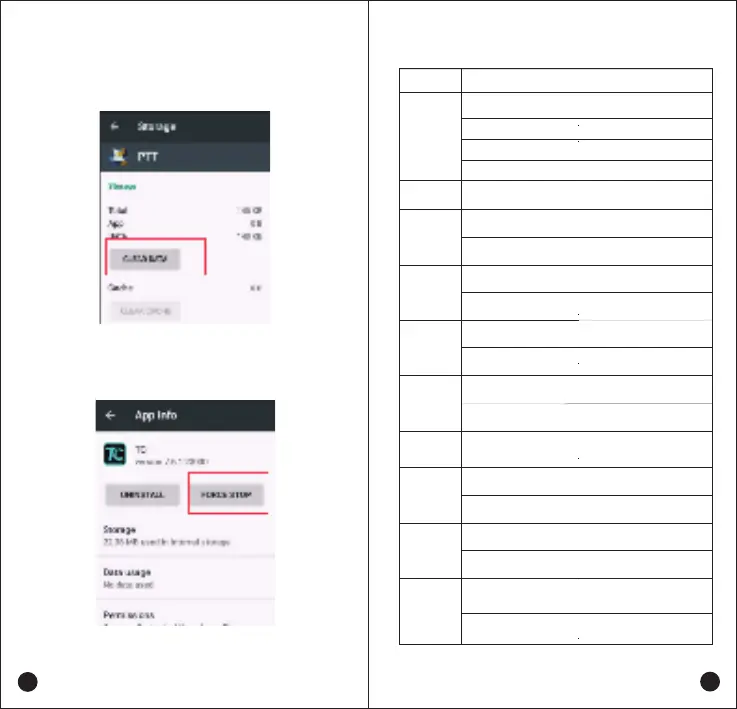
Clear the application data or cache
The Non-systematic APP stops running
Settings -- Apps -- Selecting the App -- CLEAR DATA
Simple troubleshooting:
The display screen is broken, Contact the dealer or our company
for Customer service.
Sim card may not in good condition due to dirt or damage,Clean
the metal contact point pole or replace it
Charging cable connectors may be damaged or have poor contact.
Pull out and re-insert the cable.
Make sure the SIM card have balance and not overdue.
Mobile network is not enabled, Switch on the SIM card network
and contact the Network operator to activate the cellular network.
Settings -- Apps -- Selecting the App -- FORCE STOP


 To Next Page