
 To Next Page
J
Jennifer RobinsonAug 2, 2025
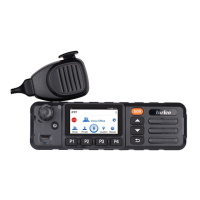
How to fix a crashed Inrico TM-9 terminal?
- Bbrandon28Aug 2, 2025
If your Inrico Radio terminal crashes, it might be due to too many apps processing simultaneously. Force some programs to quit or restart the terminal.

How to fix a crashed Inrico TM-9 terminal?
If your Inrico Radio terminal crashes, it might be due to too many apps processing simultaneously. Force some programs to quit or restart the terminal.
What to do if my Inrico TM-9 shows a white screen error?
If your Inrico Radio displays a white screen, the display screen may not work temporarily. Try restarting the device. If the issue persists, the display screen might be damaged and you should contact the dealer or our company.
What to do if the buttons on my Inrico TM-9 are not working?
If the buttons on your Inrico Radio are not working, it could be a temporary issue. Try restarting the terminal. If the problem continues, the buttons might be broken, and you should contact the dealer or our company.
Why can't my Inrico TM-9 connect to the network?
Your Inrico Radio might not be able to connect to the network for several reasons. Ensure your SIM card has a balance and isn't in arrears. If the mobile network is unavailable, select the SIM card network and contact your operator to activate the cellular network. In areas with poor signal, try reinserting the SIM card or using a different one, and move to an area with a better signal, such as near a window.
What to do if I hear echo or noise when connecting with my Inrico TM-9?
If you experience echo or noise during connection, it could be due to a weak signal. Ensure your Inrico Radio terminal is within network coverage. Also, check if the speaker is covered and clean the speaker surface.
How to fix 'Unable to Locate' on my Inrico Radio?
If your Inrico Radio is unable to locate, it may be due to a weak signal preventing the device from receiving it. Move to an open and flat area and try again.
What to do if my Inrico Radio doesn’t detect the SIM card?
If your Inrico Radio doesn’t detect the SIM card, the card may be incorrectly installed. Remove and re-insert the SIM card to ensure it is properly seated.
Specifies voltage range for device operation.
Prohibits operation in hazardous or explosive environments.
Lists actions and conditions to avoid for safe operation.
Stresses using approved accessories to prevent hazards.
Guide on inserting SIM and TF cards into the device.
Instructions for attaching and removing the device bracket.
Guidance on connecting the DB25 interface.
Steps to power on the mobile PoC radio.
Explains the function and usage of the prompt bar.
How to manage received, sent, and drafted messages.
Steps for configuring IP address and logging in.
How to select contacts/groups and use PTT for talking.
Steps to connect the device to a Wi-Fi network.
Solutions for terminal crashes due to too many apps.
Troubleshooting steps for unresponsive buttons.
Solutions for display issues or screen damage.
Resolving audio issues like echo or noise.
Tips for improving device location accuracy.
Steps to resolve SIM card detection problems.
 General
| Category | Professional Radio |
|---|---|
| Power Output | 5W |
| Operating System | Android |
| GPS | Yes |
| Bluetooth | Yes |
| Display | 2.4 inch |
| Connectivity | USB |
| Cellular Network | 4G |
| WiFi | 802.11 b/g/n |