Manager / User Code Change
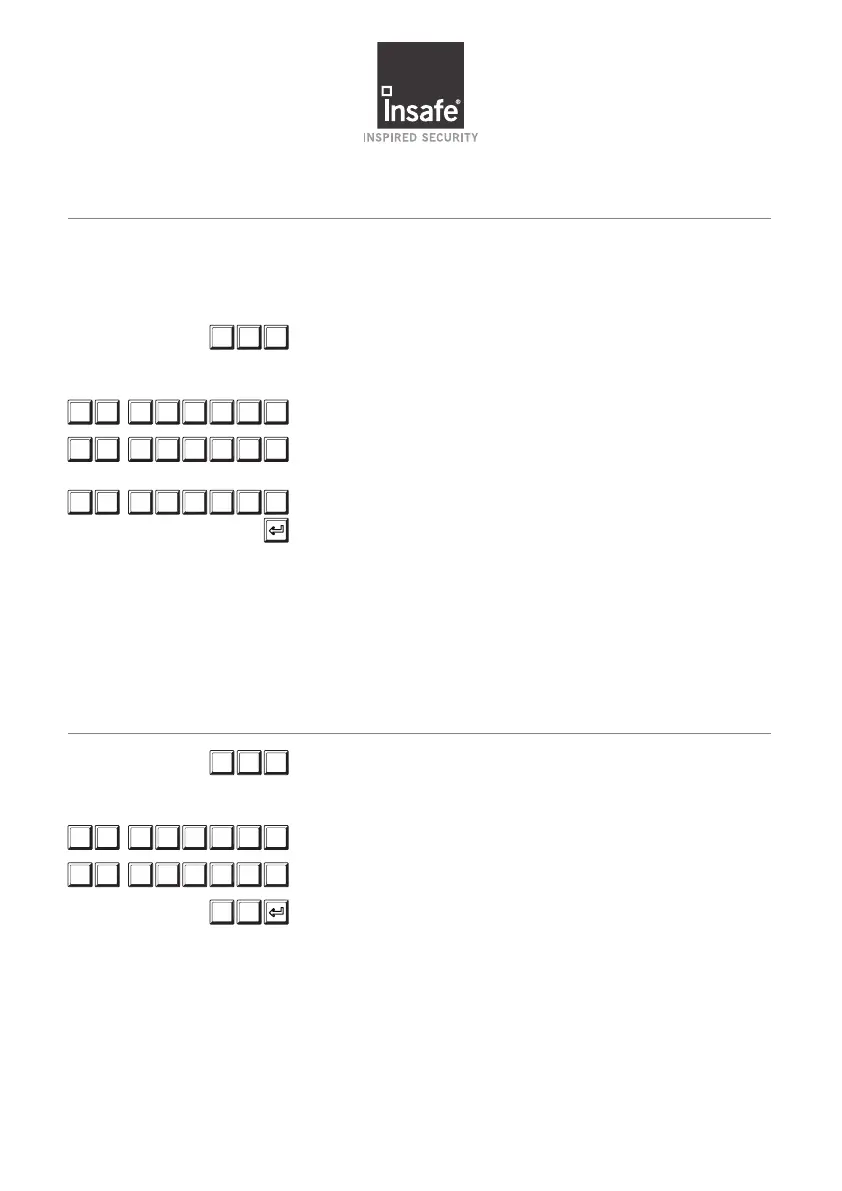
Press #52 to put lock in program mode.
The green led will stay on during this process.
If the light goes out, restart the process
Enter user ID and current combination “01-xxxxxx”
Enter user ID again followed by your new combination
“01-xxxxxx”
Enter ID and new combination again then press
purple button to complete the process. The keypad will
beep and flash green 3 times. 3 low beeps and 3 red LED
flashes will indicate code not changed
Test the code by opening and closing the lock with the
door in the open position.
# 5 2
Remember: Manager and User codes are 8 digits long (a fixed 2-digit ID followed by
a changeable 6-digit PIN).
Ensure door is open through the entire process (including testing).
0 1 X X X X X X
0 1 X X X X X X
0 1 X X X X X X
Adding 02 User Code
CODE MUST BE CHANGED BY THE USER BEFORE THE LOCK CAN BE OPENED.
Press #50 to enter Add User Mode. The green led will
stay on during this process. If the light goes out, restart
the process
Input Manager code (01-xxxxxx)
Input new user ID and code (02-xxxxxx)
Press 2 then 1, followed by the purple button to
complete the process. The keypad will beep and flash
green 3 times. 3 low beeps and 3 red LED flashes will
indicate code not added.
# 5 0
0 1 X X X X X X
0 2 X X X X X X
2 1


 To Next Page
 Loading...