EasyManua.ls Logo

Insignia NS-20EM50A13 - User Manual

Insignia NS-20EM50A13
10 pages
Print Icon
To Next Page IconTo Next Page
Loading...
NS-20EM50A13
User Guide
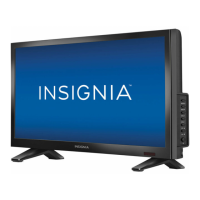
20” Widescreen LED Monitor
NS-20EM50A13_12-0349_MAN_V1_EN.book Page i Wednesday, July 18, 2012 11:38 AM

Other manuals for Insignia NS-20EM50A13

Questions and Answers

  • B
    brianjonesJul 31, 2025
    What to do if my Insignia NS-20EM50A13 has power but no screen image?
    • A
      Angela AguilarJul 31, 2025
      If your Insignia Monitor has power but no screen image, first adjust the brightness. If any colors are missing, check the VGA or DVI cable to ensure it's securely connected. You can also try connecting the monitor to another computer or ensuring that the VGA or DVI cable you are using is not damaged.
  • I
    iwilsonAug 7, 2025
    Why my Insignia NS-20EM50A13 has no power?
    • B
      Brenda WalkerAug 7, 2025
      If your Insignia Monitor is not turning on, ensure the A/C power cord is securely connected to both the power adapter and the monitor. Plug another electrical device into the power outlet to verify the outlet is supplying proper voltage. Also, make sure a VGA or DVI cable is installed and the computer is turned on. Check that the VGA or DVI cable is tightly secured to the output port on the back of the computer and check to see if the blue power LED is ON.
  • J
    Joseph McdonaldAug 14, 2025
    Why does my Insignia Monitor display wrong colors?
    • R
      Regina SmithAug 14, 2025
      Wrong or abnormal colors on your Insignia Monitor can be caused by loose or broken pins in the cable connector, leading to an improper connection.
  • M
    Michael EstradaAug 23, 2025
    Where to buy replacement power cord for Insignia NS-20EM50A13 Monitor?
    • V
      Virginia WoodAug 23, 2025
      If you need a replacement power cord or VGA cable for your Insignia Monitor, these are available. Please contact Insignia Customer Support at 1-877-467-4289 or visit www.insigniaproducts.com.

Summary

Introduction

Safety Precautions

Monitor safety precautions and warnings for proper and safe usage.

Setting up your monitor

Installing the stand base

Step-by-step guide to attach the monitor stand base securely.

Stand removal for mounting

Instructions for detaching the stand for VESA mounting.

Making connections

Connecting monitor to computer

Procedure for connecting the monitor to a PC using VGA or DVI cables.

Using the on screen display (OSD)

OSD Menu Navigation

Guide to accessing and navigating the monitor's on-screen display menus.

Troubleshooting

Common issues and solutions for monitor operational problems.

Troubleshooting questions

Multi-monitor display setup

Specifications

One-year limited warranty

Insignia NS-20EM50A13 Specifications

General IconGeneral
Screen Size20 inches
Resolution1600 x 900
Panel TypeTN
Aspect Ratio16:9
Brightness250 cd/m²
Response Time5 ms
Contrast Ratio1000:1
Input PortsVGA
Power Consumption25W (operational), 0.5W (standby)
Viewing Angle90° (H) / 65° (V)

Related product manuals