To Next Page
P
Patrick MorenoJul 28, 2025
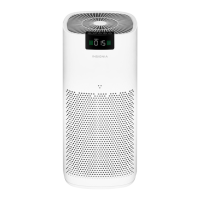
Why don't my Insignia NS-AP16BK8 Air Cleaner HEPA filter and pre-filter last?
- KkinggloriaJul 28, 2025
Excessive amounts of pet dander, dust, or smoke may decrease the life expectancy of the filter.

Why don't my Insignia NS-AP16BK8 Air Cleaner HEPA filter and pre-filter last?
Excessive amounts of pet dander, dust, or smoke may decrease the life expectancy of the filter.
Why is my Insignia NS-AP16BK8 Air Cleaner filter indicator flashing?
When the filter indicator LED flashes blue, you need to check and replace your pre-filter. When the filter indicator LED flashes red, you need to check and replace your HEPA filter. When the filter indicator LED flashes both blue and red, check and replace both filters.
Why is my Insignia NS-AP16BK8 Air Cleaner not working?
There could be a few reasons why your air purifier isn't working. First, make sure that it is plugged in and turned on. Also, verify that the power outlet is working. If your air purifier is plugged into a surge protector, ensure that the surge protector is turned on.
What to do if my Insignia NS-AP16BK8 has poor air flow or is loud?
If your air purifier has poor airflow or is making loud noises, consider the following: 1. Ensure the air purifier is on a flat surface. 2. Make sure nothing is blocking the air inlet and filtered air outlet. Position your air purifier at least 1 foot (.3 meters) away from walls or large objects. 3. Check the condition of the filters and replace them if they are dirty. 4. Remove the plastic bag from the HEPA filter. 5. Make sure the filters are seated properly.
Instructions on safe use of the polarized plug to prevent electric shock.
Guidelines for safe use of the power cord and extension cords.
Basic troubleshooting steps for a non-functional air purifier.
Solutions for reduced airflow or excessive noise from the air purifier.
 General
| Brand | Insignia |
|---|---|
| Model | NS-AP16BK8 |
| Type | Air Cleaner |
| Color | Black |
| Filter Type | HEPA |
| Number of Fan Speeds | 3 |
| Voltage | 120V |
| Noise Level | 50 dB |
| Power Source | Electric |