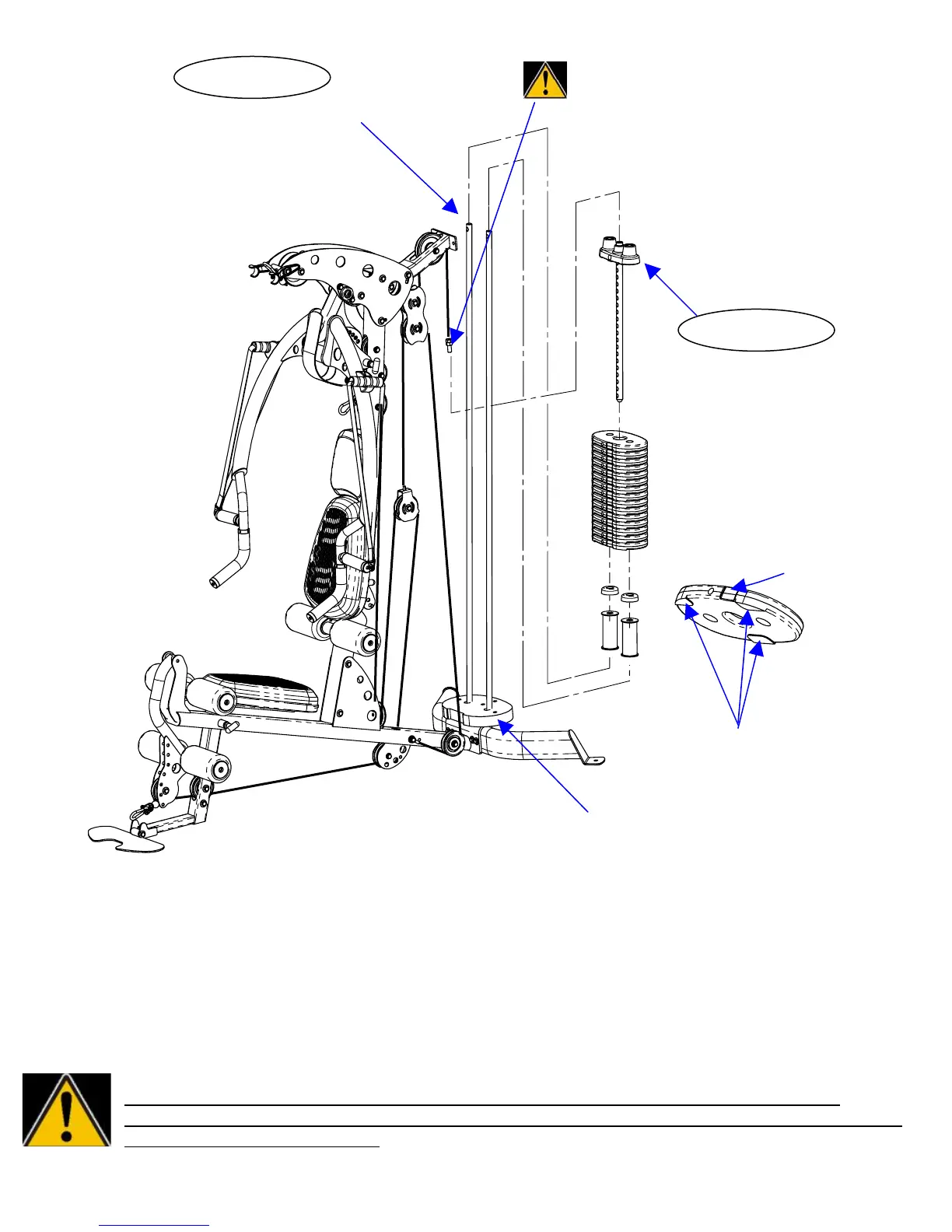
IMPORTANT! Cable Bolt must be fully threaded
Remove Bolts from Guide Rods into Selector Stem with Jam Nut tightened securely
before using. Failure to do so may cause cable to
come loose from weights and cause injury.
Install Weight Stack Risers,
Rubber Donuts, Weight Stack,
Top Weight/Selector Stem
(In That Order)
INSTALL WEIGHT STICKERS NOW
Front of weight plate has recessed
area for weight plate number
Bottom of weight plate has
three feet
Shroud Plate
Step 32: Remove the bolts that connect the top of the Guide Rods to the Main Upright.
NOTE: Before beginning Step 33: If optional 200 lb. heavy weight stack is being assembled, eliminate the
weight stack risers. (This space will be taken up by 5 extra weight plates.)
Step 33: Slide Weight Stack Risers down the Guide Rods and onto the Shroud Plate. Next slide
the Rubber Donuts down the Guide Rods until sitting on Weight Stack Risers. Next slide each
plate down the Guide Rods until all 15 Weight Plates are resting on the Rubber Donuts.
Be sure that all weight plates are facing forward. (Front of plates is signified by recessed area for
weight stack numbers). Next slide Top Weight/Selector Stem down guide rods and onto weight
stack. Finally connect top cable to top weight by threading cable bolt into it.
IMPORTANT!! Cable bolt must be fully threaded into Selector Stem with Jam Nut
tightened securely before using. Failure to do so may cause the cable to come loose from
the weights and cause injury.
Page 21
STEP 32
STEP 33


 To Next Page