EasyManua.ls Logo

Insportline DEVRON - Installation and Basic Operations; On and Off Controls; Walk Assist Function

Insportline DEVRON
26 pages
Print Icon
To Next Page IconTo Next Page
To Previous Page IconTo Previous Page
Loading...
6
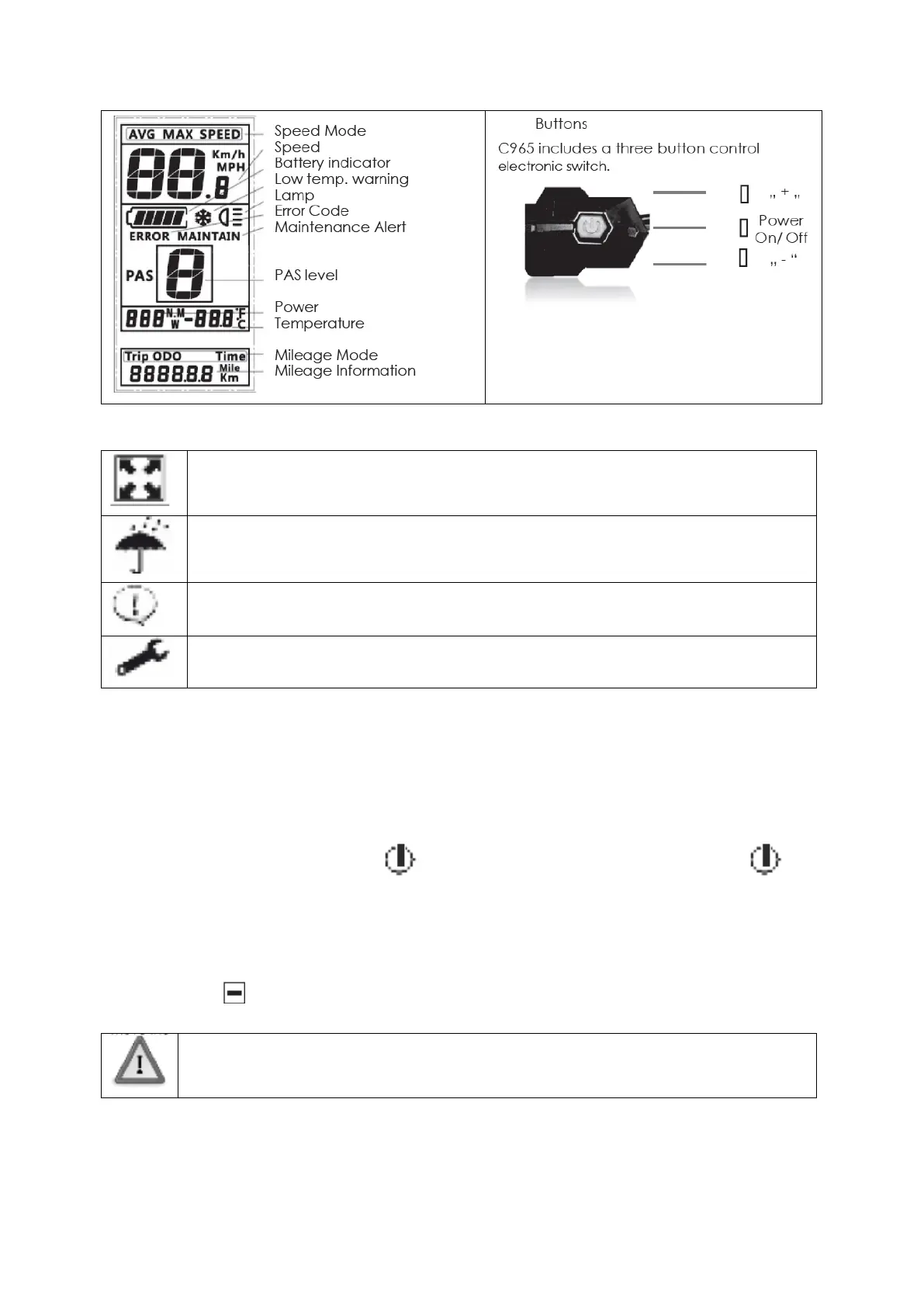
Caution: Do not plug in or unplug this display when the power to the unit is on!
Avoid collisions.
Protect the displays membrane to provide water resistant performance.
Do not attempt to reset parameters if the display is not working.
Call for service if the C965 display is not working.
INSTALLATION
Install the display and button control on the handlebar and adjust its location. Plug it into the controller
with power off.
ON/OFF
To turn the unit on, press and hold the button to start the display. A long press again will
switch it off.
The display switches off automatically if there is no activity for ten minutes (default).
WALK ASSIST
Press and hold to start the walking assist. You will see the walking icon on the display and the
motor will move the bicycle or vehicle at 6km/h.

This function is designed for walking alongside only. Please do not use this
function when riding.