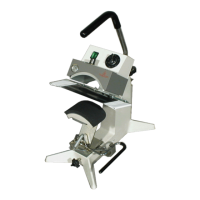
THIS MACHINE IS DESIGNED TO BE OPERATED BY ONE OPERATOR ONLY
- 2 -
Operation
1. It is recommended that you review the "How
to Apply Instructions" (in our Product
Catalog) before beginning heat sealing
operations.
2. Push ON/OFF switch to ON position. Set
desired temperature and lift handle so that
the upper platen arm is away from lower
platen.
NOTE
A setting of 8.5 on the temperature dial is
approximately 350°F (177°C).
CAUTION
The temperature adjustment knob gets
very hot during operation. Adjust
only when machine is cold.
3. Allow the machine to warm up for
approximately 30 minutes. When the
selected temperature is reached, the neon
lamp on the power switch will cycle on and
off.
NOTE
The thermometer indicates the internal
temperature of the heat platen and will
indicate a temperature approximately
15 degrees F (8.3 degrees C) higher
than the actual heat platen surface.
The temperature control is calibrated at
the factory and indicates the TRUE
surface temperature of the heat platen.
NOTE
The lower platen may be changed from
the standard platen to the special
custom platen by tilting the back of the
platen up and moving it towards the
operator. Install the alternate platen by
reversing the above procedure until the
platen locks in place.
NOTE
The lower platen may be adjusted to
accommodate various caps, sleeves,
pant legs, etc. Rotate the adjustment
knob located on the lower front of the
base. Clockwise rotation will move the
lower platen to the rear and counter-
clockwise rotation will move the lower
platen forward.
4. Set the desired pressure by adjusting the
pressure adjust knob on the top-rear of the
machine. To reduce pressure, turn knob
clockwise.
5. Place the substrate on lower platen. For a
cap, pull sweatband out, place crown on
lower platen, and lock the cap retainer by
pushing handle to the rear until it locks.
Smooth out all wrinkles.
6. Position transfer or lettering on substrate or
cap.
7. Close machine by pulling handle down into
locked position.
8. Set timer for desired time cycle.
9. The bell will ring at end of the time cycle.
Pull handle up slowly and move the upper
platen handle to its full open position. This
technique will avoid transfer paper (cover)
from being pulled off prematurely due to
suction from the separating platens.
10. Unlock cap retainer and remove substrate.
Preventive Maintenance Suggestions
The Insta Graphic Systems® (IGS) heat seal
machines are relatively maintenance free. For a
long, trouble-free life, the following preventive
maintenance steps should be followed:
1. Do not heat seal items such as buttons, pins,
snaps, or zippers which tend to cut the
silicone rubber pad or scratch the Teflon
heat platen.
2. Periodically clean the Teflon-coated heat
platen with a non-abrasive piece of cloth.
Stubborn stains may be cleaned, when
platen is cool, with mineral spirits.
3. When the heat platen is hot and not in use,
keep in open position (away from the
silicone rubber pad).


 To Next Page
 Loading...