13
User Manual
2 hours on High temperature. Default warming settings can only be
changed while in Ready mode, before brewing.
To change the Keep Warm settings:
1. Press and hold the
button for 3 seconds to change the default
warming temperature or time.
2. To change the temperature, press the
button to select Low,
Medium or High.
Note: The current warming temperature can be changed during or after brewing,
once the warming plate has turned on.
3. To change the time, press the and buttons and toggle through
Hours and Minutes.
Note: you cannot change the time on the warming plate once warming starts.
4. Press the button to confirm choices.
Once you save your preferences, they are stored as your new default settings for
quick and easy brewing next time. You can change settings anytime.
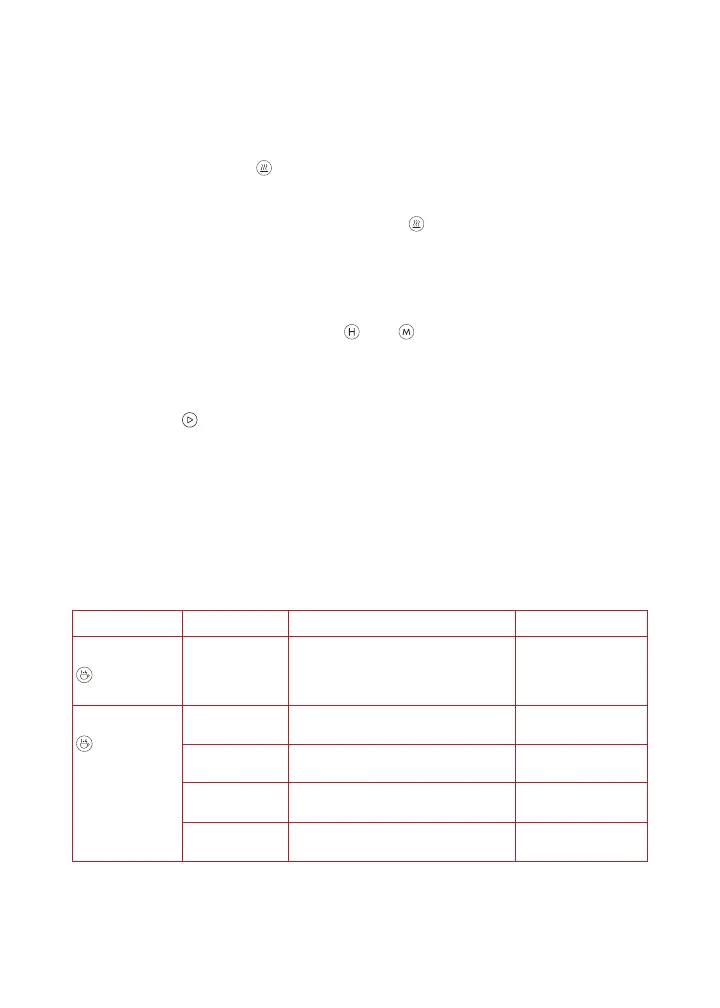
Coffee Measurement Chart
We recommend using a medium-fine grind of coffee with your
Instant
®
Infusion Brew Plus. This will give you optimal results and the
smoothest flavor.
Batch Size Cups Grounds Water
Small batch
button
is on
4 cups 4 rounded scoops or 6 Tbsp. 4-cup line
Full carafe
button is
off
6 cups 6 rounded scoops or 9 Tbsp.
or 1/2 cup + 1 Tbsp.
6-cup line
8 cups 8 rounded scoops or 12 Tbsp.
or 3/4 cup
8-cup line
10 cups 10 rounded scoops or 15 Tbsp.
or 3/4 cup + 3 Tbsp.
10-cup line
12 cups 12 rounded scoops or 18 Tbsp.
or 1 cup + 2 Tbsp.
12-cup line



 To Next Page