EN
27
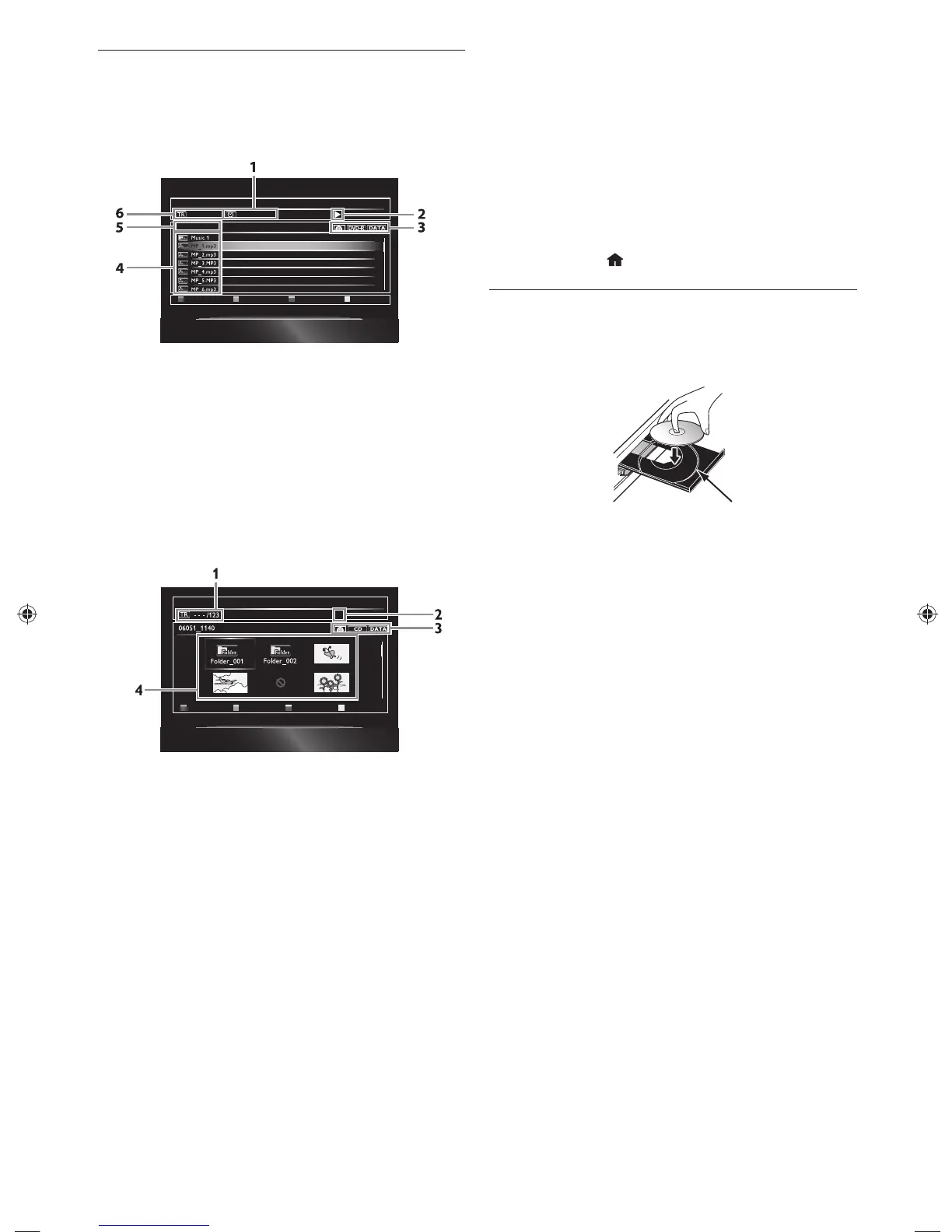
7.2 Guide to File List
ɶ Video / Music File List
e.g.) MP3 mode
DATA_xxxxx
0 : 00 : 121 / 1234
Page Up
File List
Page Down
1. Elapsed playing time of the current track
2. Playback status
3. Media type
4. Group (folder) / File list
5. Name of disc / USB flash drive
6. Current track (file) number / Total number of tracks
(files)
ɶ Picture File List
Page Up Page Down
Thumbnail
Ê
1. Current file number / Total number of files
2. Playback status
3. Media type
4. Group (folder) / File list (thumbnails)
ɶ How to Navigate through the Track / File List
• Use [Î / ï] to move the highlight up and down in the
list.
• To access the files in a group (folder), select the
desired group (folder), then press [Enter].
• Press [Í] or [Return] to go back to the previous
hierarchy.
• Press [A] or [B] to change the page of the list.
• Press [D] to go back to the media mode screen.
• Press [Home
] to exit.
7.3 How to Insert a Disc
1. Press [Open / Close fl] to open the disc tray.
2. Place the disc on the disc tray with its label side facing
up.
Align the disc to the disc tray guide.
3. Press [Open / Close fl] to close the disc tray.
• It may take a while to load the disc.
E5WF1UDENBook.indb27E5WF1UDENBook.indb27 2011/07/0415:21:242011/07/0415:21:24



 To Next Page