En-68
Advanced Connections
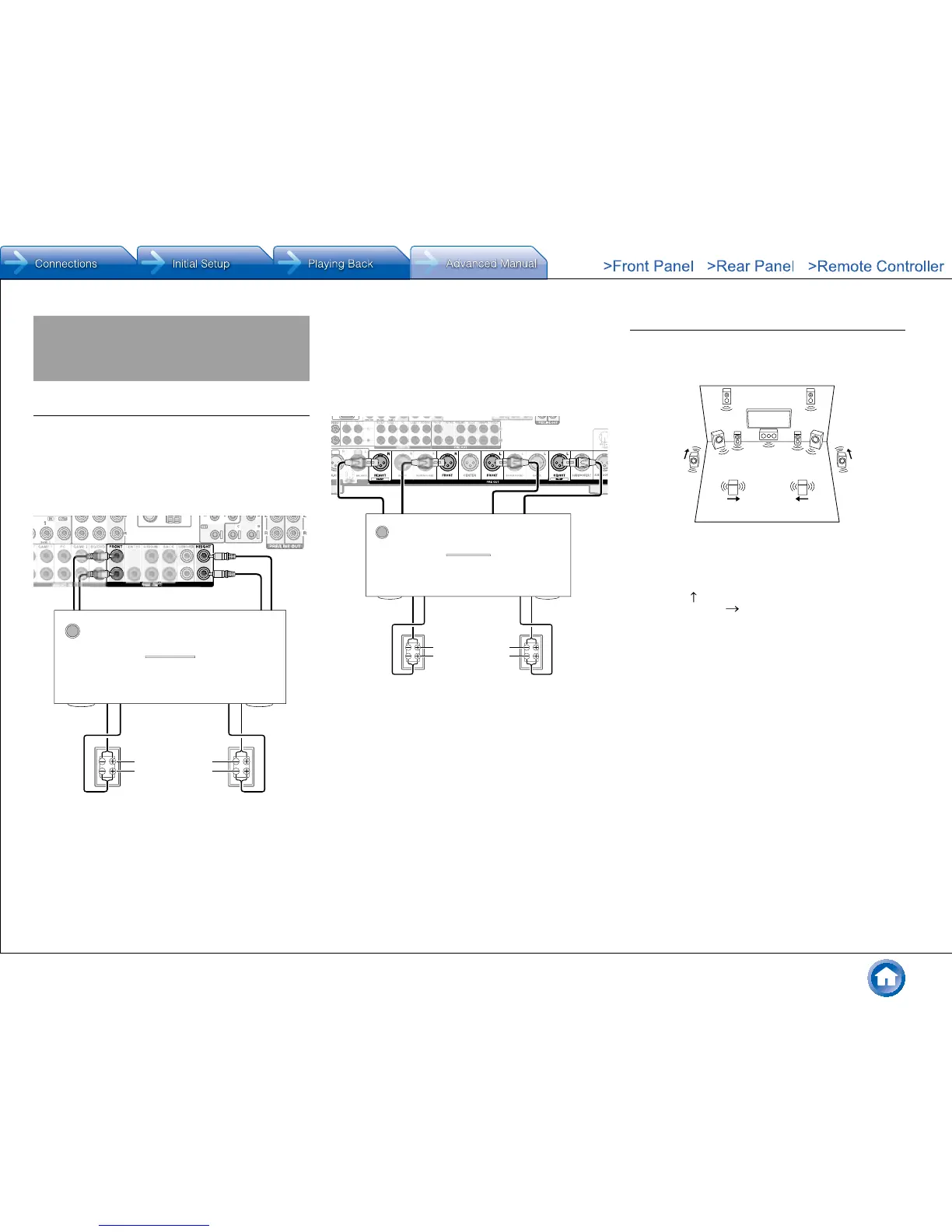
Connecting Bi-amp Speakers
It is possible to connect speakers supporting bi-amping to
improve quality of the bass and treble. Up to 5.1 ch will be
played in bi-amping.
Bi-amping with PRE OUT RCA jacks
1. Connect as below using the FRONT terminals and
HEIGHT terminals.
Tweeter (treble)
Woofer (bass)
2. Turn the unit on and make the bi-amping setting.
1 After pressing RCV on the remote controller, press
Setup.
2 With the cursors, select "2. Speaker" -
"Configuration" - "Bi-Amp".
3 Select "Yes" with the cursors.
● Before bi-amping, be sure to remove the short-
circuit connector that connects the tweeter (treble)
jack and the subwoofer (bass) jack.
● Use speakers supporting bi-amping only. For
details, refer to the speakers' instruction manual.
Bi-amping with PRE OUT XLR jacks
1. Connect as below using the FRONT terminals and
HEIGHT(Bi-AMP) terminals.
PUSH
Tweeter (treble)
Woofer (bass)
2. Turn the unit on and make the bi-amping setting.
1 After pressing RCV on the remote controller, press
Setup.
2 With the cursors, select "2. Speaker" -
"Configuration" - "Bi-Amp".
3 Select "Yes" with the cursors.
● Before bi-amping, be sure to remove the short-
circuit connector that connects the tweeter (treble)
jack and the subwoofer (bass) jack.
● Use speakers supporting bi-amping only. For
details, refer to the speakers' instruction manual.
Connecting Dipole Speakers
A dipole speaker is bidirectional speaker outputting the
same sound in two directions, for example forward and
backward.
TV
Connections
An arrow for matching the phases () is marked on a
dipole speaker. Place the surround speakers (a) so that
their arrows ( ) point to the TV and the back speakers (b)
so that their arrows ( ) point to each other.
If the phases do not match due to mistake in speaker distance,
installation angle or positive/negative of wiring, sound image and sound
field may be unclear or hard of listening.


 To Next Page