19" Intelligent 8-Port PDU User Manual
7
②. PDU System Information
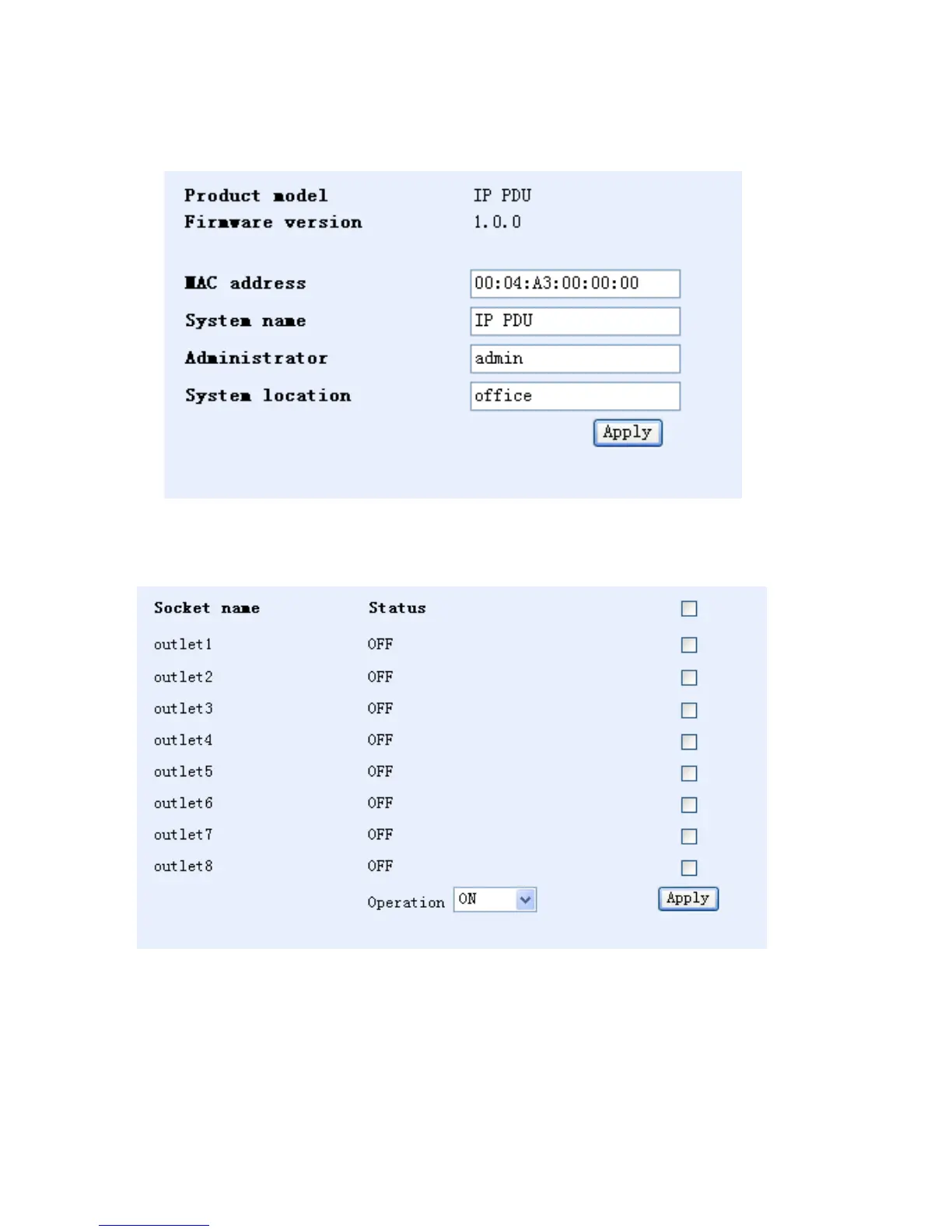
Click "System" in the configuration bar on the left side of the interface to display PDU system information. The
screen displays the following:
③. Power Port Control
Click "Socket" in the configuration bar on the left side of the interface. The screen displays the following:
Users can turn on or shut off any of the eight outputs through this interface.
• Start all: click on the drop-down menu from the Operation box, choose “Start” and click the “Apply”
button.
• Shut off all: click the drop-down menu from the Operation box, choose “Shut off” and click the “Apply”
button.
• Custom Start and Shut off (for example — the user wants to turn on outlets 1, 2, 3, and 4 but shut off
5, 6, 7, and 8): Click the empty boxes of the outlets to turn on, select Start from the drop down menu
and click Apply. Then, click the empty boxes of the outlets to turn off, select Shut off and click Apply.


 To Next Page