Need help?
Do you have a question about the Intellitronix DP6004 and is the answer not in the manual?
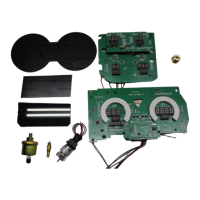
Lists all included parts for the digital dash panel installation.
Remove existing gauges and place the new circuit board into the stock housing.
Modify mounting posts and screw the circuit board into place using acrylic washers.
Connect the circuit boards following wiring instructions, using existing or separate wires.
Place the factory bezel and smoked acrylic lenses over the circuit boards and secure.
Connect the black wire to the vehicle engine block for proper grounding.
Connect red/pink wire to accessory +12V power from fuse panel or harness.
Connect red wire to constant +12V power from the battery source.
Connect the orange wire to the oil pressure sending unit.
Connect the blue wire to the water temperature sending unit.
Connect grey wires to left and right turn signal indicator circuits.
Connect tan wire to parking brake light switch.
Connect green/yellow wire to Check Engine Light circuit.
Connect the yellow wire to the factory fuel sending unit.
Configure dip switches based on fuel sender manufacturer and ohm range.
Test fuel gauge continuity and OHMS to sender for proper operation.
Connect green wire to the negative (-) side of the ignition coil.
Details connections for various ignition systems like GM HEI, Magneto, etc.
Guide to adjust RPM display, cylinder count, and max RPM settings.
Connect white wire from factory or Intellitronix sender to gauge.
Utilize PCM/ECM for speed signal on computer-controlled engines.
Overview of odometer, trip meter, high speed recall, and 0-60 time.
Ensure proper installation and wiring before attempting calibration.
Guide to calibrate the speedometer using a measured mile and recall button.
Do not move the vehicle if 'CAL' mode is active; it may cause data loss.
Activate and clear the trip meter using the recall button.
Enter the vehicle's actual mileage into the odometer setting.
Record and recall data like high speed, 1/4 mile ET, and 0-60 time.
Contact details and hours for Intellitronix technical support.
Visit the Intellitronix support page for quick answers and FAQs.
Details the terms of the product's limited lifetime warranty.
Steps for returning a product, including RMA number and packaging.
Conditions for refunds, including restocking fees and proof of purchase.
 General
| Display Type | Digital |
|---|---|
| Input Voltage | 12V |
| Bezel Color | Black |
| Product Type | Digital Gauges |
| Gauge Type | Oil Pressure |
| Operating Temperature | -40°F to 185°F |
| Mounting Type | Dash Mount |

 To Next Page