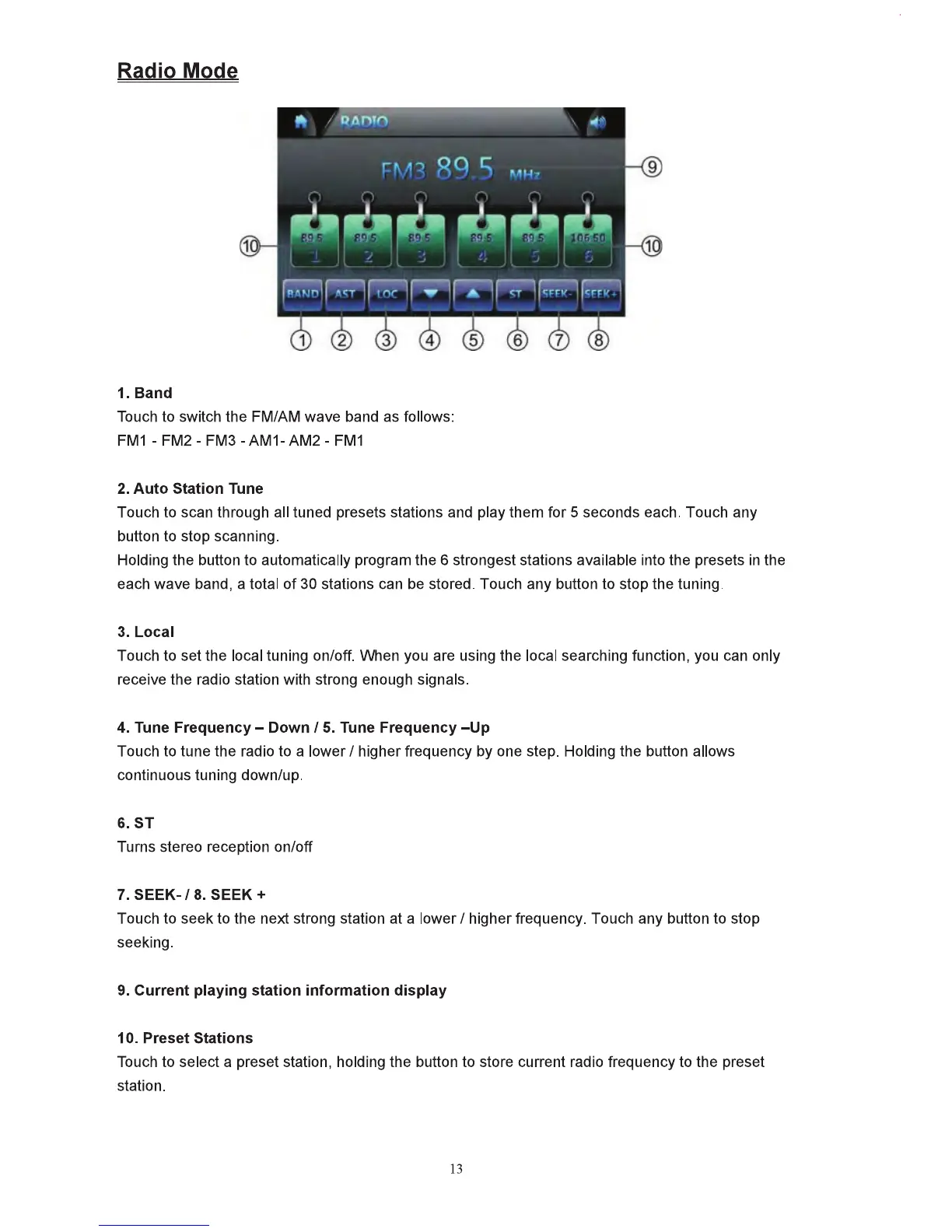
Radio Mode
1.Band
Tbuch
to
swttch
the
FMIAM
wave
band
as
folows:
FM1
• FM2 •
FM3
• AM1·
AM2
•
FM1
2.
Auto
S1atlon
rune
Touch
to
scan
through
all
tuned
prese1s
stations
and
play them for 5
seconds
each.
Touch any
button
to
stop scannllg.
Holding
the
button
to
automatiCally
program the 6 strongest stations available into the presets in the
each
wave
band,
a total
of30
stations
can
be
stored. Touch any button
to
stop
the tuning.
3. Local
Toucb
to
set the local tuning on/off.
Wlen
you
are using the local
searching
funcdon,
you
can
only
receive the
radio
stdon
wtth
strong
enough
signals.
4..
Tune
Frequency-
Down
II.
Tune Frequency
-Up
Touch
to
tune the radio
to
a
loWer
1 higher trequency
by
one
step.
Hold!~
the button allows
continuous tuning
down/up.
6.ST
Turns stereo reception on/off
7.
SEEK-II.
SEEK+
Touch
to
seek to the next strong station
at
a lower I higher frequency.
Touch
any button to stop
seeking.
t.
Current
pla~ng
station information
dilplay
10. Preset Stldions
Touch
to select a preset station,
hokliniJ
the button to store current
radio
frequency
to
the preset
station.
13



 To Next Page