EasyManua.ls Logo

Inteq Car multimedia system - Bluetooth Mode; Phone Call; Phone Book; Audio

Inteq Car multimedia system
58 pages
Print Icon
To Next Page IconTo Next Page
To Previous Page IconTo Previous Page
Loading...
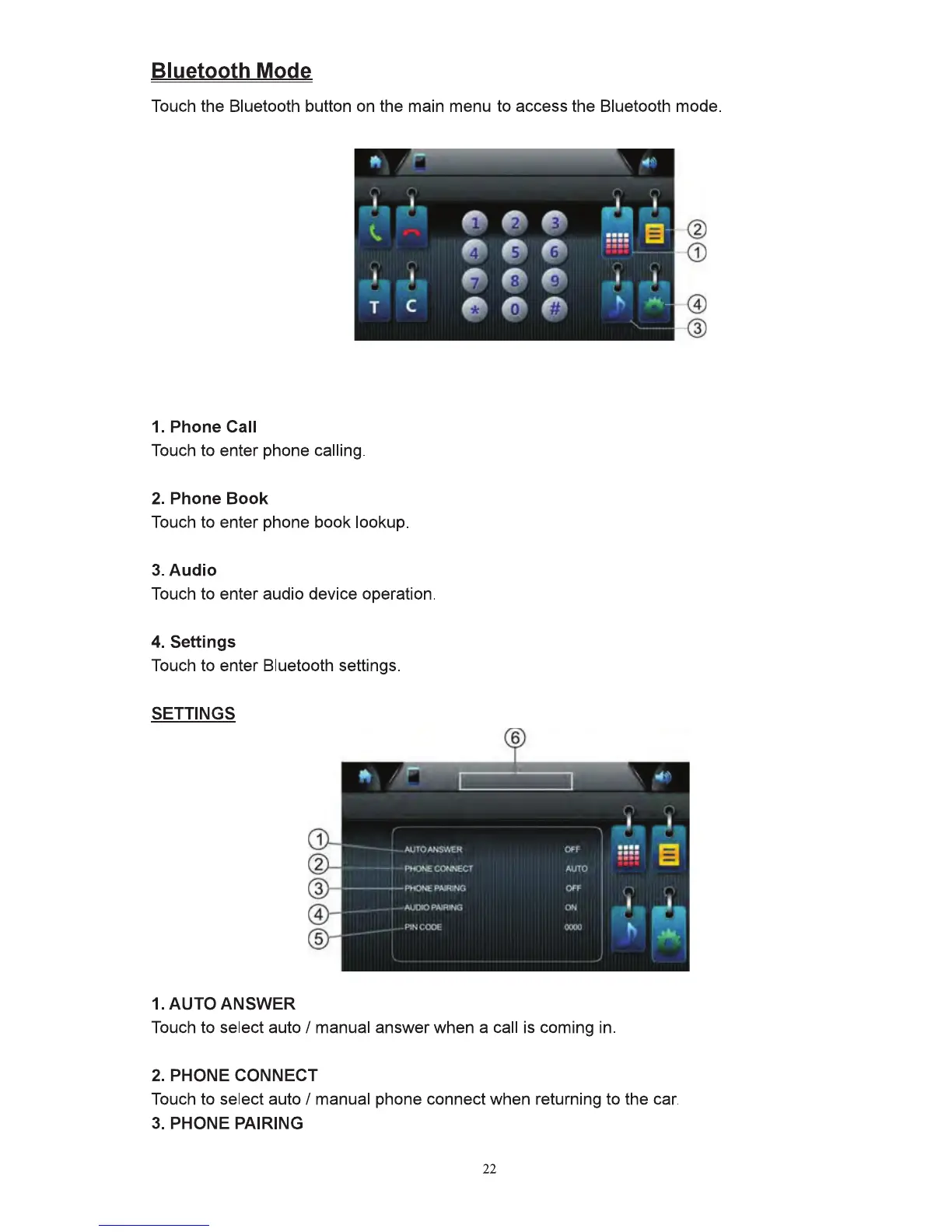
Bluetooth Mode
Touch
the Bluetcolh bullon
on
the main
menu
to
access
the Bluetooth
mode.
,.
..
..
I I
~ ...
I
t,.
,.
e
e
....
e-
0
e
:::
:
I I
~
,
I I
T
c
0
Q
0
"'
...
_
1. Phone Call
Touch
to
enter
phone
calling.
2. Phone
Book
Touch
to
enter
phone
book
lookup.
3.Audio
Touch
to enter audio device operalfon.
4. Settings
Touch
to
enter
Bluetoolh settings.
SETnNGS
II
AUtOANSV•EI{
""'
::::
6
f1
Pt«J~
CONNECT AUTO
11
-----PHONJ:
~1NG
Ol"f
II
Al..Ut0
PAIRING
ON
~
~.
li
1-'\NCOOE
'""
,.,
...
1. AUTO ANSWER
Touch
to select auto I
manual
answer
when
a call is
coming
in.
2. PHONE CONNECT
Touch
to
select auto I
manual
phone connect when returning
to
the
car.
3. PHONE PAIRING
22
fj
D
m
~