Remote Control
(!)
II
2
3 A
f1
f'
,
..
-:~.l~
::;:o:_,
4
5
6
NAV:
11
7 8 9 0
m
~
m!
4
m
6
flil
...
..
~~
m
m
"
~4m
~
aw
II
..
,
•
I ~
til
I
ml
m
.....
...
~
11+
1
I
m
gj
"'"
I
~
Kl!
":
SU
B·T
TITLE
"H
~
fFT
:XC•I\'
lQQ\1
ol
m
A · B
/"'
-
OI
SP
m
~
ml
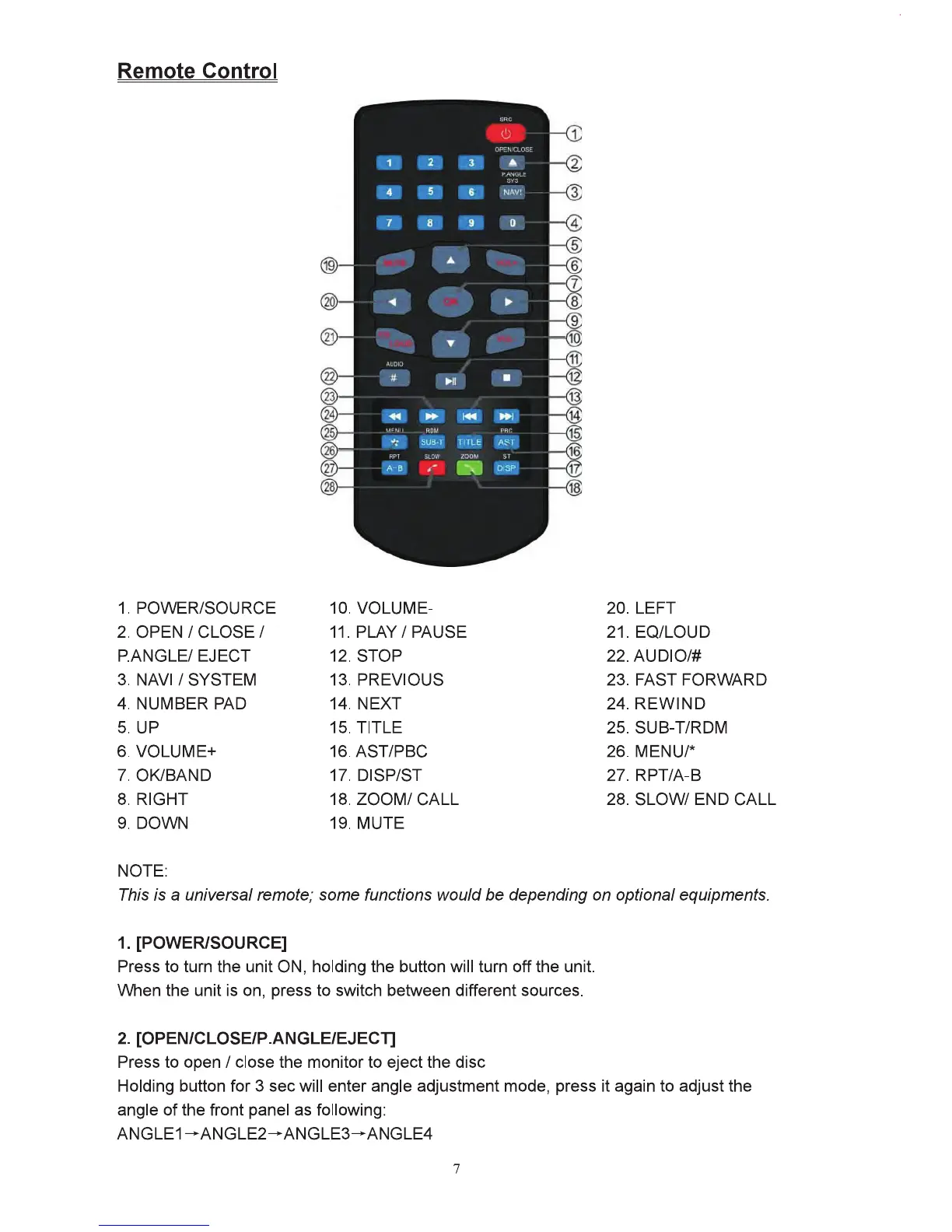
1. POVVERISOU RCE 10. VOLUME- 20. LEFT
2.
OPEN
I CLOSE I
11.
PLAY I PAUSE 21. EQ/LOUD
P.ANGLEI EJECT 12.
STOP
22.AUDIO/#
3.
NAVI/
SYSTEM 13. PREVIOUS 23. FAST FORWARD
4. NUMBER PAD 14.
NEXT
24.
REWIND
5.
UP
15. TITLE 25. SUB-T/RDM
6. VOLUME+
16.AST/PBC
26.
MENUr
7. OK/BAND 17. DISP/ST 27. RPT/A-8
8. RIGHT 18.
ZOOM/
CALL
28.
SLOW/
END
CALL
9. DOWN 19.
MUTE
NOTE:
This
is a universal remote; some functions would
be
depending on optional equipments.
1. [POWER/SOURCE]
Press
to tum the unit ON,
holding
the
button
will tum off the
unit.
When the
unit
is
on, press
to
switch between different sources.
2.
[OPEN/CLOSEIP.ANGLEIEJECl]
Press
to
open I close the monitor
to
eject the
disc
Holding
button
for 3 sec will enter
angle
adjustment
mode,
press
it
again
to
adjust the
angle
of
the
front panel
as
following:
ANGLE1-ANGLE2-ANGLE3-ANGLE4
7



 To Next Page