EMERGENCY COMBINATION SYSTEM
4
ECS-9216
Front Panel
Front Panel
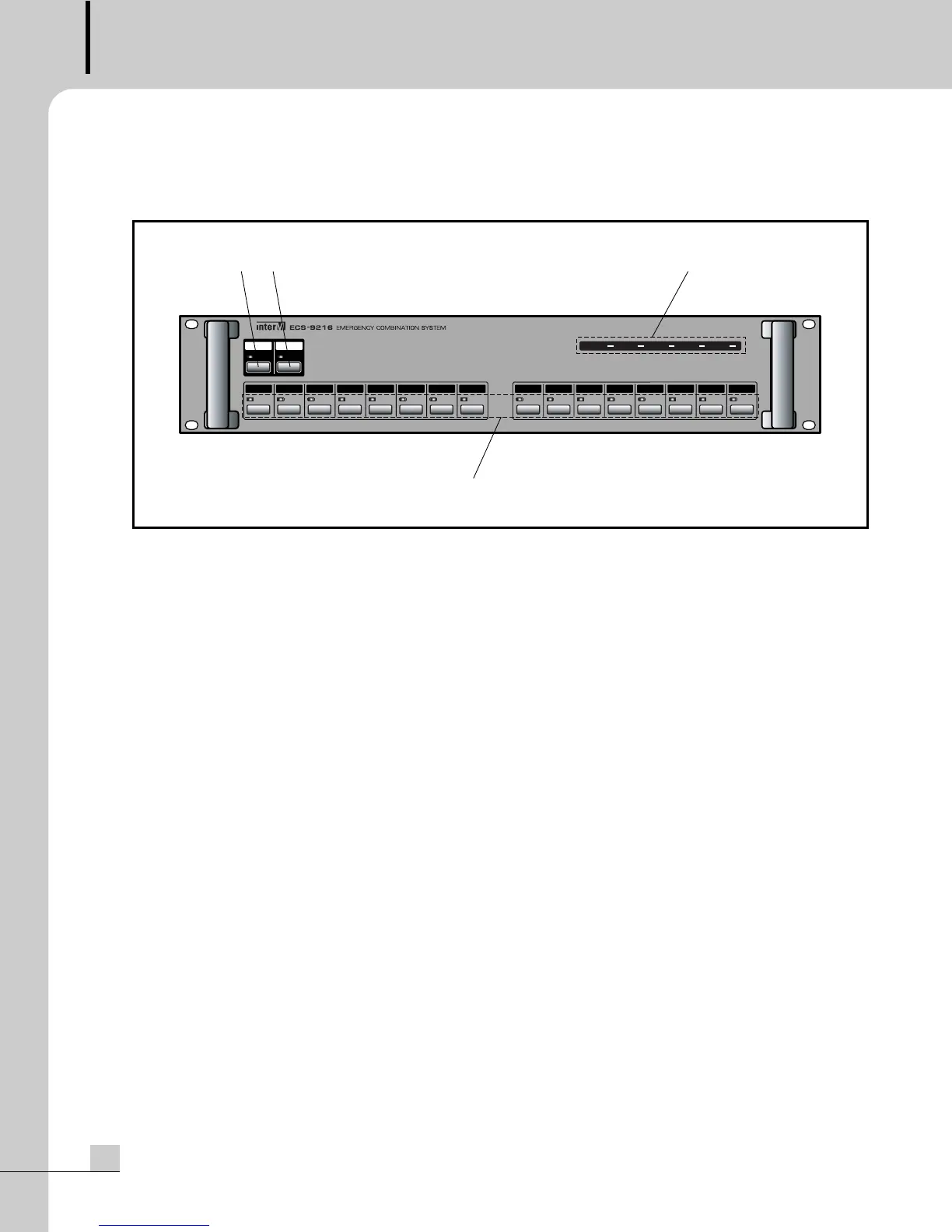
1. ALL SWITCH AND LED
This switch selects all 16 speaker outputs simultaneously.
2. EMERGENCY/NORMAL SELECT SWITCH AND MODE DISPLAY LED
This switch selects the mode(Emergency/Normal). On the Emergency mode, the mode display led is red. On
the Normal mode, the mode display led is green.
3. PRIORITY STATUS DISPLAY LEDS
These leds display the priority status. The priority is Emergency > Timer > Remote1 > Remote2 > Main(BGM).
4. SPEAKER CHANNEL SELECT SWITCHS AND SPEAKER CHANNEL LEDS
These switch select individual channel 1 through 16. On the Emergency mode, the speaker channel leds are
red. On the Normal mode, the speaker channel leds are green.


 To Next Page