EMERGENCY COMBINATION SYSTEM
7
ECS-9216
Installation
Installation
* CAUTION
A PD-9359 is able to supply DC 120W
so, please set the total DC power of devices (Ref: ECS-9216 is 14W, EP-916 is 4W, RM-916 is 6W) under
maximum power supply by PD-9359.
1. Turn off the power before installation of the system. Installing on the power-on may make a trouble.
2. Connect the DC power input to the emergency DC power supply of Power Distributor(ex: PD-9359).
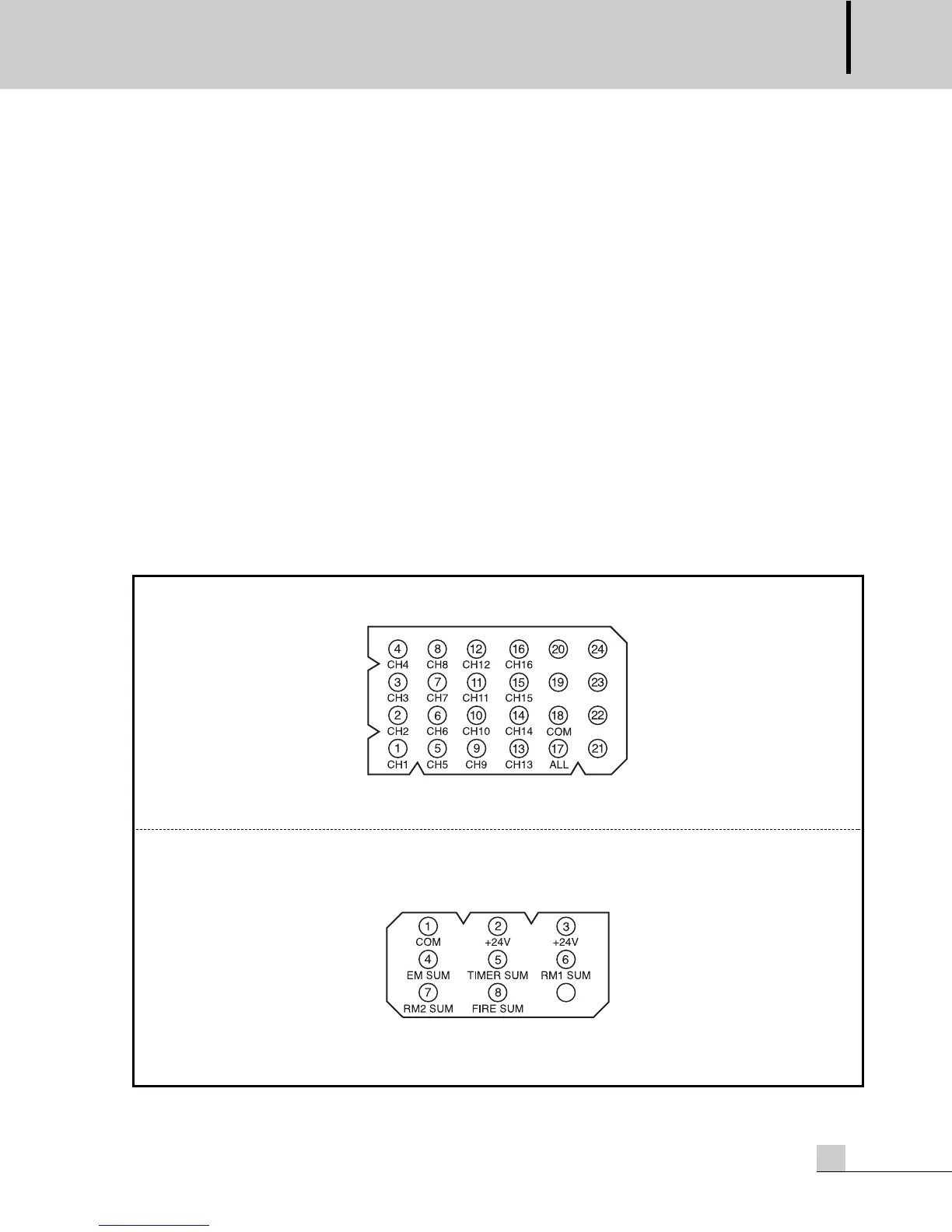
3. Connect the remote mic station connector 1,2 to the Inter-M RM-916(Figure 1).
4. Connect the emergency panel connector to the Inter-M EP-9216(Figure 2).
5. Connect the fire sensor input connector to the fire panel. Each 16 fire sensor input channels have 3
ports(Figure 3,4).
6. Connect the power distributor terminal to the remote control switch of Inter-M Power Distributor.
7. Connect the timer switch terminal to the remote out of Inter-M Timer(ex: PW-9242N).
8. Connect the link in/out to the additional ECS-9216 to expand system.
9. Connect the amp input terminal to the speaker out of an amplifier.
10. Connect the speaker output terminal to the speaker.
- Remote mic station connector pin NO and function.
(Figure 1)
- Emergency panel connector pin NO and function.
(Figure 2)


 To Next Page