MIXING AMPLIFIER
18
PMU-360N/480N/600N
5. AOE Stream Setting AOE Stream
AOE-212N is Network Audio Stream Server/Client equipment developed by Inter-M. It can be built a
broadcasting system over the internet network which makes a possible to build a broadcasting system
without a distance limitation.
PMU-N series can broadcast audio streaming from AOE-212N over the network.
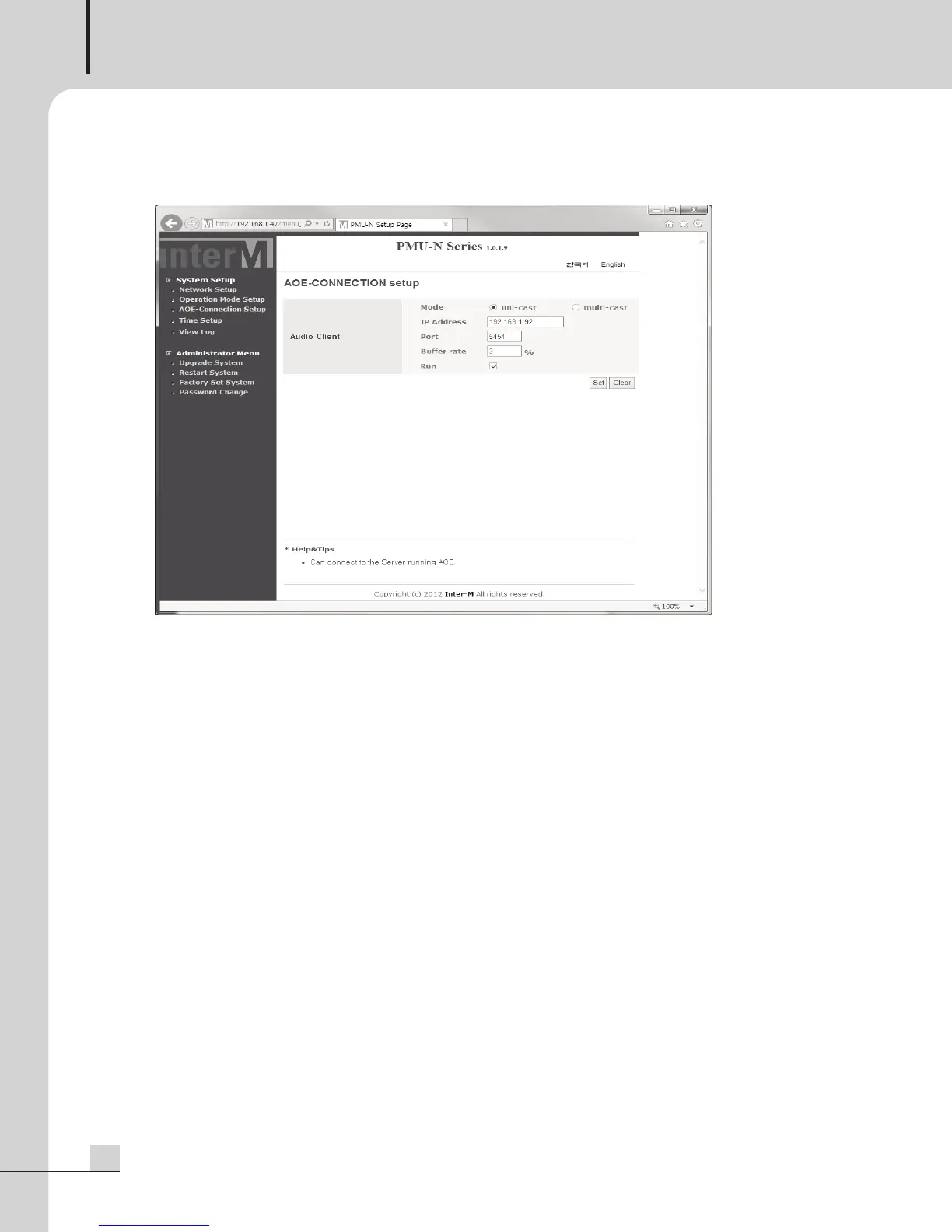
Select the identical operation mode of connected AOE-212N and configure the server IP address and port.
Mode: It must be selected as same mode of AOE-212N (stream server) for normal operation.
IP Address: Set the IP address of AOE-212N which is communicated with PMU-N.
Port: Use the same port of AOE-212N
Buffer rate: The initial value is set as 3%. Lower value can reduce a buffering time and higher value can
increase the buffering time but stability to play
※Caution : If AOE-212N is set with DHCP, the IP addess may be changed when AOE-212N is turned on
after power was turned off. When PMU-N is not connected with AOE-212N, make sure to
check the correct IP address of AOE-212N.


 To Next Page