3
U
SING REACH ME
1. Press the REACH ME menu button or .
2. Press the
BROWSE menu button, and then NEXT/PREVIOUS menu button
or to scroll through the options.
3. Press the
ACCEPT menu button or to accept the Reach Me setting.
If you selected
FORWARD TO, enter the extension or outside number, and
then press the
ACCEPT menu button or to accept the setting.
USING HOT RULES
1. While on a call or while a call is ringing, press the HOT RULES menu but-
ton.
2. Do one of the following:
• Press the
APPLY menu button or to accept the Hot Rule.
• Press the
NEXT/PREVIOUS menu button or to scroll through
the options, and then press the
APPLY menu button or .
If you selected current location, enter the extension number, or press
, and then enter the outside number.
CHANGING YOUR STATUS
1. Press or the STATUS menu button.
2. Press the
BROWSE menu button, and then press the NEXT/PREVIOUS
menu button or to scroll through the options.
If the status includes a time, date, or forwarding number, enter the informa-
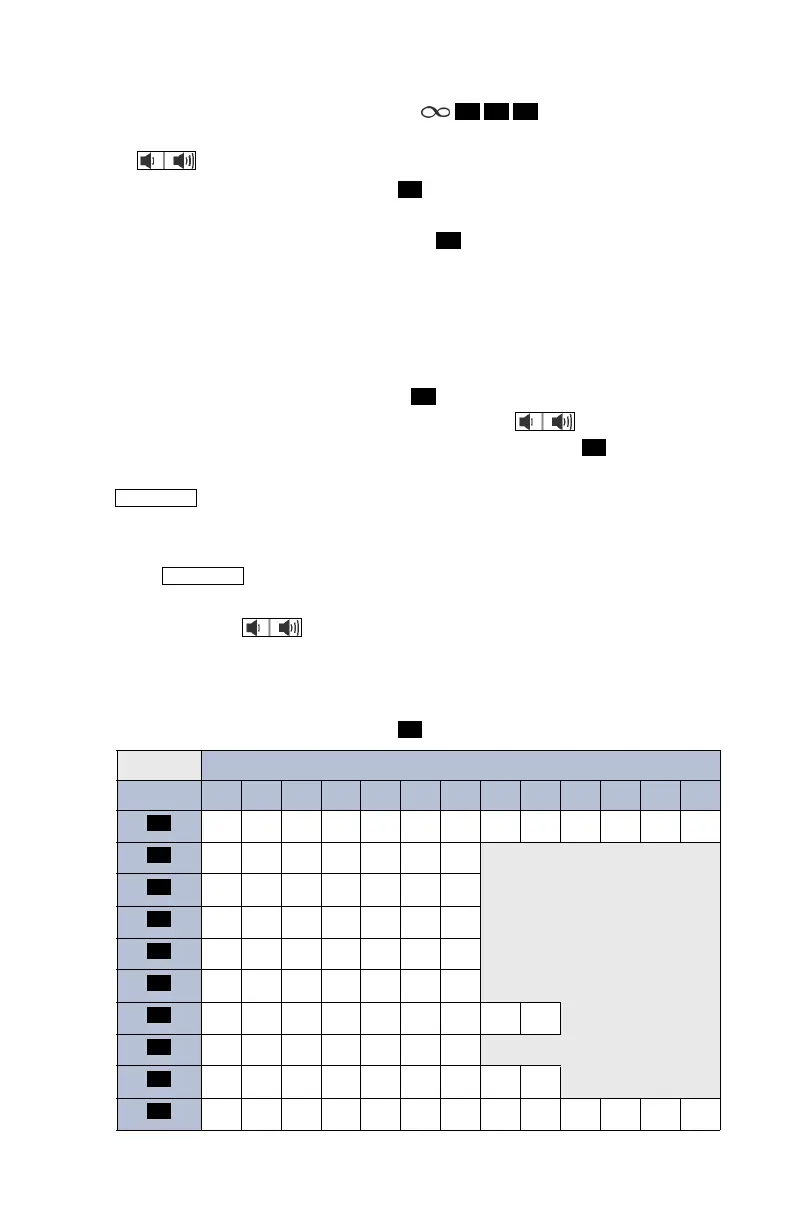
tion using the dialpad buttons. See the following table for dialpad button
character descriptions.
3. Press the
ACCEPT menu button or to set the status.
NUMBER OF TIMES BUTTON IS PRESSED (IN ALPHA MODE)
BUTTON
1 2 3 4 5 6 7 8 9 10 11 12 13
1!|’:;,/\><)(
ABC2abc
DEF3de f
GHI 4gh i
JKL5 j k l
MNO 6mn o
PQRS7 p q r s
TUV8 t u v
WX Y Z 9 w x y z
0.@#*-_&%=$~+
5 6 0
#
#
#
#
OUTGOING
STATUS
#
1
2
3
4
5
6
7
8
9
0


 To Next Page