3
Inter-Tel
®
Model 8560/8660 User Guide
FINDING YOUR WAY
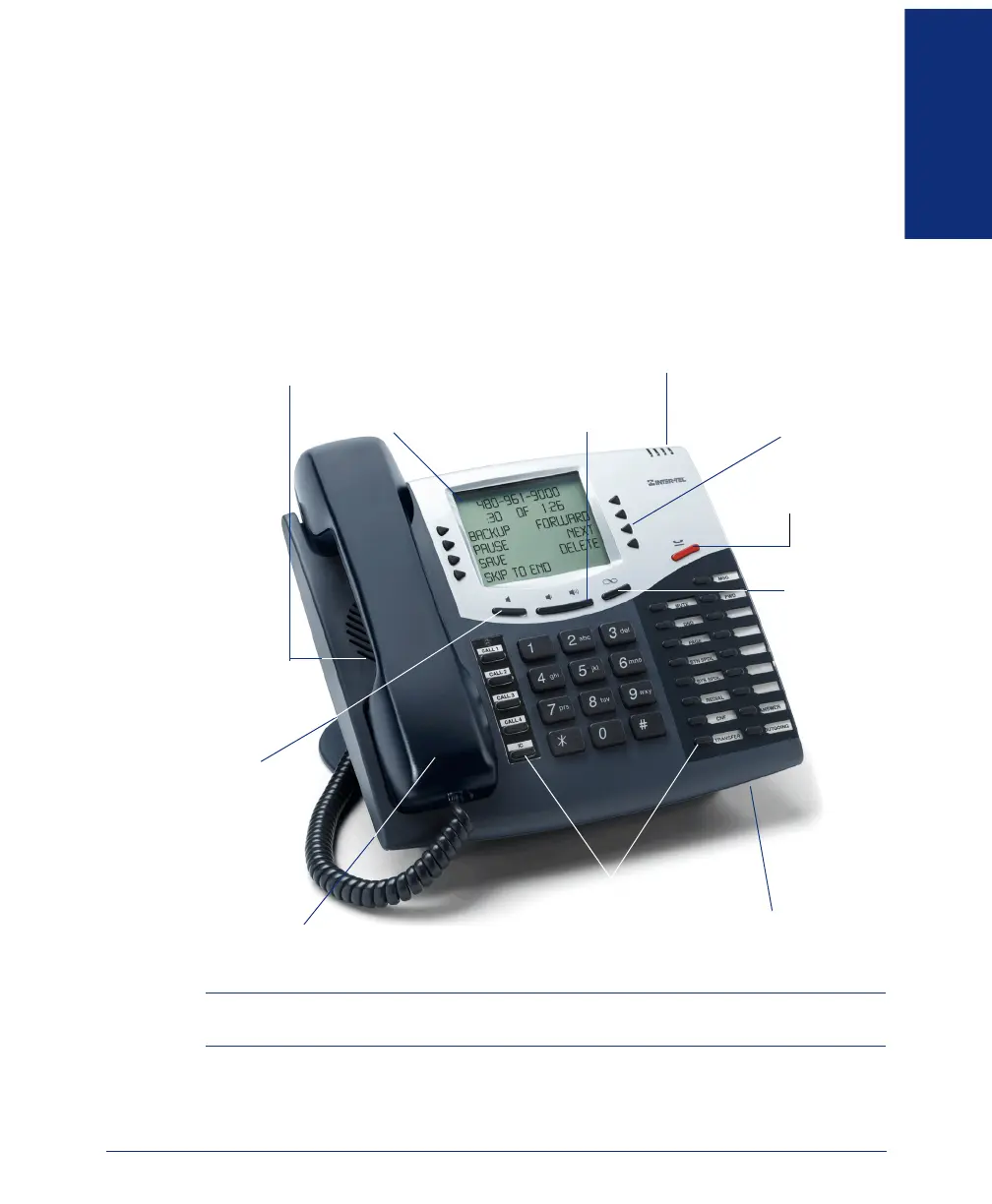
ABOUT YOUR ENDPOINT
Your Model 8560/8660 endpoint has three basic types of buttons in addition to a dis-
play and a Message Indicator lamp.
• Dialpad buttons: Allow you to enter numbers and letters.
• Feature buttons: Provide quick access to various telephone and voice mail fea-
tures.
• Liquid Crystal Display (LCD) menu buttons: Allow you to scroll through dis-
plays and make selections based on the active feature.
NOTE: This is the default configuration. Your buttons may have been programmed dif-
ferently. If you are uncertain about the configuration, ask your system administrator.
Hearing Aid-Compatible
Message Indicator Lamp
Internal Speaker
Hold Button
Special
LCD Menu
LCD With Six
16-Character Lines
Handsfree Microphone
(Underneath Edge)
Feature Buttons
Speaker
Ring and Voice
Volume Control
(HAC) Handset
12-Button
Buttons
Button
Button
Dialpad



 To Next Page