28
Burner does not start with a call for heat
• Checktheelectricalsupplytofurnace.
• VerifythefurnacedoorswitchisintheON position.
• Check for line voltage (115 VAC) at the oil primary
control.
• CheckindicatorLEDwithburneroff,nocallforheat(no
ame).SeeTable 9, (page 29).
- If green LED indicator is on, the cad cell is seeing
stray light or the cad cell of controller is defective.
- If green LED indicator is off, go immediately to step
5.
- IfLEDindicatorisashing(redorgreenonBeckett
7505 control), refer to the next step 1 below - Reset
primary control.
• JumperT to T terminals on primary control.
- If burner starts, check thermostat or limit wiring
connections.
- If burner does not start, turn off power. Check all
wiring connections.
- If burner does not start, replace primary control.
Burner starts & then locks out on safety with
Honeywell R7184 LED indicator flashing ½
second on, ½ second off. For Beckett 7505
control, the red LED will flash
1. Reset primary control: To reset the control from (soft)
lockout, the button needs only to be pressed and
released. If the R7184 control is in restricted mode,
press and hold the button for 45 seconds - until the LED
ashesonce.Ifthe7505controlisinrestrictedmode,
press and hold the button in for 15 seconds until the
red turns off and the yellow LED turns on.
Restricted Lockout: If the control locks out three
times in a row without a complete heat cycle between
attempts, the lockout becomes a restricted (hard) lockout.
2.If the LED indicator stops ashing and the ignition
remains off, the primary control could be defective. If
line voltage is present at the igniter terminals, and there
is no ignition, the igniter is likely defective and needs
to be replaced.
3.Ifthestopsashing,burnerturnson,butthecontrol
locks out again, check the cad cell. If the cad cell is
operational, replace the primary control.
4.If the LED continues to ash at the interval listed
above, verify that the control is not in restricted mode.
If in restricted mode, reset it. If not in restricted mode,
replace the control.
5. If the (LED indicator for R7184 control; green LED for
7505control)staysoffwhiletheameison,checkthe
cadcellsightingforviewoftheame.
6. If the burner locks out, check the cad cell resistance.
See Table 8.
7. If the burner stays running, the system is operational.
8. If the (LED indicator for R7184 control; green LED for
7505 control) is off, check the cad cell assembly after
disconnecting the line voltage.
Burner will not start and the LED indicator
is flashing at 2 seconds on, 2 seconds off
for R7184 (or green LED is flashing for 7505)
• Holdtheresetbuttondownfor1-2seconds.IfLED
indicatorcontinuestoash,waitfor60-70seconds.If
itstillcontinuestoash,replacetheprimarycontrol.
• Honeywell R7184 control: To check cad cell resistance,
press and release the button during the run mode, with
theigniteroff.TheLEDwillashtoindicatethecadcell
resistance. For proper burner operation, it is important
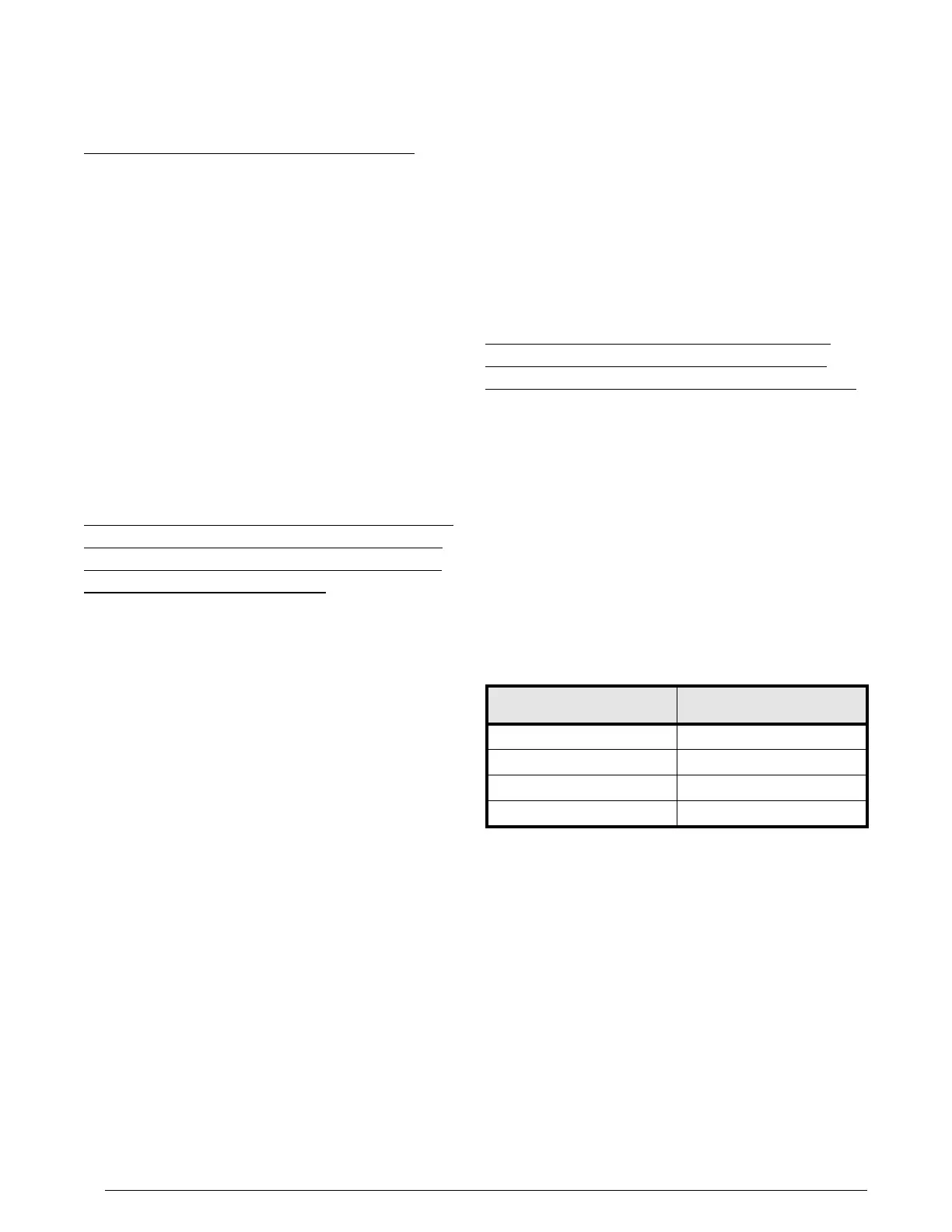
that the cad cell resistance is under 1600 Ohms. For
cad cell resistance, see Table 8.
• Beckett 7505 control: To check cad cell resistance,
unplug the cad cell leads (yellow wires) from the control.
Measure the resistance with a meter in the conventional
way (when a ame is present). For proper burner
operation, it is important that the cad cell resistance is
under 1,600 Ohms.
Table 8
Table 8.
sensing flame
1 0-400
2 400-800
3 800-1600
4 >1600


 To Next Page