Need help?
Do you have a question about the inTest THERMOSTREAM ATS-615 and is the answer not in the manual?
Details customer training, repair services, spare parts ordering, and technical support contact information.
Details various safety warnings including electrical hazards, hot/cold surfaces, and handling precautions.
Details safety cautions related to equipment operation, handling, and maintenance.
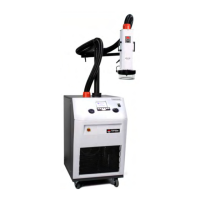
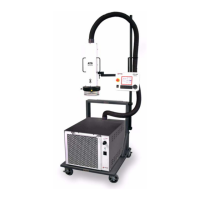
Describes the THERMOSTREAM® system's capabilities, control methods, and core components.
Provides step-by-step procedures for starting up and shutting down the THERMOSTREAM® system.
Visually identifies and labels the various controls and indicators on the THERMOSTREAM® system.
Provides detailed descriptions of the Graphical Display, Program Buttons, and Rotary Encoder.
Provides an overview of manual operation screens and their respective page numbers.
Explains how to use the MANUAL OPERATION screen to run the system to HOT, AMBIENT, or COLD setpoints.
Details the MANUAL TEST SETUP screen for creating 12 manual test setups with HOT, AMBIENT, and COLD setpoints.
Provides an overview of program operation screens and their respective page numbers.
Details the PROGRAM OPERATION screen for running the system with up to 12 programmable setpoints.
Explains how to set up 12 program test setups, each with unique setpoints for the THERMOSTREAM®.
Enables the user to define test setup parameters common to both manual and program test setups.
Displays system software version and allows configuration of system settings like IEEE address and baud rate.
Explains the three communication interfaces (GPIB, Serial, MCT) supported by the THERMOSTREAM® Systems.
Details the syntax rules for message strings, commands, and queries used for remote communication.
Explains how command and query errors are reported using the IEEE-488.2 standard and the ESR? query.
Provides an overview of the remote command set, listing IEEE mandatory, RS-232C serial, and device-specific commands.
Details IEEE mandatory commands for controlling the THERMOSTREAM® system, including status and reset commands.
Details RS-232C serial commands for controlling local/remote modes, status, and device clear functions.
Lists and describes device-specific commands for controlling system parameters and operations.
Details performance specifications including temperature range, transition rate, and air flow output.
Describes temperature display, resolution, accuracy, and DUT temperature control features.
Highlights key features such as Frost Free, ECO Friendly Mode, and Adjustable Thermal Head.
Details weights, dimensions, serviceability, safety features, and facility requirements for the ATS-615.
 General
| Temperature Accuracy | ±1.0°C |
|---|---|
| Transition Time (+125°C to -55°C) | 10 seconds |
| Transition Time (-55°C to +125°C) | 10 seconds |
| Power Supply | 50/60 Hz |
| Temperature Ramp Rate | Up to 15°C/second |


 To Next Page