EasyManua.ls Logo

Intex KOM0229 - User Manual

Intex KOM0229
28 pages
Go to English
Print Icon
To Next Page IconTo Next Page
Loading...
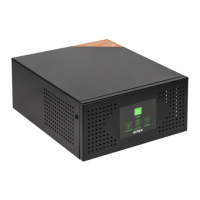
Uninterruptible power supply
sine wave line-interactive
12 V | 230 V | 400 W
KOM0229
Instrukcja obsługi
Manual de utilizare
Owners manual
Bedienungsanleitung
EN
DE
PL
RO

Questions and Answers

  • A
    Anne HernandezAug 2, 2025
    What to do if Intex KOM0229 emits continuous beep and there is no power on outlets?
    • J
      Jared WuAug 2, 2025
      If your Intex UPS is emitting a continuous beep and there's no power at the outlets, it likely shut down due to a severe overload. To resolve this, unplug some of the devices connected to the UPS to reduce the load, and then turn the UPS back on.
  • G
    Gregory ClarkAug 10, 2025
    Why Intex KOM0229 does not provide expected run time?
    • R
      Robert LeeAug 10, 2025
      There are a couple of reasons why your Intex UPS might not be providing the expected runtime: * Too many devices are connected to the UPS outlets, creating an excessive load. * The battery may not be fully charged. To address this, leave the UPS plugged in for 10 hours to allow it to fully charge. If, after charging, the UPS still doesn't provide the expected runtime, the battery may need to be replaced.
  • B
    Brooke GutierrezAug 17, 2025
    What to do if Intex KOM0229 UPS emits continuous beep, the yellow led flashes and power output is normal?
    • C
      Carrie HermanAug 17, 2025
      If your Intex UPS is emitting a continuous beep while the yellow LED flashes and the power output is normal, it indicates that the UPS is overloaded. To fix this, turn off the UPS and unplug some of the connected devices to reduce the load.
  • M
    Makayla Johnson PhDAug 25, 2025
    What to do if Intex KOM0229 has no reaction while AC is connected?
    • J
      Joseph FranklinAug 26, 2025
      If your Intex UPS shows no reaction when connected to AC power, here are a few things to check: * Ensure the power cord is securely plugged in. * Check the breaker, and reset it if necessary. Also, remove some of the load and check the load for short-circuits or faults. * Test the wall socket with a table lamp to ensure it's working.

Summary

REAR VIEW

Battery connector (12 V DC)

Specifies the terminal for connecting the external 12V DC battery.

OPERATION OF UPS

LED DISPLAY AND AUDIBLE ALARM

TROUBLESHOOTING

UPS no reaction while AC is connected

Addresses issues where the UPS does not respond when connected to AC power.

UPS emits continuous beep, yellow LED flashes

Details the cause for continuous beeping and flashing yellow LED on the UPS.

IMPORTANT SAFETY INSTRUCTIONS

Battery Safety and Handling

Provides crucial safety guidelines for battery replacement, disposal, and handling.

Electrical Hazard Precautions

Warns about electric shock risks from internal voltages and improper connections.

CAUTION

SPECIFICATION

Intex KOM0229 Specifications

General IconGeneral
ModelKOM0229
WaveformSimulated Sine Wave
Capacity600VA
Output Voltage220/230VAC ± 10%
Communication InterfaceNo
Dimensions300 x 101 x 142 mm
Weight4.2 kg

Related product manuals