SECTION 11—WHEELS AND CASTERS
Part No. 1125035 47 At’m
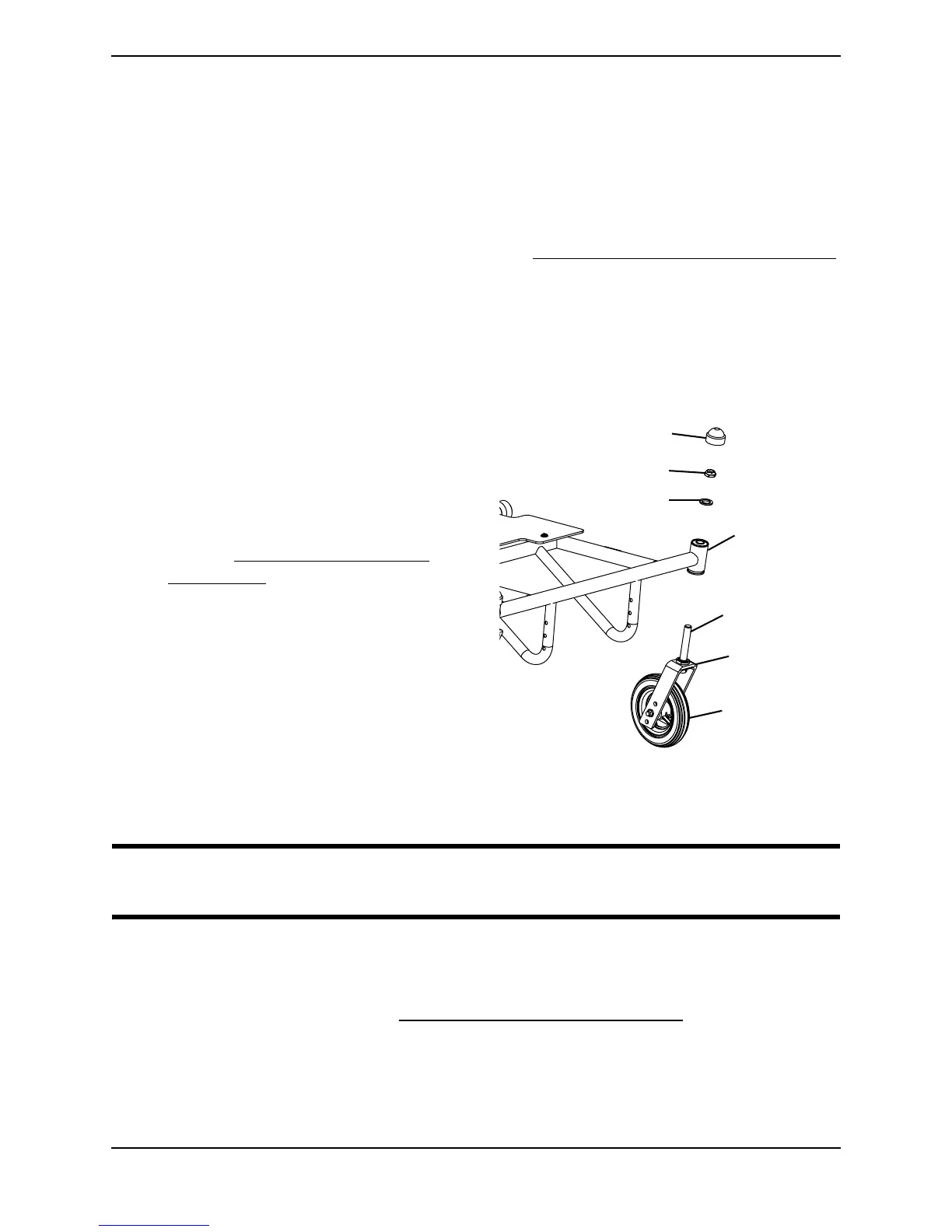
Adjusting Forks
NOTE: For this procedure, refer to FIGURE 11.2.
1. Remove the dust covers from the caster headtubes.
2. To properly tighten the caster journal system and guard against flutter, perform the
following check:
A. Remove battery pack or battery box. Refer to Removing/Installing the Battery Pack
on page 36.
B. Tip back the wheelchair to floor.
C. Pivot both forks and casters to top of their arc simultaneously.
D. Let casters drop to bottom of arc (wheels should swing once to one-side, then
immediately rest in a straight downward position).
E. Adjust locknuts according to
freedom of caster swing.
F. Bring wheelchair back to driving
position.
G. Install the battery pack or battery box.
Refer to Removing/Installing the
Battery Pack on page 36.
3. Test wheelchair for maneuverability.
4. Readjust locknuts if necessary, and
repeat STEPS 1-3 until correct.
5. Snap dust covers into the caster
headtubes.
FIGURE 11.2 fAdjusting Forks
Removing/Installing the Drive Wheels
WARNING
Maintain tire pressure at a minimum of 30 p.s.i.
NOTE: For this procedure, refer to FIGURE 11.3.
Removing
1. Disengage the motors. Refer to Engaging/Disengaging the Motors on page 42.
2. Push and hold the quick-release button on the drive wheel and pull the drive wheel
out of the wheelchair frame.
3. Repeat STEPS 1-2 for the other drive wheel.
Front
Caster
Locknut
Fork
Washer
Dust Cover
Caster
Headtube
Fork
Stem












 To Next Page