EasyManua.ls Logo

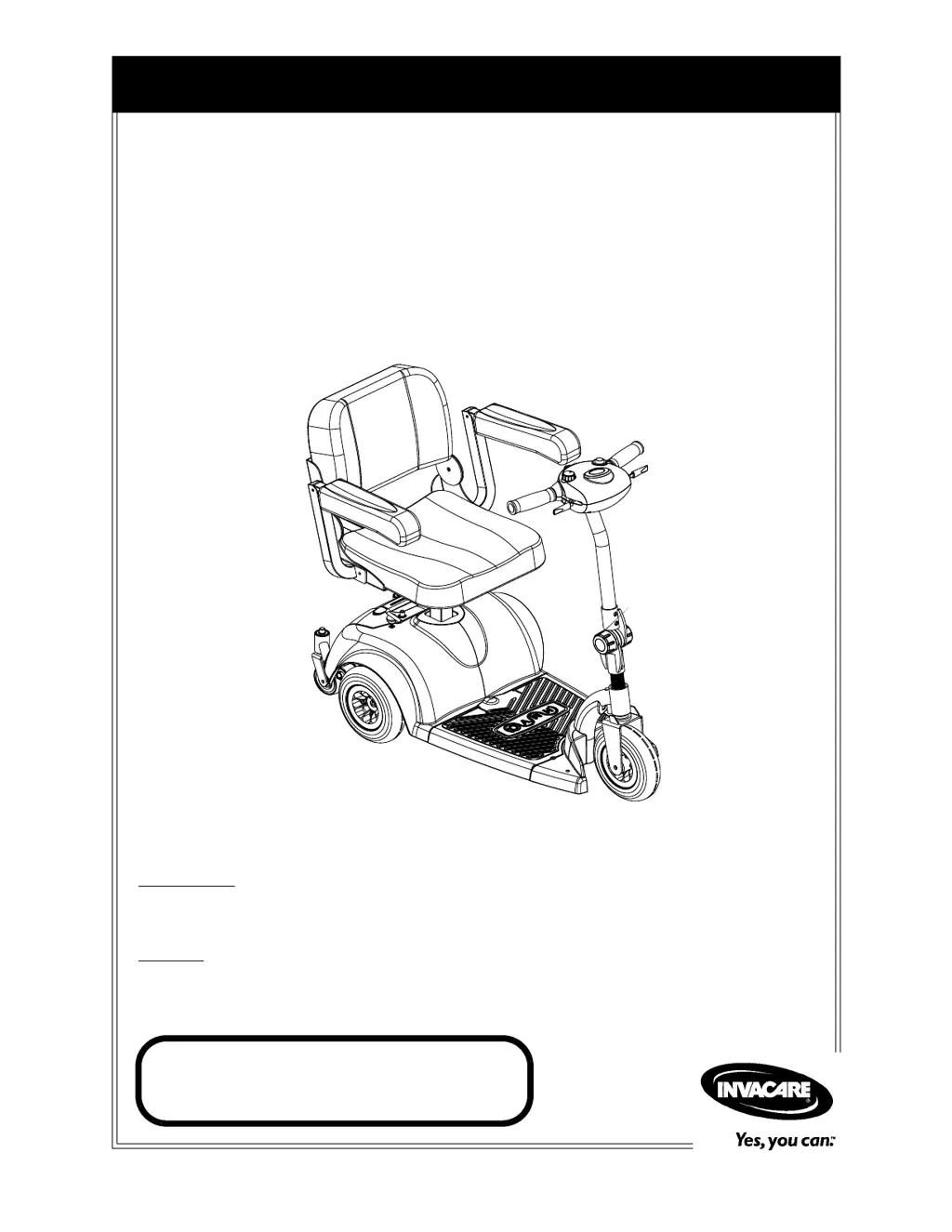
Invacare Zoom 220 - User Manual

Invacare Zoom 220
52 pages
Print Icon
To Next Page IconTo Next Page
Loading...
Owner’s Operator and Maintenance Manual
DEALER: This manual MUST be given to
the user of the wheelchair.
USER:
BEFORE using this wheelchair, read
this manual and save for future reference.
For more information regarding
Invacare products, parts, and services,
please visit www.invacare.com
HMV
Highly
Maneuverable Vehicle
Zoom
220

Table of Contents

Questions and Answers

  • A
    Alexandra BrownAug 2, 2025
    What to do if my Invacare Zoom 220 will not drive?
    • M
      Michael RushAug 3, 2025
      If your Invacare Scooter won't drive, first, ensure the brake release lever is engaged. Charge the batteries if they are low. Make sure the key is fully inserted into the keyswitch and that the charger is unplugged from the scooter. Also, check if the circuit breaker has tripped and reset it if necessary. If the breaker trips again, it may indicate the need for internal repairs. Finally, if the key was turned off while driving, wait 30 seconds with the key in the off position before turning it back on.
  • V
    Valerie TaylorAug 8, 2025
    What to do if battery indicator shows the charge level is low too soon after being recharged on Invacare Zoom 220?
    • S
      Shelley MillerAug 8, 2025
      If the battery indicator on your Invacare Scooter shows a low charge level too soon after being recharged, the charger might not be working correctly, or the batteries could be weak. Have the charger checked or replaced. If that doesn't solve the issue, replace the batteries.
  • R
    Rebecca BaileyAug 15, 2025
    Why are the batteries not charging on my Invacare Zoom 220?
    • M
      Maria TaylorAug 15, 2025
      If the batteries of your Invacare Scooter are not charging, the charger may not be working, or the battery connections may be loose. Ensure there is current at the wall outlet. Check all connections and make sure they are secure. If these steps don't resolve the issue, consider replacing the charger or seeking internal repairs.
  • K
    Karen SotoAug 20, 2025
    Why does my Invacare Zoom 220 Scooter have limited driving distance?
    • S
      Sarah WilcoxAug 20, 2025
      If your Invacare Scooter has a limited driving distance, it might be due to the battery not being charged long enough or the batteries being weak. To resolve this, charge the batteries overnight, ensuring at least eight hours of charge between uses. If the problem persists, consider replacing the batteries.
  • J
    John LopezAug 27, 2025
    Why do the batteries draw excessive current when charging on my Invacare Scooter?
    • M
      Mrs. Tracy RobertsAug 27, 2025
      If the batteries in your Invacare Scooter draw excessive current when charging, it likely indicates battery failure. You should replace the batteries.

Summary

Register Your Product

Special Notes

Tie-Down Restraints and Seat Restraints

Information on using restraints for transportation and seat positioning.

Seat Positioning Strap

Details about the seat positioning strap's function and limitations.

Typical Product Parameters

Label Locations

Warning Labels

Location and meaning of various warning labels on the scooter.

General Guidelines

Operation and Service Information

Information and warnings related to operating and servicing the scooter.

Electrical and Grounding Safety

Guidelines for electrical connections, grounding, and safety precautions.

Batteries, Rain Test, and Weight Limits

Information on battery types, rain test, weight training warning, and weight capacity.

EMI Information

Electromagnetic Interference (EMI)

Explains the effects of EMI on the powered wheelchair and precautions.

Safety and Handling

Stability, Balance, and Weight Distribution

Guidelines for maintaining stability, balance, and understanding weight distribution.

Stairways and Escalators Safety

Warnings and procedures for navigating stairways and escalators safely.

Safety Inspection

Initial Inspection and Adjustments

Initial checks and adjustments for safe operation and user preference.

Weekly and Monthly Inspections

Routine weekly and monthly inspection and adjustment procedures.

Periodic Inspections

Procedures for periodic safety inspections and adjustments.

Maintenance and Troubleshooting

Suggested Maintenance Procedures

Recommended procedures for maintaining the scooter's condition.

Troubleshooting Common Issues

Table of symptoms, causes, and solutions for common scooter problems.

Operation of the Powered Scooter

Control Panel Overview

Explanation of the scooter's control panel features and functions.

Operating the Scooter

Step-by-step guide on how to operate the scooter safely.

Brake Release Lever Operation

Procedure for engaging and disengaging the brake release lever.

Resetting the Circuit Breaker

Instructions on how to reset the circuit breaker.

Seat and Arms

Padded Seat Adjustments

Steps for removing, installing, and adjusting the padded seat.

Folding;Unfolding Padded Seat Back

How to fold and unfold the seat back for the padded seat.

Deluxe Seat Removal and Installation

Steps for removing and installing the deluxe seat.

Deluxe Seat Height and Swivel Adjustment

How to adjust seat height and 90° swivel for the deluxe seat.

Deluxe Seat Arm Removal and Installation

Steps for removing and installing the arms on the deluxe seat.

Replacing Deluxe Armrest Pads

How to replace the armrest pads on the deluxe seat.

Tiller Adjustment

Adjusting the Tiller Angle

Procedure for adjusting the tiller's angle for comfort and use.

Wheels and Casters

Drive Wheel Removal and Installation

Steps for removing and installing the drive wheels.

Front Wheel Removal and Installation

Steps for removing and installing the front wheel.

Fork Removal and Installation

Steps for removing and installing the front fork assembly.

Caster Assembly Removal and Installation

Steps for removing and installing the caster assemblies.

Batteries

Recommended Battery Type

Specifies the recommended type of batteries for the scooter.

Battery Box Removal and Installation

Steps for removing and installing the battery box.

Battery Removal and Installation

Detailed steps for removing and installing the batteries.

Charging the Batteries

Instructions and warnings for charging the scooter batteries.

Transporting

Disassembling and Assembling for Transport

Steps to disassemble and reassemble the scooter for transportation.

Scooter Accessories

Crutch;Cane Holder Installation and Removal

How to install and remove the crutch/cane holder.

Safety Flag Installation and Removal

How to install and remove the safety flag.

Walker Holder Installation, Removal, and Use

How to install, remove, and use the walker holder.

Rear Mounted Basket Installation and Removal

How to install and remove the rear mounted basket.

Limited Warranty

Invacare Zoom 220 Specifications

General IconGeneral
Ground Clearance2.25"
Turning Radius42"
Overall Length41"
Overall Width22"
Battery TypeU1
Range per ChargeUp to 15 miles
Weight Capacity300 lbs.
Charger TypeOff-board charger

Related product manuals