18
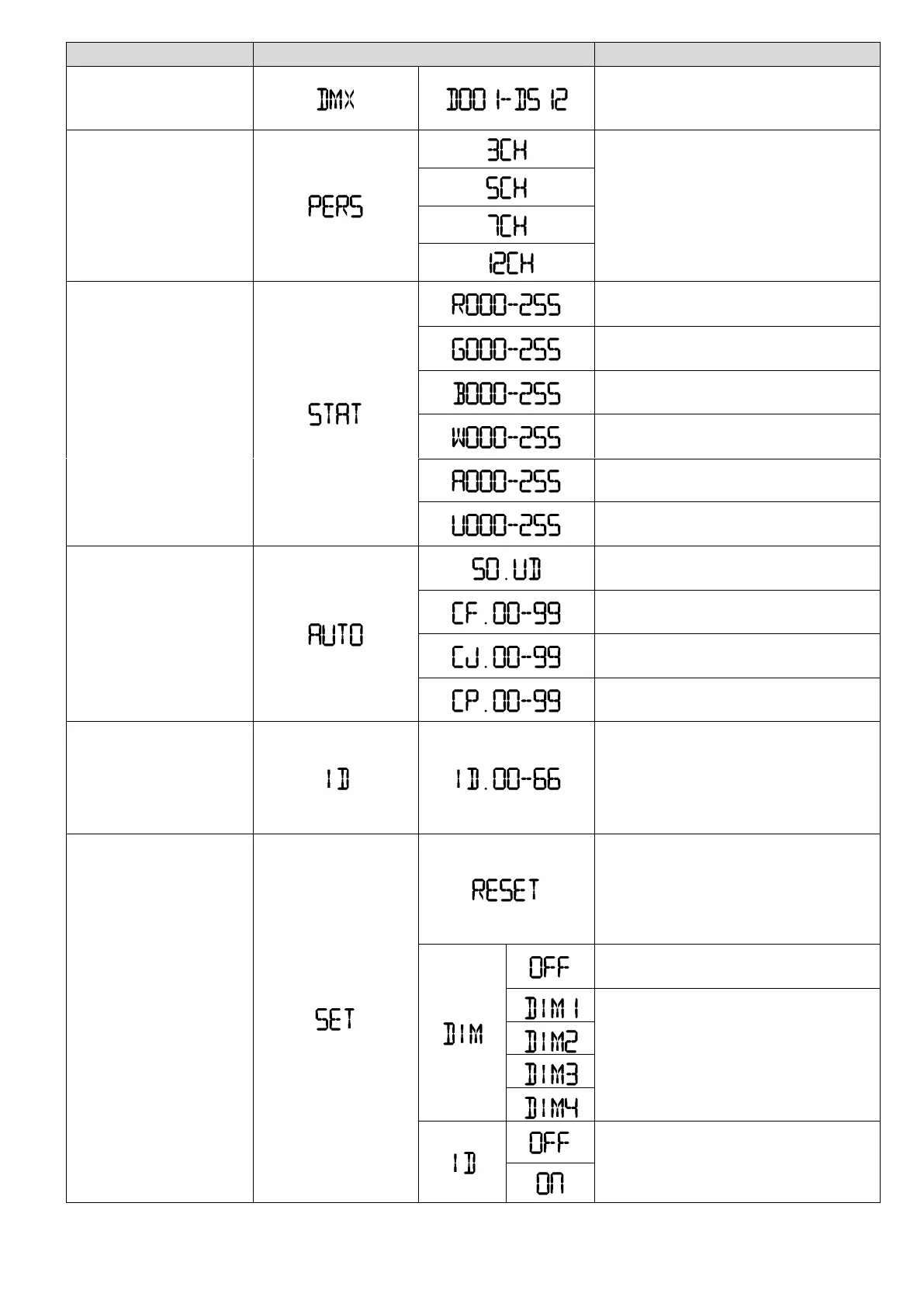
Select DMX channel mode and set
DMX start address
.
Selection of DMX operating modes
Green Intensity 0% - 100%
White Intensity 0% - 100%
Amber Intensity 0% - 100%
Color change in sound mode
Color change in fading mode. Speed
adjustable
Color change in jump mode.
Speed adjustable
Farbwechsel im Puls-Modus.
Geschwindigkeit einstellbar
Defining the ID addresses for the set
DMX address. Each DMX address can
be assigned up to 66 ID addresses.
This is a grouping of devices possible
.
This will reset to the default values.
The password is required. Press [UP],
[DOWN], [UP],
[DOWN] and then
[ENTER]
The changes of dimmer and RGBWA
are linear
Speed modes for the
nonlinear dimmer; "DIM1" is the
fastest, "DIM4" the slowest
This enables the application of ID
addressing via the DMX controller to
be enabled ("On") or disabled ("Off")
Speed modes for the
nonlinear dimmer; "DIM1" is the
fastest, "DIM4" the slowest
This enables the application of ID
addressing via the DMX controller to
be enabled ("On") or disabled ("Off")


 To Next Page