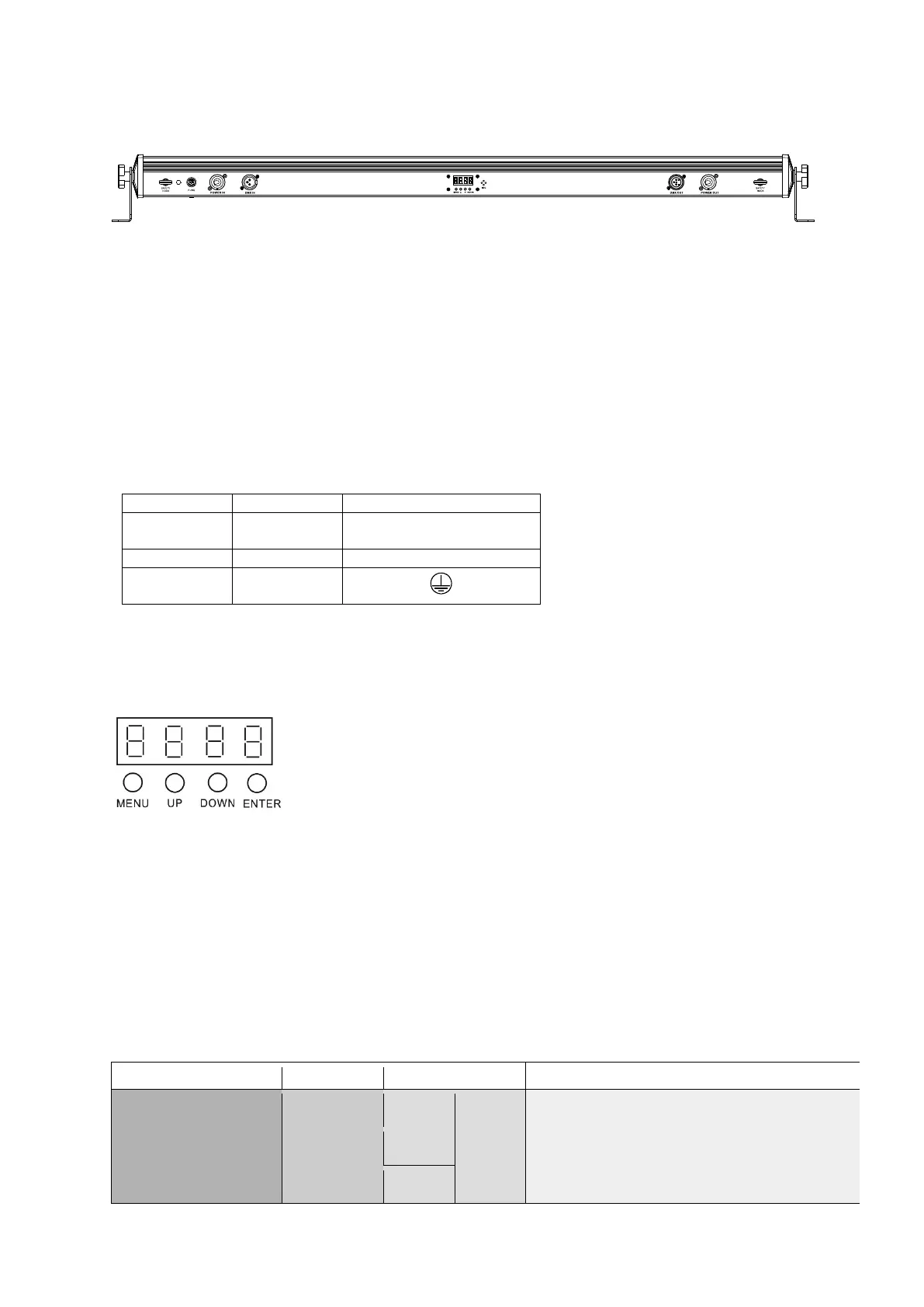
Picture 1 (backside):
1. Fuse holder for F1A 250V fuse.
2. Power In - Powercon compatible network input jack.
3. DMX In - 3-pin DMX input.
4. On-board menu - LED display with control buttons. Displays operating mode and other system
settings.
5. MIC - Microphone for music control.
6. DMX Out - 3-pin DMX output.
7. Power Out - Powercon compatible power outlet socket.
8. Catch eyelet - The device must be secured with a suitable safety cable against dropping.
The assignment of the connection leads is as follows:
The pRedective conductor must be connected!
3.2 Operating modes and setting of the on-board menu:
MENU - To select the operating mode
ENTER - Activates the setting process of a menu point or saves a setting
UP - To increase a value
DOWN - To decrease a value
The "PaintBAR HEX12P" has various operating modes, all of which can be set via the on-board menu
(see fig.1 housing back). Always press "Menu" repeatedly until the function to be set is reached. With
"Enter" you get to the individual, adjustable values. Then use "Up" and "Down" to set the desired
values. These can be confirmed with "Enter". Familiarize yourself with these settings in order to be
able to operate the unit optimally.
You can set the following modes and functions:



 To Next Page