Cutter Operation Steps:
Note:
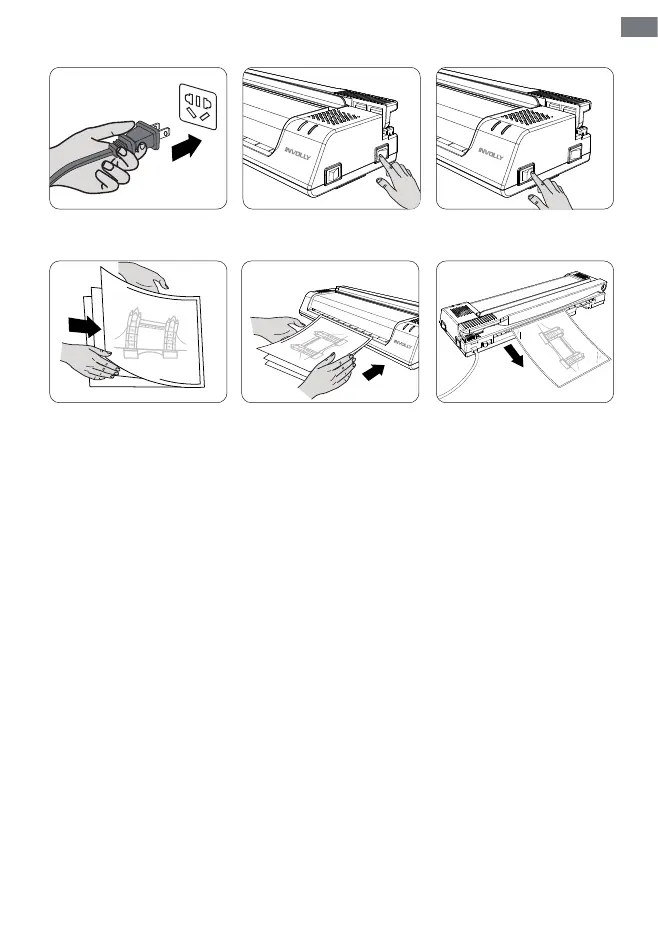
Step 1 Step 2 Step 3
Step 4 Step 5 Step 6
1. Start lamination until the green light for Ready comes on.
2. The lamination thickness should be 150(2x75)-250(2x125) microns, and the minimum should not be
less than 75 microns, otherwise the sheets will easily winkle or produce air bubbles. The max lamination
thickness is 0.5mm, and paper jams will occur if it exceeds 0.5mm.
3. Do not touch the machine housing when the laminator is working, and do not cover anything on the
housing.
4. After 30 minutes of continuous use of the laminator, a rest of 30 minutes is recommended before
proceeding to the next round of work.
5. If jam, please use the "ABS" button to release and take the pouches out.
1. Open the cutter lock, and lift the cutter handle.
2. Insert the paper from under the finger guard (transparent board) by aligning the scale line.
3. Press the finger guard with your left hand to prevent the paper from moving.
4. Hold the cutter handle firmly against the finger guard and cut down quickly.
ON OFF
COLD
HOT
Ready
Power
ON OFF
COLD
HOT
COLD
HOT
ON
OFF
Ready
Power
Ready
Power
Ready
Power
ABS
EN
03



 To Next Page