Note:
ABS Button Function:
Cleaning and Maintenance
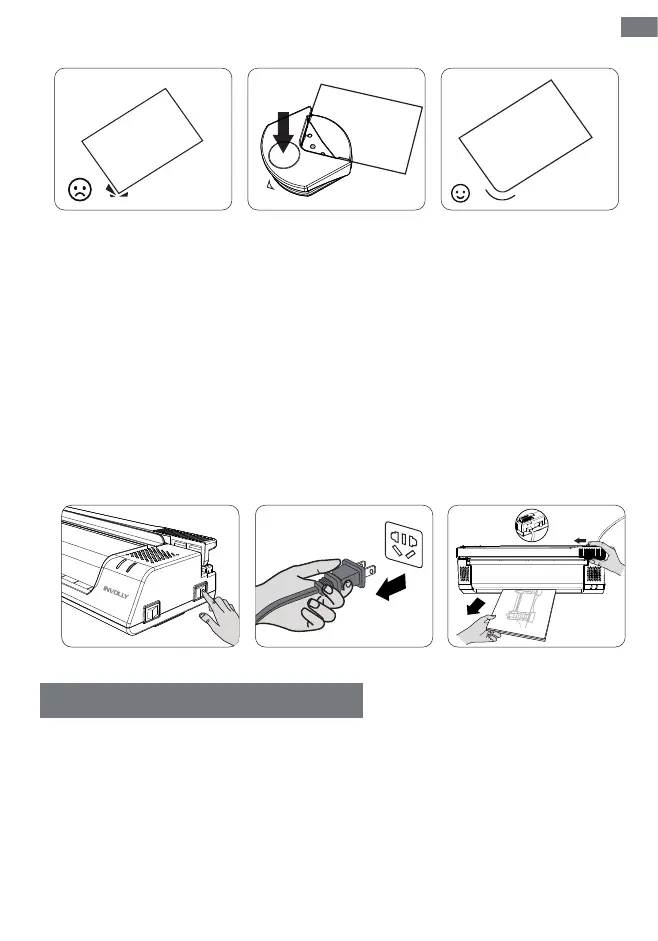
If the paper is not inserted straight, the roller is contaminated, or the laminating material is inappropriate,
the laminating pouch may get jammed. In this case, the ABS button can help you solve it.
1. The concer rounder can cuts 3 sheets of 80g paper or one sheet of laminated paper at a time.
2. Do not cut too thin or too thick laminated pouches.
Follow the steps below:
1. Turn the power switch to the OFF position.
2. Unplug the power adapter.
3. Switch the ABS button to the other side, press and hold it, and then carefully pull out the laminating
pouch from the entrance.
The laminator requires regular cleaning and maintenance, otherwise, long-term use will cause the rollers
to be covered with residue, affecting the laminating effect.
The cleaning procedure is as follows:
1. Turn the mode switch to HOT, wait for 3-5 minutes, and the Ready green indicator lights up.
2. Insert clean paper directly into the laminator so that the residue is absorbed by the paper and taken
out of the machine.
3. Repeat the process of laminating clean paper until the paper is clean.
Step 1 Step 2 Step 3
ON OFF
COLD
HOT
Ready
Power
Step 1
Press
Carefully
pull out
Push and
hold on
Step 2
EN
05



 To Next Page