EasyManua.ls Logo

ION Flash Cube - User Manual

ION Flash Cube
6 pages
To Next Page IconTo Next Page
Loading...
Skip to content
Manuals+
User Manuals Simplified.
ion Flash Cube User Guide
Home » ION » ion Flash Cube User Guide
Flash Cube
Quickstart Guide
Contents [ hide
1 Introduction
1.1 Box Contents
1.2 Support
2 Quick Setup
2.1 Connection Diagram
2.2 Remote Control
2.3 Speaker Linking
3 Features
3.1 Front Panel
3.2 Rear Panel
4 Appendix
4.1 Technical
Specifications
5 File Downloads
6 References
7 Related Manuals
Introduction
1. Make sure all items listed in the Box Contents section are included in the box.
2. READ SAFETY INSTRUCTION BOOKLET BEFORE USING THE PRODUCT.
Box Contents
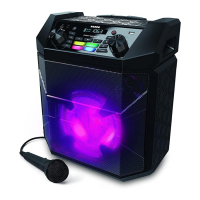
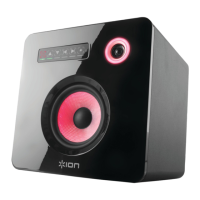
Flash Cube

Other manuals for ION Flash Cube

Question and Answer IconNeed help?

Do you have a question about the ION Flash Cube and is the answer not in the manual?

ION Flash Cube Specifications

General IconGeneral
BrandION
ModelFlash Cube
CategorySpeakers
LanguageEnglish

Summary

Introduction

Box Contents

Lists all items included in the product packaging.

Quick Setup

Connection Diagram

Visual guide for connecting audio sources and multiple units.

Remote Control Operations

Explains functions of buttons on the remote control.

Speaker Linking Guide

Instructions for connecting two Flash Cubes wirelessly.

Features

Front Panel Overview

Details on buttons and LEDs located on the front of the device.

Rear Panel Overview

Explains the function of connectors and buttons on the rear panel.

Appendix

Technical Specifications

Provides detailed technical data, dimensions, and power requirements.
File Downloads

References

Related Manuals

Related product manuals