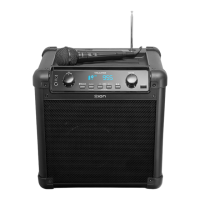
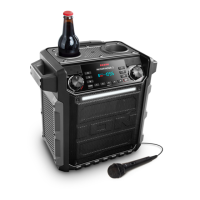
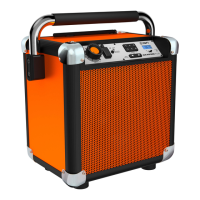
The ION Job Rocker is a portable sound system designed for various uses, including job sites, outdoor activities, and general entertainment. It features a robust design and a range of functionalities to provide audio playback and power to other devices.
Function Description:
The Job Rocker serves as a versatile audio system, capable of playing music from multiple sources and providing power outlets. Its primary function is to deliver high-quality sound in various environments. It includes an AM/FM radio tuner, Bluetooth connectivity for wireless audio streaming, and an auxiliary input for wired connections. The unit is powered by a rechargeable lead-acid battery, offering portability and extended use without a direct power source. Additionally, it features two AC outlets on the rear panel, allowing users to power other products directly from the Job Rocker, making it a convenient power hub on the go.
Important Technical Specifications:
- Input Voltage: 110-120VAC, 60 Hz
- Battery Life: Up to 50 hours (Note: Battery life may vary based on temperature, age, and volume usage of the product.)
- Output Power: 50W Peak
- Frequency Response (±3dB): 77 Hz – 20 kHz (Aux)
- Microphone Type: Dynamic microphone (compatible with the unit)
- Supported Bluetooth Profile: A2DP
- Bluetooth Range: Up to 100 feet
- Radio Frequency Range:
- US: AM 520-1710 kHz, FM 87.5-108 MHz
- EUROPE: AM 522-1629 kHz, FM 87.5-108 MHz
- JAPAN: AM 520-1710 kHz, FM 75.5-90.5 MHz
Usage Features:
- Master Volume Control: Adjusts the speaker's main mix volume, encompassing the Auxiliary Input, Tuner, and Bluetooth audio.
- Auxiliary Input: A stereo 1/8" input allows connection of external audio sources like CD players or MP3 players.
- Bluetooth Connectivity: The unit can be paired wirelessly with Bluetooth devices. A "Paired" LED indicates a successful connection. A "Disconnect" button allows users to break previous Bluetooth connections and reset the module.
- AM/FM Presets: Users can store up to 6 AM and 6 FM radio stations for quick access. Stations are saved by pressing and holding a numeric preset button and recalled by a light tap.
- Radio Selector: A switch to select between AM, FM, or turn the tuner off. This switch does not power off the entire unit.
- LCD Display: Shows the current radio station.
- Tuner Buttons: Used to search for radio stations. Holding these buttons down initiates a scan for the next available station. The unit remembers the last station used.
- Power LED: Indicates whether the Job Rocker is on or off.
- Telescoping FM Antenna: Adjustable for optimal FM radio reception. It is recommended to rotate the antenna horizontally when extended and retract it when not in use to prevent damage.
- AC Outlets: Two AC outlets on the rear panel provide power to other products.
- Battery Level Indicator: Four lights indicate the remaining battery power when the unit is ON and not plugged in. Battery life varies with volume and usage.
- Power ON/OFF Switch: Turns the Job Rocker on or off. The unit can charge its battery even when powered off, as long as it's connected to a power source.
Maintenance Features:
- Rechargeable Batteries: The Job Rocker uses lead-acid batteries, similar to car batteries. To maximize battery lifespan:
- Fully charge the battery before first use.
- Charge the battery completely after each use.
- Avoid completely draining the battery.
- The unit can be left plugged in for up to two weeks.
- For maximum life, drain the battery 80% once a month.
- Storage:
- Avoid storing in high temperatures and moist places.
- For long-term storage, periodically recharge the battery. If not charged for six months, the battery may not charge.
- Repair: If the battery loses its ability to recharge, contact ION Audio technical support.
- Disposal: Bring the unit to a recycling center or dispose of it according to local ordinances.
- Fuse Cover: If the fuse is broken or if the voltage selector switch setting is changed, a screwdriver or other tool can be used to lift the tab and replace the fuse. Ensure the replacement fuse has the appropriate rating to prevent damage.
- Cleaning: Clean the unit only with a dry cloth.
- Ventilation: Do not block any ventilation openings. Install according to manufacturer's instructions.
- Power Cord Protection: Protect the power cord from being walked on or pinched, especially at plugs, convenience receptacles, and where it exits the apparatus.
- Servicing: Refer all servicing to qualified service personnel. Servicing is required if the apparatus has been damaged (e.g., power-supply cord or plug damaged, liquid spilled, objects fallen into, exposed to rain/moisture, abnormal operation, or dropped).
- Component Replacement: When servicing, use only identical replacement parts or factory-recommended equivalents.
- AC Line Powered Units: Before returning a repaired unit to the user, use an ohmmeter to measure from both AC plug blades to all exposed metal parts. The resistance should be more than 2,000,000 ohms.

 Need help?
 General


 To Next Page