
 Need help?
Do you have a question about the ION SPORT BOOM and is the answer not in the manual?
Lists detailed technical specifications including output power, drivers, Bluetooth, battery, dimensions, and weight.
Outlines trademarks, logos, and licensing information for ION Audio and related technologies.
Lists all items included in the product package, such as the speaker, microphone, and cables.
Provides guidance on where to find the latest product information and technical support.
Offers essential tips for using the Sport™ Boom outdoors and maintaining its water-resistant capabilities.
Explains the process of charging the speaker and best practices for battery longevity.
Details the controls, buttons, and display elements located on the front of the Sport™ Boom.
Describes the ports and connections available on the rear of the Sport™ Boom speaker.
Step-by-step guide to pairing and connecting devices wirelessly via Bluetooth.
Instructions on how to link two Sport™ Boom speakers for true wireless stereo sound.
Explains how to access and operate the built-in FM radio functionality.
Details how to connect external audio sources using the 3.5mm auxiliary input port.
Guide on playing music files directly from a connected USB drive.
Information on utilizing the speaker's USB port to charge other compatible devices.
Instructions for downloading and using the ION Sound Control™ app to manage speaker functions.
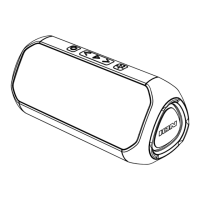
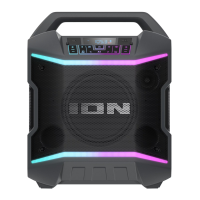
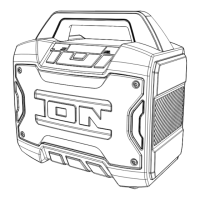
The ION Sport™ Boom is a portable, water-resistant speaker designed to enhance your entertainment experience with robust audio and convenient features. It's built for both indoor and outdoor use, making it a versatile companion for various activities.
The Sport™ Boom serves as a powerful audio playback device, capable of connecting to various sources. Its primary function is to deliver high-quality sound from Bluetooth-enabled devices, allowing for wireless streaming of music and other audio. Beyond Bluetooth, it offers an FM radio tuner for listening to local stations, a USB-A port for playing music directly from a USB drive, and an Aux input for connecting external audio players via a 3.5mm cable.
A key feature of the Sport™ Boom is its Stereo-Link™ capability, which allows you to wirelessly connect two Sport™ Boom speakers for a true stereo sound experience. When linked, one speaker acts as the primary, playing the left channel, while the secondary speaker handles the right channel, creating a wider and more immersive soundstage.
The speaker also includes a microphone input, enabling you to use it for announcements or karaoke. Microphone volume can be adjusted independently, ensuring clear vocal projection over the music.
For an enhanced audio experience, the Sport™ Boom features a "Boom Button™" that, when pressed, simultaneously boosts bass EQ and volume, and activates a light show that pulses to the beat of the music, adding a dynamic visual element to your listening.
Beyond audio playback, the Sport™ Boom incorporates a power bank function. Its USB-A port can be used to charge compatible 5V, 1A smartphones, tablets, or other devices, making it a convenient power source when you're away from an outlet.
The device is equipped with a clear display that shows relevant information such as the current source (FM, AUX, USB), Bluetooth connection status, Stereo-Link™ status, radio station frequency, volume level, repeat mode, charging status, and battery life percentage. Voice prompts are also available to guide you through various operations, such as Bluetooth pairing and connection status, and can be enabled or disabled as preferred.
Operating the Sport™ Boom is intuitive, with clearly labeled buttons on the front panel. The Power button turns the unit on and off with a press and hold. The Source button allows you to cycle through the available input modes: FM, USB, and Aux.
Bluetooth connectivity is straightforward. Upon powering on, the speaker automatically enters Bluetooth pairing mode if it's the first time or if it remembers the last mode used. The Bluetooth button initiates pairing mode, and a double-press disconnects a paired device and re-enters pairing mode. A single press can also disconnect a paired device and switch to Aux mode. Once connected, you can control audio playback directly from the speaker using the Play/Pause / Presets button, and the Previous ( < ) and Next ( > ) buttons to skip tracks. Volume is adjusted using dedicated Volume Up/Down buttons.
For FM radio, the Previous and Next buttons allow you to navigate between stations, with a press and hold function to seek the next strongest station. The Play/Pause / Presets button is used to save and recall up to 12 radio presets, making it easy to access your favorite stations.
USB playback automatically begins when a USB drive is connected to the USB-A port. The Play/Pause / Presets button controls playback, and the Previous and Next buttons navigate tracks. The Repeat button cycles through different repeat modes: "ALL" for all tracks on the drive, "FOLD" for tracks in the current folder, "OnE" for the currently playing track, and "rAn" for random shuffle.
The EQ button provides control over the speaker's equalization. Pressing it allows you to cycle through Low, Mid, and Hi EQ frequencies, which can then be adjusted using the Volume Up/Down buttons. If no adjustments are made within five seconds, the speaker exits EQ adjustment mode.
The Stereo-Link™ feature is activated by pressing and holding the Stereo-Link™ button on both speakers. Once linked, one speaker is designated as the primary by pressing its Bluetooth button, and your device connects to this primary speaker. This setup provides a true left/right stereo experience. To exit Stereo-Link™ mode, double-press the Stereo-Link™ button again.
The Sport™ Boom can also be controlled remotely using the ION Sound Control™ app, available for both Android and iOS devices. The app allows you to select the audio source, adjust volume and EQ, enable or disable voice prompts, and monitor battery life. It also provides access to support resources and warranty information.
To ensure the longevity and optimal performance of your Sport™ Boom, several maintenance guidelines are provided. The speaker is water-resistant, designed to tolerate splashing water. However, it is recommended to bring the unit indoors during extreme weather and to avoid placing it in standing water or puddles. Crucially, the power input, USB cable, power adapter, and power outlet must be completely dry before making any connections to prevent electric shock. Any non-water-resistant devices connected to the speaker should be kept in a dry place.
Battery care is essential for maximizing the internal battery's life. Before initial use, the battery should be fully charged, which can take up to 4 hours with a 5V, 2A power adapter. It's advised to power off the speaker while charging for optimal results. To prolong battery life, avoid full discharge whenever possible, as Li-Ion batteries perform best when operating between 30-80% charged. The product should not be used while charging, and charging should be avoided in exceedingly hot (above 90°F/32°C) or cold (below 32°F/0°C) temperatures. For long-term storage, it's best to store the speaker with a 50% battery charge and in moderate temperatures. If the battery level remains low and is not charged for six months, it may permanently lose capacity. If the battery fails to charge, contacting ION Audio support is recommended.
The Sport™ Boom includes an auto-standby feature to conserve battery life. If no audio is played for 15 minutes, the unit enters standby mode. Resuming audio or pressing any button will wake it up. After 60 minutes of inactivity, the speaker will fully power off, requiring a press and hold of the Power button to turn it back on.
In case of troubleshooting, the manual provides guidance for common issues such as distorted sound (suggesting lowering the source volume), hum from connected cables (checking cables and grounding), high-pitched whistling from microphones (feedback, suggesting repositioning the microphone), and inability to hear the microphone over music (lowering music volume). For Bluetooth connection problems, it advises ensuring devices are close, unobstructed, and to try disconnecting and re-pairing, or resetting the Bluetooth connection on the audio device. If audio dropouts occur during Bluetooth playback, it may be due to the unit trying to link to another speaker, and exiting Stereo-Link™ mode is suggested.
When the product reaches the end of its life, it should be brought to a recycling center or disposed of in accordance with local ordinances.
 General
| Type | Portable Bluetooth Speaker |
|---|---|
| Brand | ION |
| Model | SPORT BOOM |
| Power Output | 50W |
| Battery Life | up to 24 hours |
| Water Resistance | IPX7 |
| Bluetooth Range | 100 feet |
| Microphone | Yes |
| USB Charging Port | Yes |
| AUX Input | Yes |


 To Next Page