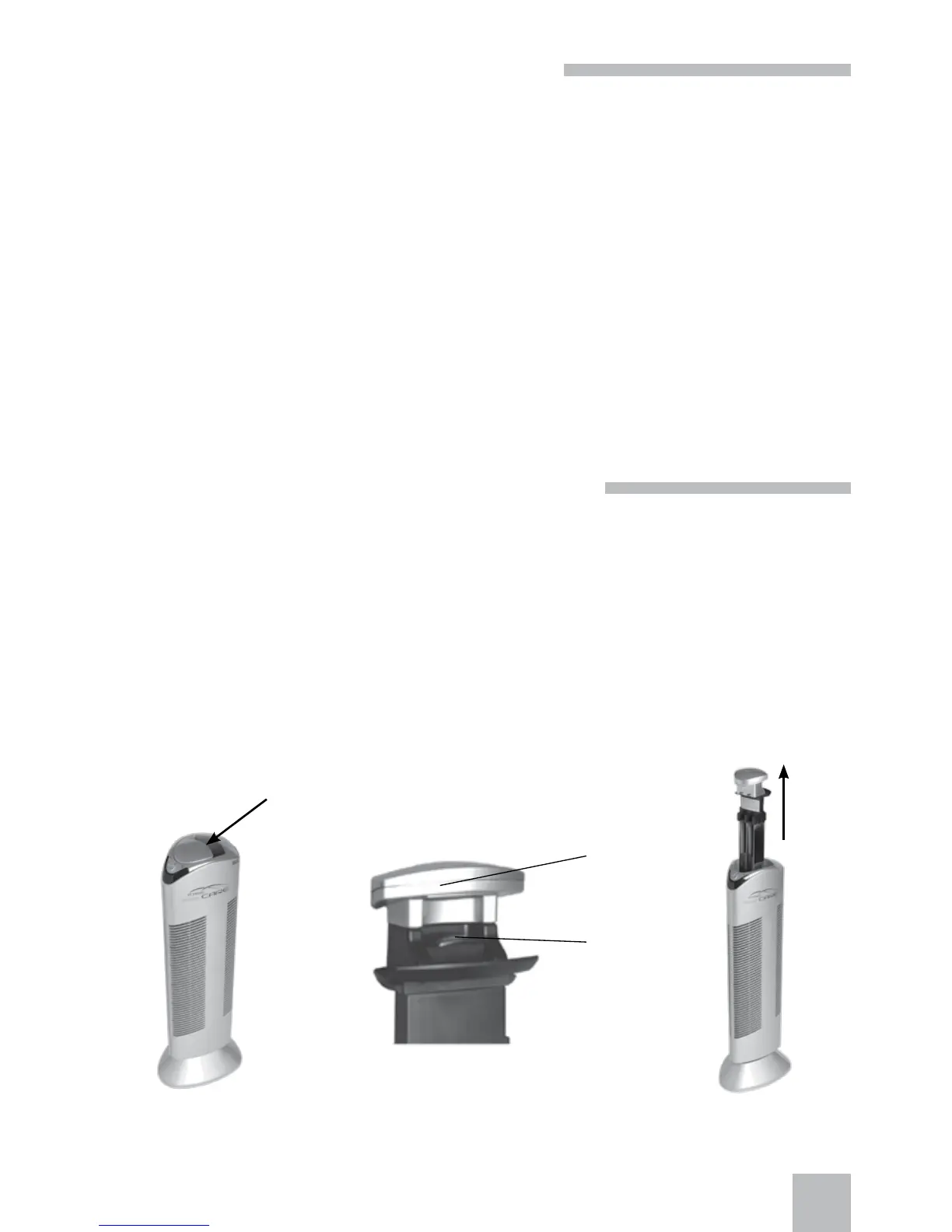
Figure 1 Figure 2
A
B
Figure 3
7
CLEANING AND MAINTENANCE
To run reliably, Ionic-CARE TRITON X6 must be cleaned regularly. Impurities are caught mainly on the
surface of the electrostatic lter (collecting sheets) but also, though in a lesser extent, on the ionizing
wires that form an important part of the air purifying system. The greater layer of impurities is caught
on the lter, the lesser is the eectiveness of cleaning. The unit will keep common functionality only
when the dust-catching collector and the ionizing wires are cleaned regularly. The cleaning interval
depends of the pollution of environment and the set unit power and therefore, it is quite individual. The
recommended cleaning interval is every 4-7 days. Use of the air purier near candles, paran lamps,
replace soot etc. is not recommended and will require the stainless lter cleaning after each air purier
exposure to such environment (see section Important Precautions).
Attention!! Do not forget to clean the unit every 4-7 days and at any time the red indicator lights
up (pollution / unit error). Noisy operation of the unit (audible hissing sound) indicates that the
purier needs complete cleaning.
Before you start the unit cleaning, ensure that you have read all important precautions and cleaning
procedures in the sections Safety Measures, Important Precautions, and Cleaning and Maintenance of
these Instructions for Use.
STAINLESS FILTER INSERTION AND REMOVAL
Before you clean the lter, remove it by pressing the lter lock (Figure 2B) against its handle (Figure 2A).
Keep holding the lock and remove the lter from the unit upwards (Figure 3). The stainless lter is rein-
serted into the unit by careful pulling into the unit and pressing that results in the lock closing (clicking),
which prevents any unintended lter removal.
Do not forget!! When removing the stainless lter, put your ngers at places shown in Figure 1. The lock
(Figure 2B) that must be pressed with force occurs there.



 To Next Page