6 ID-299 Iss 3 08/07/985ID-299 Iss 3 08/07/98
EVENT MODE - (Having selected r L -E EVENT (Segment) RELAY )
You may program the relay to operate for any combination of the segments.
i.e. Delay, Ramp 1, Ramp 2, Soak, Ramp 3, End.
Use ↑ / ↓ to select whether you want the relay ON (Green LED lit) , or OFF (Green LED off) in this segment.
- - - - - - - - - - - - - - - - - - - - - - - - - - - - - - - - - - - - - - - - - - - - - - - - - - - - - - - - - - - - Press
→ to proceed
Step through each segment and repeat above for each segment.
TEMPERATURE MODE - (Having selected r L - t TEMPERATURE RELAY )
You may program one ON operation at a your specified temperature and one OFF operation at a further specified temperature.
These two operations must be in different segments. If a duplicate action is attempted, the previously set action will be
cancelled. Operations can only be entered in Ramp segments. These must be ramps that will cause the kiln to pass through the
programmed temperature. When the controller first starts the relay will be OFF. This means that the first operation should be
an ON (Even if in terms of your process something is turned Off! )
- - - - - - - - - - - - - - - - - - - - - - - - - - - - - - - - - - - - - - - - - - - - - - - - - - - - - - - - - - - - Press → to proceed
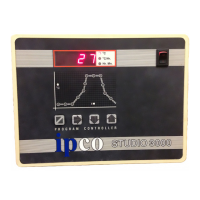
The Red LED’s on the mimic will show the segment selected
A Green LED shows an operation is programmed into this segment.
The display indicates whether an operation is an ON or an OFF.
Use
↑ / ↓ to select or remove an operation.
↓ Selects (or removes) an ON operation
↑ Selects (or removes) an OFF operation
NB. If the segment has ‘PASS’ as a parameter then the above actions are inhibited.
Having Selected an operation (i.e. Green LED lit.)
Press and hold the secret key to display the temperature at
which the operation occurs.
Use
↑ / ↓ to adjust the switching temperature.
Release the secret key to accept the value.
- - - - - - - - - - - - - - - - - - - - - - - - - - - - - - - - - - - - - - - - - - - - - - - - - - - - - - - - - - - - Press → to proceed
Repeat the above step for each segment.
Two / Three Zone Control (Please also refer to “Option wiring”.)
For a full three zone control the kiln requires three thermocouples and three contactors driving the heating elements of three
separate zones. The thermocouples are situated in each of the heating zones so as to monitor the temperature in that zone.
We recommend the use of type N mineral insulated thermocouples in three zone kilns. These ensure leakage currents
from the elements will not effect the operation of the thermocouples and / or the controller.
Full three term (PID) control is available on all three zones. As shipped the Integral and Derivative terms are turned off for
the slave zones. This reduces the risk of the slaves influencing the main zone. (See also “Configuration”)
Refining the control
Where a consistent difference exists between zones during a firing then use the offset (See “Configuration”) to enter a value
numerically opposite that being achieved. e.g.. If zone 2 is always 3OC above the main zone, then enter ‘-3’ in the offset for
zone 2.
Where the difference varies over the temperature range or between various loads then reduce the value of ‘Proportional Band
(See “Configuration”) for each of the offending zones.
Security Lock (Not fitted on single program version)
Access codes can be entered, amended, or if security is not required can be omitted.
SET LOCK NUMBER
Ensure no LED’s are lit on the mimic display.
Press and hold down the switch hidden under the “P” of IPco for 10 seconds.
The display will initially show ‘Lock’.
After 10 seconds the display will show the current lock number.
Use
↑ / ↓ keys to set a code. (range = 00 to 99. note;- 00 is No Lock)
Once the hidden switch is released, the code number will be stored.
‘LOCKED’ OPERATION
With a Lock number set, any attempt to Stop / Start / Modify the program will display the message ‘Lock’.
To continue at this point with the selected operation ;-
Press and hold down the switch hidden under the “P” of IPco
Ln 00 is displayed.
Use ↑ / ↓ keys to select the code that you have already set.
Release the secret key and the desired function will occur.
Gas Relay (Option)
No parameters are required for this option. The relay turns ON at the first instance of heat demand by the controller. It turns
OFF at the ‘End’ of a firing cycle or if an Error is detected.
See also Electrical Connections. See also “Option wiring”
Alarm Relay (Option)
No parameters are required for this option The relay turns ON when the controller is switched ON. It turns OFF if the kiln
temperature exceeds the highest programmed setpoint by 20OC, or if an error is detected (See ‘Problems’). Where linked
programs are used the alarm will initially be determined by the first program. As each additional program is linked to, then
the alarm value will be determined by the highest setpoint encountered during the complete firing sequence. In a three zone
controller, an over temperature in any zone will cause the alarm. See also “Option wiring”
Auxiliary Relay (Option)
After the last ramp, entry of parameters for the auxiliary relay is prompted by r L y
Use↑ / ↓ to select. r L - t TEMPERATURE RELAY
r L -E EVENT (Segment) RELAY
r L y NO OPERATION
- - - - - - - - - - - - - - - - - - - - - - - - - - - - - - - - - - - - - - - - - - - - - - - - - - - - - - - - - - - - Press → to proceed
The first segment to be programmed will be indicated by a Red LED. Each press of the → key will advance you to the next
segment. Green LED’s show you where operation of the relay will occur.
N.B. You MUST ensure that the temperatures and segments that you program for the auxiliary relay
will occur during your program. No Validation is performed.


 To Next Page
 Loading...