Android operation instructions
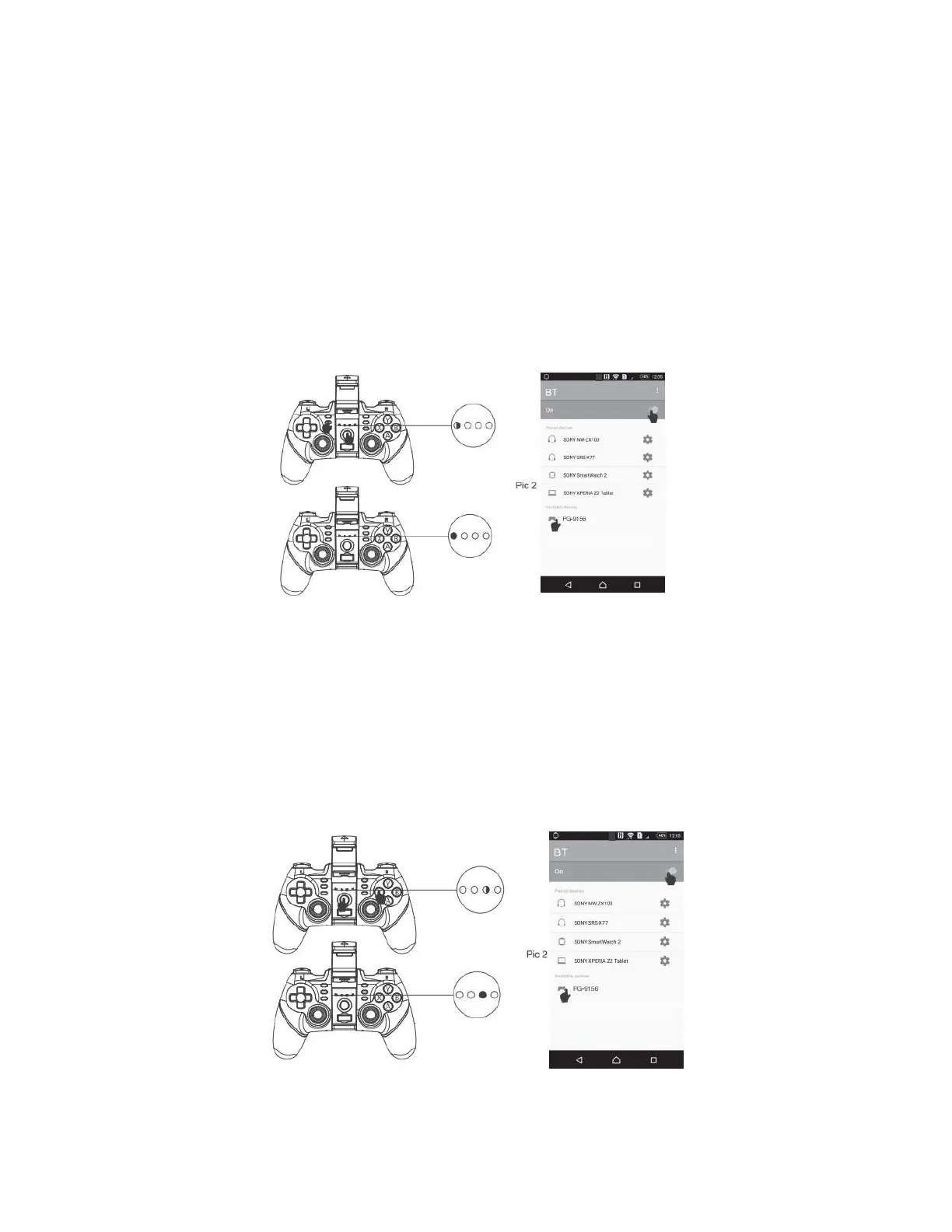
V3 direct play:
- Press and hold Android + Home buttons simultaneously for 2 seconds to start pairing
for V3 direct play, and the LED1 indicator on the gamepad flashes quickly. When the
device name "PG-9156" is available on the Android phone/tablet, select and connect it.
After it is successfully connected, the LED1 indicator will be always on. You can directly
press the home button, and LED1 indicator will flash slowly, which will be automatically
connected.
Standard game:
- Press and hold the X + Home buttons for 2 seconds to start pairing for standard game,
and the LED3 indicator on the gamepad flashes quickly. When the device name
"PG-9156" is available on the Android phone/tablet/smart TV, select and connect it.
After it is successfully connected, the LED3 indicator will be always on. You can directly
press the Home button, and LED3 will flash slowly, which will be automatically
connected. You can directly play simulator games, or you can download the Gamepad
enabled games from Google Play Store.


 To Next Page