Need help?
Do you have a question about the iPega PG-9156 and is the answer not in the manual?
Details connectivity, battery life, standby time, supported devices, and compatibility with various platforms.
Identifies all ports, buttons, and controls on the gamepad, including D-pad, analog sticks, and action buttons.
Instructions for pairing and connecting the gamepad to Android devices using V3 direct play mode via Bluetooth.
Guide for connecting the gamepad to Android devices for standard gaming, using Bluetooth pairing.
Steps to pair and connect the gamepad to iOS devices for V3 direct play mode using Bluetooth.
Details on connecting the gamepad via USB to PC, PS3, NS, and Android devices in wired mode.
Instructions for using the 2.4G wireless receiver with PC, Android, PS3, and NS consoles.
Information on recharging the gamepad using a microUSB cable and understanding charging indicator LEDs.
Guide on enabling and disabling Turbo mode for action buttons and setting it manually.
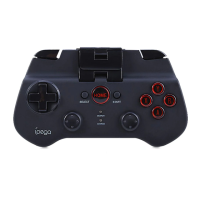
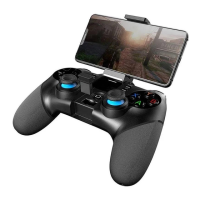
The iPega PG-9156 is a versatile Bluetooth gamepad designed to enhance your mobile and console gaming experience. It features a built-in smartphone holder, allowing you to securely attach your device directly to the controller for an integrated gaming setup. This gamepad offers multiple connectivity options, including Bluetooth 4.0 for wireless play and a wired mode via USB, making it compatible with a wide range of platforms.
For Android users, the gamepad supports two primary operation modes: V3 direct play and standard game mode. In V3 direct play, you initiate pairing by simultaneously pressing the Android and Home buttons for two seconds. The LED1 indicator on the gamepad will flash rapidly, signaling that it's in pairing mode. Once "PG-9156" appears on your Android phone or tablet, you can select and connect to it. Upon successful connection, LED1 will remain steadily lit. For subsequent connections, simply pressing the Home button will re-establish the link, with LED1 flashing slowly to indicate automatic reconnection. This mode allows for direct gameplay without additional setup.
For standard Android games, you press and hold the X and Home buttons simultaneously for two seconds to enter pairing mode. In this case, the LED3 indicator will flash quickly. Similar to V3 direct play, you select "PG-9156" from your device's Bluetooth list. Once connected, LED3 will stay on. Reconnecting is as simple as pressing the Home button, which will cause LED3 to flash slowly. This mode is ideal for playing simulator games or titles downloaded from the Google Play Store that support gamepad input.
iOS users can also enjoy a seamless gaming experience with the V3 direct play mode. To activate it, press and hold the iOS and Home buttons together for two seconds. The LED2 indicator on the gamepad will flash rapidly, indicating pairing mode. When "PG-9156" appears on your iOS phone or tablet, select it to connect. After a successful connection, LED2 will remain lit. Subsequent connections are simplified by pressing the Home button, which will cause LED2 to flash slowly as it automatically reconnects.
Beyond wireless connectivity, the iPega PG-9156 also offers a robust wired mode. When connected via a USB data cable, the gamepad automatically recognizes different modes. To activate wired mode, press the "RB" button while plugging in the USB cable, and LED1 and LED3 will flash quickly. This mode supports Windows PC, Android devices, PS3, and Nintendo Switch. For PC connection, the default mode is X-input 360, with LED3 staying on. You can switch to D-input mode by pressing and holding the Select and Start buttons for three seconds, which will illuminate LED2. For PS3, Nintendo Switch, or Android console connections, press and hold the "R1" button while plugging in the USB cable. The LED light will remain on once successfully connected.
The gamepad also features a 2.4G wireless mode, which is activated by pressing and holding the L1 and Home buttons for three seconds. In this mode, LED1 and LED2 will flash quickly. Once successfully connected, both LED1 and LED2 will remain on. To reconnect, simply press the Home button, and LED1 and LED2 will flash slowly. This mode supports PC, Android, PS3, and Nintendo Switch consoles. You can switch between D-input and X-input 360 modes by pressing and holding the Select and Start buttons for three seconds.
Maintenance features include straightforward charging and power management. To recharge the gamepad, use the included microUSB cable. The LED4 indicator provides clear feedback on the charging status: it flashes quickly when the power is low, flashes slowly during recharging, and remains steadily on when fully charged.
The gamepad also incorporates an automatic shutdown feature to conserve battery life. If there's no operation for five minutes, the device will automatically power off. To resume play, simply press the Home button to wake it up and reconnect it to your console. To manually turn off the gamepad, press and hold the Home button for three seconds.
For enhanced gameplay, the iPega PG-9156 includes a Turbo mode. All eight action buttons can be manually configured for Turbo functionality. To enable Turbo mode for a specific button, press and hold the desired action button, then press the Turbo button. To disable Turbo mode for an action button, press and hold the action button again, then tap the Clear button. This feature allows for rapid, repeated inputs, which can be advantageous in certain games.
 General
| Device type | Gamepad |
|---|---|
| Programmable buttons | Yes |
| Gaming control technology | Digital |
| Gaming platforms supported | Android, PC, Tablet PC, iOS |
| Gaming control function buttons | Clear memory button, Home button, Select button, Start button, Turbo button |
| Frequency range | 2.4 GHz |
| Device interface | Bluetooth |
| Connectivity technology | Wireless |
| Product color | Black |
| Built-in display | No |
| Battery type | Built-in |
| Power source | Battery |
| Mobile operating systems supported | Android, iOS |
| Windows operating systems supported | Windows 10, Windows 7, Windows 8 |
| Package type | Box |
| Package depth | 70 mm |
| Package width | 140 mm |
| Package height | 180 mm |
| Package weight | 248.8 g |

 To Next Page