EasyManua.ls Logo

IQAir GC series - User Manual

IQAir GC series
26 pages
Print Icon
To Next Page IconTo Next Page
Loading...
GC Series
High-Performance Air Cleaning System
Users Manual
HB GCSer_GB_0407 / 105.10.35.12
Swiss Made
All manuals and user guides at all-guides.com
all-guides.com

Table of Contents

Other manuals for IQAir GC series

Question and Answer IconNeed help?

Do you have a question about the IQAir GC series and is the answer not in the manual?

Summary

Important Safety Instructions

IQAir System Setup Guide

Connecting to Power

Instructions on how to safely connect the IQAir system to a power source.

IQAir System Components Overview

How the IQAir System Works

Explanation of the air purification process within the IQAir system.

IQAir Control Panel Operation

Control Panel Elements and Buttons

Identification and explanation of the control panel's display and buttons.

Filter Life Monitoring and System Settings

Monitoring filter life and accessing settings like filter reset, airflow units, and language.

Setting the Daily Timer

Guide to program the daily ON and OFF times for the IQAir system.

Filter Load Index Setting and Adjustment

Adjusting pollution indices for more accurate filter life calculations.

IQAir Remote Control Operation

IQAir Filter Replacement Guide

Filter Life Monitoring and Replacement Signs

How the filter life monitor works and signs indicating filter replacement is needed.

Opening and Closing the Housing for Filter Access

Instructions for accessing the filters by opening and closing the unit's housing.

Replacing the Pre-Filter (Filter 1)

Detailed steps for removing and installing the pre-filter element.

Replacing Gas Phase Filters and Post-Filter Sleeves

Procedure for replacing the gas phase filter cartridges and post-filter sleeves.

IQAir System Maintenance

Overview

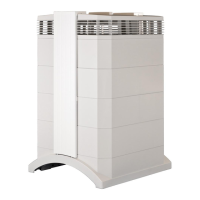
The IQAir GC Series is a high-performance air cleaning system designed for improving indoor air quality. It features a modular tower design with vertically stacked filtration and air-moving components. Air is drawn into the system at the base, passes through several filter stages, and is returned to the room via a diffuser on top. The housing modules are held together by two locking arms, which, when opened, allow easy access to all filters for replacement.

Function Description:

The IQAir GC Series functions by drawing room air through two arched openings at its base. This air first passes through a HEPA pre-filter (Filter 1) which removes most pollution particles. At the core of the system, a powerful centrifugal fan generates airflow, pushing the air through four gas phase filter cartridges (Filter 2 & 3) that contain up to 7.8 kg of gas phase control media. This media retains specific chemical pollutants. Finally, particulate post-filter sleeves hold back abrasion particles from the gas phase filter media, and low-turbulence, low-velocity air is returned to the room via the EvenFlow™ diffuser. The system is designed to filter the room air volume at least twice every hour on the set fan speed for significant air quality improvement. For high pollution intensity or stringent air quality requirements, more air changes may be necessary, potentially requiring more than one system.

Important Technical Specifications:

The IQAir GC Series is a Swiss-made product. It includes four post-filter sleeves and four gas phase filter cartridges, which are supplied separately and must be installed before use. The system operates with a power cord (plug types vary) and can be fitted with optional casters for mobility. The control panel, located on the front locking arm, features an LCD display, Filter Life LEDs (for Filters 1, 2, and 3), Fan Speed LEDs, a Timer LED, and keys for Power, Arrow (▲), Menu, and Enter. The system offers six different fan speeds, each corresponding to a specific air delivery rate (airflow), which can be displayed in cubic feet per minute (cfm) or cubic meters per hour (m³/h). The Filter Life Monitor calculates the remaining life of individual filters based on elapsed operation time, set fan speeds, and programmed filter load indices.

Usage Features:

The IQAir GC Series can be operated and controlled via its electronic control panel or an optional hand-held remote control.

  • Control Panel:
    • Power Key: Switches the system on/off (standby mode allows automatic timer start-up and menu access).
    • Arrow (▲) Key: Adjusts fan speed when the system is on; modifies selected settings in enter mode.
    • Menu Key: Accesses ten active menu functions:
      1. Filter Life Monitor: Displays remaining filter life for each filter element.
      2. Daily Timer: Activates the timer and sets daily ON periods with specific start and end times.
      3. Weekly Timer: Deactivates the daily ON period on specific days of the week.
      4. Timer ON Fan Speed Selection: Sets fan speed for the Timer ON period (1 to 6).
      5. Timer OFF Fan Speed Selection: Sets fan speed for the Timer OFF period (0 to 6, where 0 is off).
      6. Time & Day Setting: Sets the current time and day.
      7. Filter Life Reset: Resets the filter life counter after a filter replacement.
      8. Airflow Units: Switches airflow units between cfm and m³/h.
      9. Language Setting: Modifies the display language.
      10. Filter Load Index Setting: Adjusts air pollution indices (Large Dust, Chemicals, Fine Dust) to reflect actual pollution levels, allowing for more precise filter life calculation. Settings range from "very low" to "very high."
    • Enter Key: Confirms settings and moves the cursor in enter mode.
    • Control Panel Locking Function: Locks/unlocks keys by pressing Menu and Enter simultaneously for 3 seconds, indicated by a star symbol.
  • Remote Control:
    • Switches the system on/off.
    • Selects desired fan speed.
    • Activates/deactivates the timer function (start/stop times must be set on the control panel).
    • Best transmission results are achieved by pointing the remote at the control panel or a surface that reflects the signal to the panel.

Maintenance Features:

  • Filter Replacement: The modular design allows for easy replacement of all filters.
    • Pre-Filter (Filter 1): Accessed by opening the locking arms, separating the upper housing from frame 1, removing filter clamps, and lifting the frame.
    • Gas Phase Filter Cartridges (Filter 2 & 3) and Post-Filter Sleeves: Accessed by opening locking arms, removing the diffuser and frame 3. Cartridges are twisted counter-clockwise to remove and clockwise to insert. New filter sleeves are pulled over new cartridges.
    • After any filter replacement, the Filter Life Monitor must be reset via the control panel.
    • Used filters can typically be disposed of with regular household waste, but if exposed to hazardous substances, local regulations for hazardous waste disposal should be followed.
  • Cleaning the Housing:
    • Always unplug the system before cleaning.
    • Use a soft, clean cloth.
    • For water-soluble stains, use window cleaning fluid.
    • For tough, non-water-soluble stains, use a silicon spray.
    • Do not use solvents or organic cleaning fluids.
  • Fan: The IQAir system is equipped with a maintenance-free fan motor.
  • Remote Control Battery Replacement: Requires one CR2025 battery. The battery compartment is located at the bottom end of the remote control and is accessed by pressing a small lever and sliding the compartment out.

Optional Accessories:

IQAir offers a range of accessories to complement the system:

  • VMFTM: Powder-coated stainless-steel wall bracket for secure wall-mounting.
  • VM InFlow™™: Wall-mounted ducting adapter kit for positive/negative pressure creation.
  • InFlow™™: Complete ducting adapter kit for positive/negative pressure creation.
  • OutFlow™™: Complete ducting adapter kit for negative/positive pressure creation.
  • PF40TM: Additional pre-filter for areas with high levels of coarse dust.
  • FlexVac™™: Mobile floor-based source capture system (also available as VM FlexVac™™ wall-mounted version).
  • ATCTM: Aluminum transport case with wheels for easy and safe transport.

IQAir GC series Specifications

General IconGeneral
BrandIQAir
ModelGC series
CategoryAir Cleaner
LanguageEnglish

Related product manuals