InfiRay Outdoor • Geni GL35R Series • Quick Start Guide www.infirayouordoor.com
All rights reserved and shall not be copied and distributed in any form without written permission
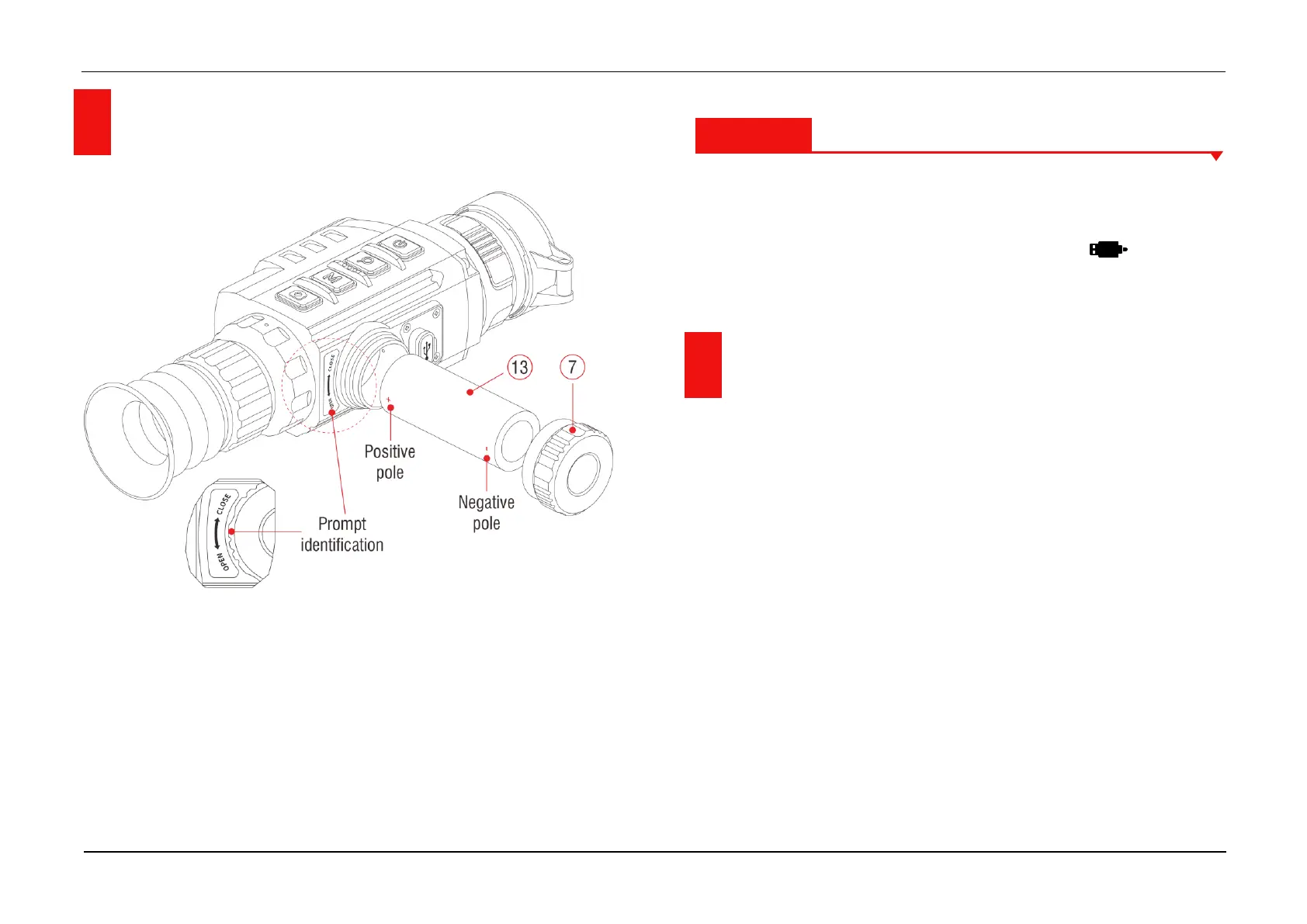
7 Battery Installation
➢ Open the battery cover (7) anticlockwise according to the prompt
identification on the device.
➢ Place one 26650 battery (13) correctly according to the polarity labels
in the battery compartment.
➢ When done, screw tightly the battery cover (7) clockwise.
Attention
- Please use batteries provided by formal manufacturers.
- Geni series can also be connected to an external power supply through
the Type-C data cable. In this case, the USB icon is displayed
on the upper right of the screen.
8 Operation
➢ Open the lens cover (10).
➢ Press and hold down the Z (5) button for 3s to power on the device.
Waite for 6s until thermal image appears on the display.
➢ Diopter Adjustment: Adjust the sharp resolution of the icons on the
display by rotating the diopter adjusting ring (2) of the eyepiece.
➢ Lens Focus Adjustment: rotate the lens focus ring (9) to focus on the
object being observed.
➢ Calibration: in the home screen, calibrate the image with a short press
of the M (4) + C (3) buttons for shutter calibration or long press the M (4)
and C (3) button for background calibration.



 To Next Page