Iridium GO! exec Single Mode Antenna LITE Kit (No GNSS)
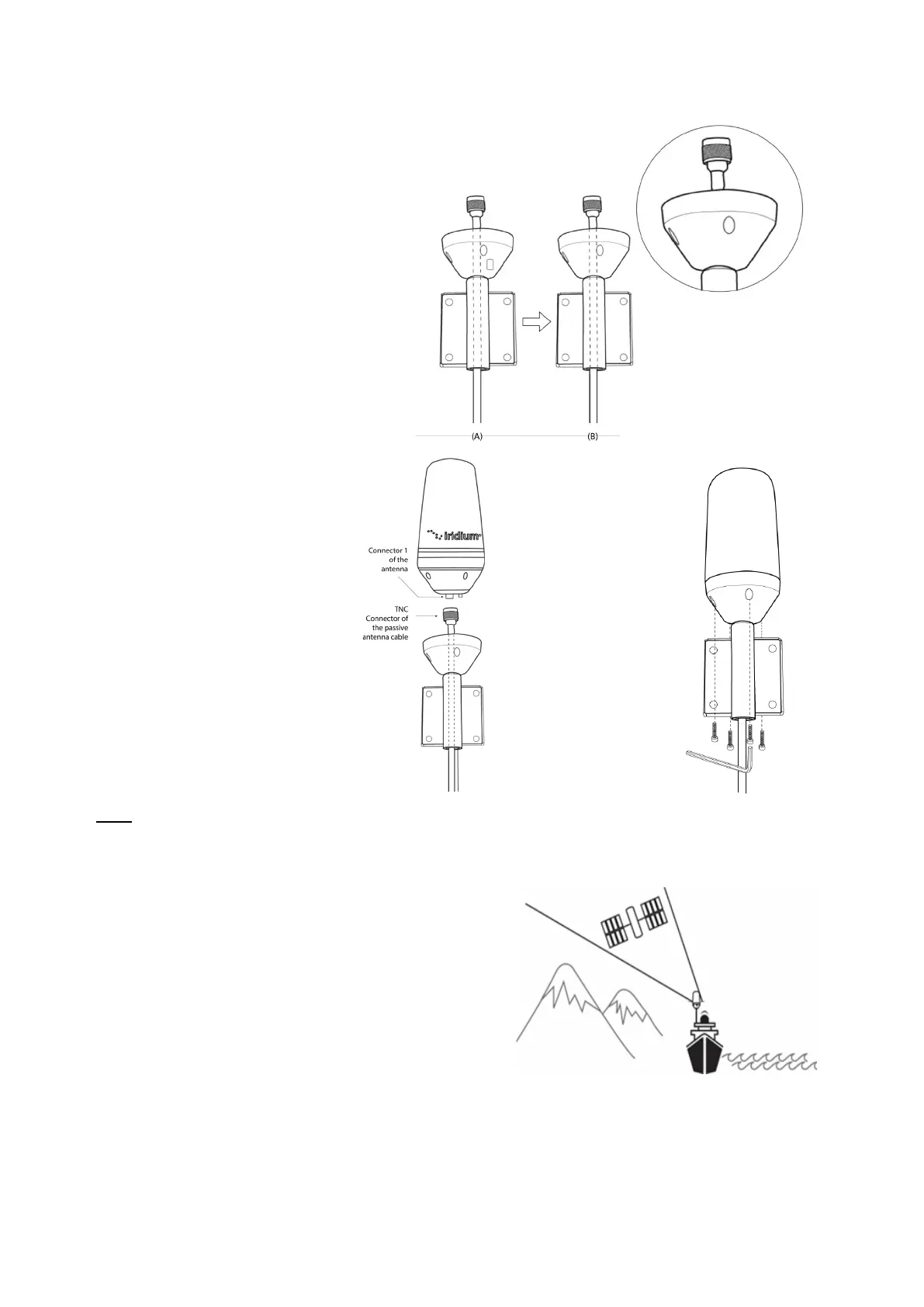
Step 5)
Insert the satellite cable through the antenna
base
Step 6)
1. Connect the SAT antenna cable
connector (TNC-M) to the antenna
connector1 (TNC-F) and hand-
tight.
Step 7)
Screw the antenna base
to the antenna housing
using screws and Allen
key provided.
Ensure that you attach
the black rubber seal
(see step 4C above)
provided to the antenna
base plate.
Note:
1) Use of an external antenna will provide connectivity for the Iridium network and GPS reception.
2) To ensure maximum performance of the antenna and to maximize availability and reliability of service, the
position of the antenna must:
a) Have a clear view of the sky
b) Be clear and free of obstructions
c) Be clear of metal objects
d) Be located above and away from other transmitting
devices
e) Be securely affixed in location
f) Not be located indoors
g) Be installed in conjunction with a certified included
cable.



 To Next Page