Iridium GO! exec Single Mode Antenna LITE Kit (No GNSS)
Note:
1) When an external antenna is connected, you may still raise the device internal antenna.
If the device’s “Power ON/OFF based on antenna lift” is enabled, this action turns the unit on and allows for
transmission over the Iridium network as well as acquiring location information using the connected external
antenna, while lowering the device antenna with the external antenna connected will not switch the device off.
To switch the device off with the external antenna connected, you need to use the power button on the device or
use the device’s Settings menu. Alternatively, with the device powered on and the device antenna in lowered
position, unplugging the external antenna will switch the device off.
If the device’s Setting “Automatically power on the device on charger connection” is enabled, unplugging the
device power supply will also switch off the device, while plugging the device to a power supply will switch the
device on.
2) Please use provided cable ties to secure the antenna cables to the mounting bracket.
3) The “LITE” kit does not include an external Global Navigation Satellite System (“GNSS”) Antenna and so will not
assist with providing location coordinates for SOS. Calls placed and messages sent using the LITE kit –
including SOS calls and messages – will not include accurate location services.
While the Iridium GO! exec device itself does have an antenna with GNSS capabilities, using the internal
antenna indoors will reduce reception and will likely result in poor or no signal reception for all purposes,
including SOS functionality. Location services will not be accurate and may show no location found. Calls –
including SOS calls – will still go through, but the app or the Iridium GO! exec device will be unable to accurately
display the location coordinates.
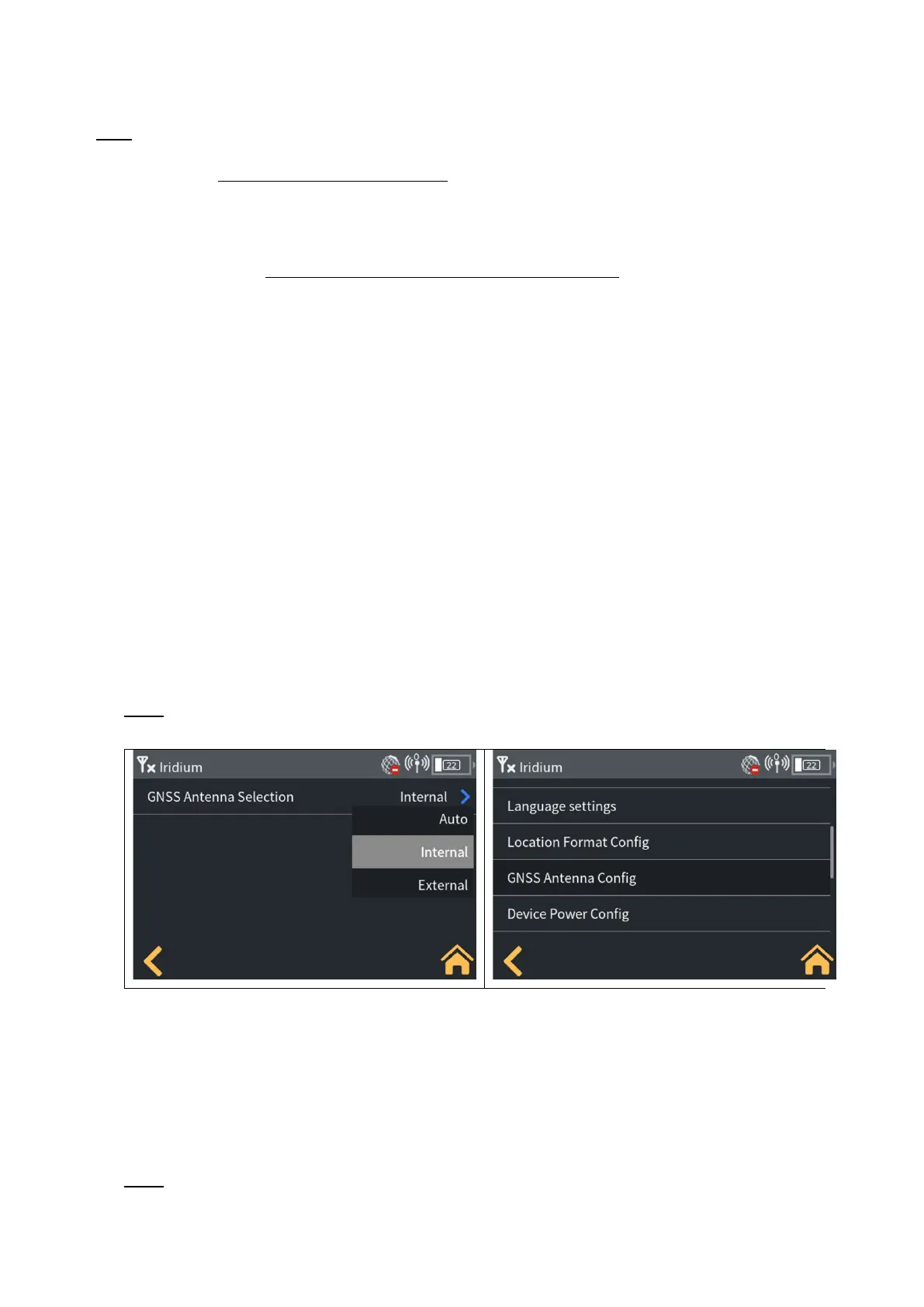
4) To allow the Iridium GO! exec device to use the internal GNSS antenna, the device's Settings menu MUST be
updated. On the LCD choose “Settings” then “GNSS Antenna Config” then “Internal”. This will force the device
to always use the internal GNSS antenna. Note that the device FW version must be 1.0.6 or higher to support
this feature.
3 Using the LITE Kit
To use the LITE kit, the Iridium GO! exec device firmware must be version 1.0.6 or higher – updates are
available via the most recent Iridium GO! exec App release on the Apple App Store and Google Play. Users just
need to download the latest version, connect to the Iridium GO! exec and follow firmware upgrade prompts on
the app screen.
Note: Users will need to change their device’s “GNSS Antenna Config” setting to “Internal” to use internal
GNSS with the single mode antenna is connected.
User will see the following options:
1) Auto:
• Devices will be set to “Auto” out of the box.
• Auto allows users to switch to an external GNSS antenna (for example, the dual mode antenna) when
it detects one is connected.
• This option also allows the device to switch back to internal GNSS when it detects the external iridium
antenna has been removed.
Note: If Auto is used with the single mode antenna, the device will not use internal GNSS and assume an
external antenna is equipped, and therefore continue searching for it.


 To Next Page
 Loading...


