IPU 40060 Issue 9
Page 19 of 27
2.5.2.3 Menus
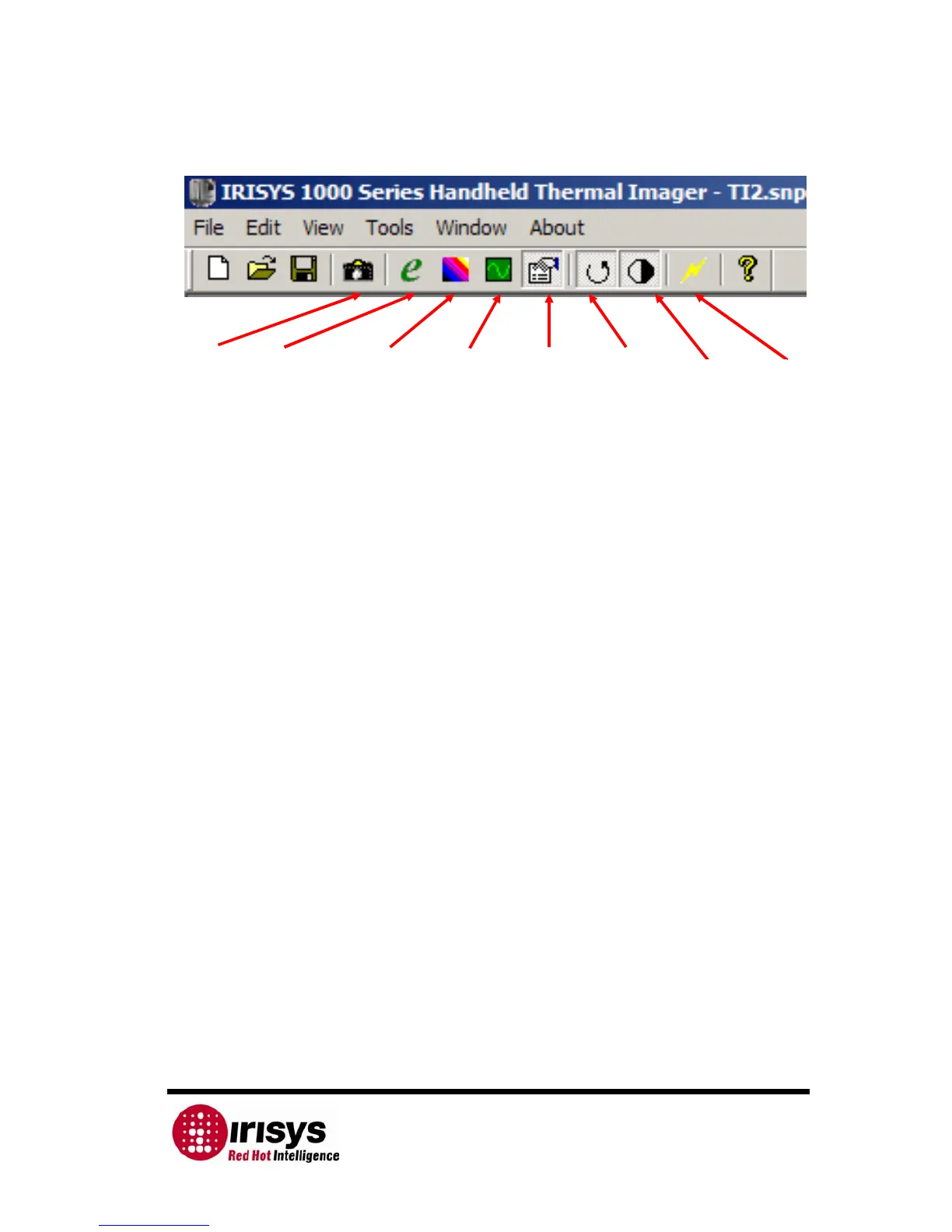
Figure 13: Thermal Imager Tool Bar
The File menu allows the following:
• New – opens a new imager window, which may be set up to run under its
own set of controls.
• Open… – opens a previously stored image.
• Close – closes the current window.
• Save – saves the current window as a scene data file.
• Save As… – saves the current window as a new scene data file.
• MS Excel output… – saves data in CSV format from the temperature/time
graph ready for use in a spreadsheet. Output of either the selected pixel(s)
or all pixels can be saved to MS Excel at a suitable up date interval.
• Snapshot n – A list of previously saved snapshots.
• Exit – Exits program.
The Edit menu allows the following:
• Copy (Ctrl C) – takes a copy of the image, it can then be pasted into
another document e.g. MS Word.
• Copy to bitmap – copies image to a ‘.bmp’ file.
• Snapshot – takes a snapshot of the image and saves it as a scene data file.
The View menu allows the following:
• Toolbar - Turn the Tool Bar on and off.
• Status Bar - Turn the Status Bar on and off.
• Control Panel - Turn the Control Panel on and off.
• Temperature Graph - Turn the Temperature Graph on and off.
The Tools menu allows access to:
• Emissivity editor – allows the editing of the emissivity tables.
• Colour map editor –allows the editing of the colour map editor.
• Edit Label – allows the editing of the labels for saving the images.
The Window menu allows access to the running windows and allows the user to
control how they are displayed. The options available are:
• Cascade. – Cascades all open images
• Tile. – Displays all open images simultaneously.
• Arrange Icons. – arranges the Icons of minimised windows.
The About menu displays information about the program, including the software
version number.
Take
Snapshot
Edit
Emissivities
Edit Colour
Map
Toggle
Temperature
Graph
Toggle
Controls
Continuous
Auto Gain
Single
Auto Gain
Live
Display


 To Next Page