EasyManua.ls Logo

IRiver T5 - Mode Selection

IRiver T5
40 pages
Print Icon
To Next Page IconTo Next Page
To Previous Page IconTo Previous Page
Loading...
Turning
the
Product
on/off
&
Mode
Selection
Turning
the
Product
on/off
Mode
Selection
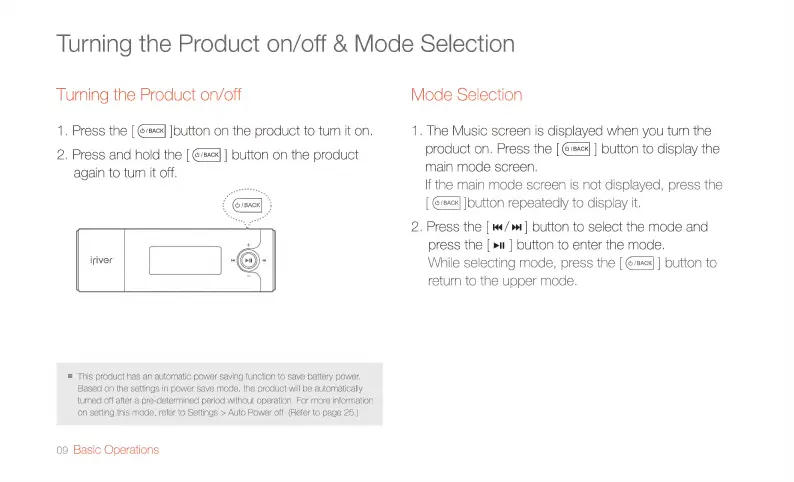
1.
Press
the
[
@sacx]
]button
on
the
product
to
turn
it
on.
1.
The
Music
screen
is
displayed
when
you
turn
the
2.
Press
and
hold
the
[EF]
|
button
on
the
product product
on.
Press
the
|@e]
]
button
to
display
the
again
to
turn
it
off.
main
mode
screen,
If
the
main
mode
screen
is
not
displayed,
press
the
[
sack}
[button
repeatedly
to
display
it.
2.
Press
the
|
«</>
]
button
to
select
the
mode
and
press
the
[
pu
]
button
to
enter
the
mode.
While
selecting
mode,
press
the
[
@/ec4]
]
button
to
return
to
the
upper
mode.
iriver
m
This
product
has
an
automatic
power
saving
function
to
save
battery
power.
Based
on
the
settings
in
power
save
mode,
the
product
will
be
automatically
turned
off
after
a
pre-determined
period
without
operation,
For
more
information
on
setting
this
mode,
refer
to
Settings
>
Auto
Power
off.
(Refer
to
page
25.)
09
Basic
Operations

Related product manuals