EasyManua.ls Logo

IRiver T5 - Connecting Products

IRiver T5
40 pages
Print Icon
To Next Page IconTo Next Page
To Previous Page IconTo Previous Page
Loading...
Connecting
Products
Connecting
Earphones
Charging
the
Product
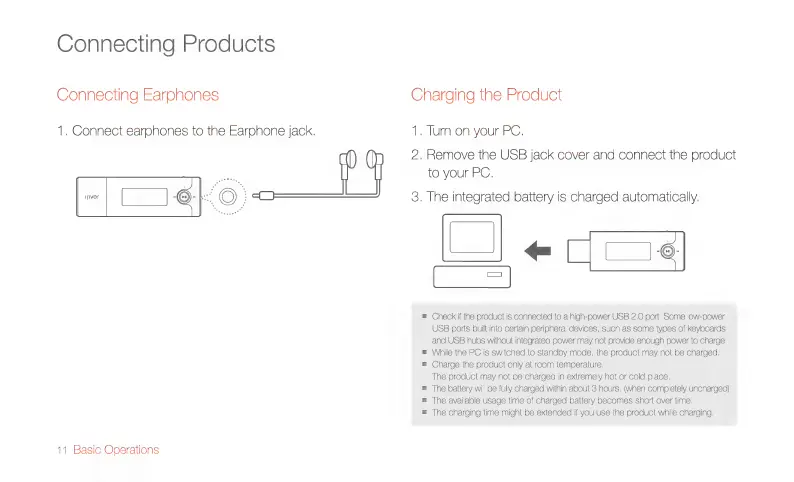
1.
Connect
earphones
to
the
Earphone
jack.
1.
Turn
on
your
PC.
2.
Remove
the
USB
jack
cover
and
connect
the
product
to
your
PC.
=|
C96
$
3.
The
integrated
battery
is
charged
automatically.
O|
e
qg
Check
if
the
product
is
connected
to
a
high-power
USB
2.0
port,
Some
low-power
USB
ports
built
into
certain
peripheral
devices,
such
as
some
types
of
keyboards
and
USB
hubs
without
integrated
power
may
not
provide
enough
power
to
charge.
While
the
PC
is
switched
to
standby
mode,
the
product
may
not
be
charged.
Charge
the
product
only
at
room
temperature.
The
product
may
not
be
charged
in
extremely
hot
or
cold
place.
The
battery
will
be
fully
charged
within
about
3
hours.
(when
completely
uncharged)
The
available
usage
time
of
charged
battery
becomes
short
over
time.
The
charging
time
might
be
extended
if
you
use
the
product
while
charging.
11
Basic
Operations

Related product manuals