EasyManua.ls Logo

IRiver T5 - Page 13

IRiver T5
40 pages
Print Icon
To Next Page IconTo Next Page
To Previous Page IconTo Previous Page
Loading...
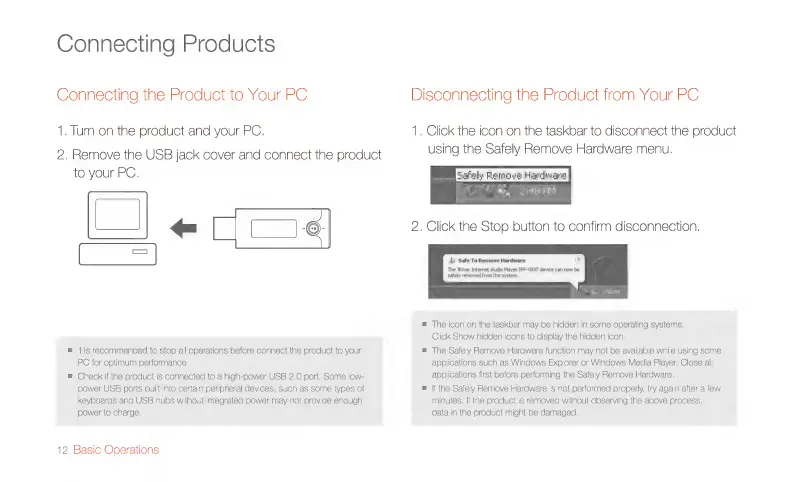
Connecting
Products
Connecting
the
Product
to
Your
PC
Disconnecting
the
Product
from
Your
PC
1.
Tum
on
the
product
and
your
PC.
1.
Click
the
icon
on
the
taskbar
to
disconnect
the
product
2,
Remove
the
USB
jack
cover
and
connect
the
product
using
the
Safely
Remove
Hardware
menu.
to
your
PC.
in
2:96
Pii
2.
Click
the
Stop
button
to
confirm
disconnection.
LJ
Ce
T
i)
Safe
To
Remove
Hardware
x
The
River
Internet
Audio
Player
IFP-1000
device
can
now
be
safely
removed
from
the
system.
=
The
icon
on
the
taskbar
may
be
hidden
in
some
operating
systems.
Click
Show
hidden
icons
to
display
the
hidden
icon.
=
itis
recommended
to
stop
all
operations
before
connect
the
product
to
your
=
The
Safely
Remove
Hardware
function
may
not
be
available
while
using
some
PC
for
optinum
performance,
applications
such
as
Windows
Explorer
or
Windows
Media
Player.
Close
all
m
Check
if
the
product
is
connected
to
a
high-power
USB
2.0
port.
Some
low-
applications
first
before
performing
the
Safely
Remove
Hardware.
power
USB
ports
built
into
certain
peripheral
devices,
such
as
some
types
of
=
If
the
Safely
Remove
Hardware
is
not
performed
properly,
try
again
after
a
few
keyboards
and
USB
hubs
without
integrated
power
may
not
provide
enough
minutes.
If
the
product
is
removed
without
observing
the
above
process,
power
to
charge.
data
in
the
product
might
be
damaged.
12
Basic
Operations

Related product manuals