Roomba
®
j6+ Owner’s Guide 9
EN
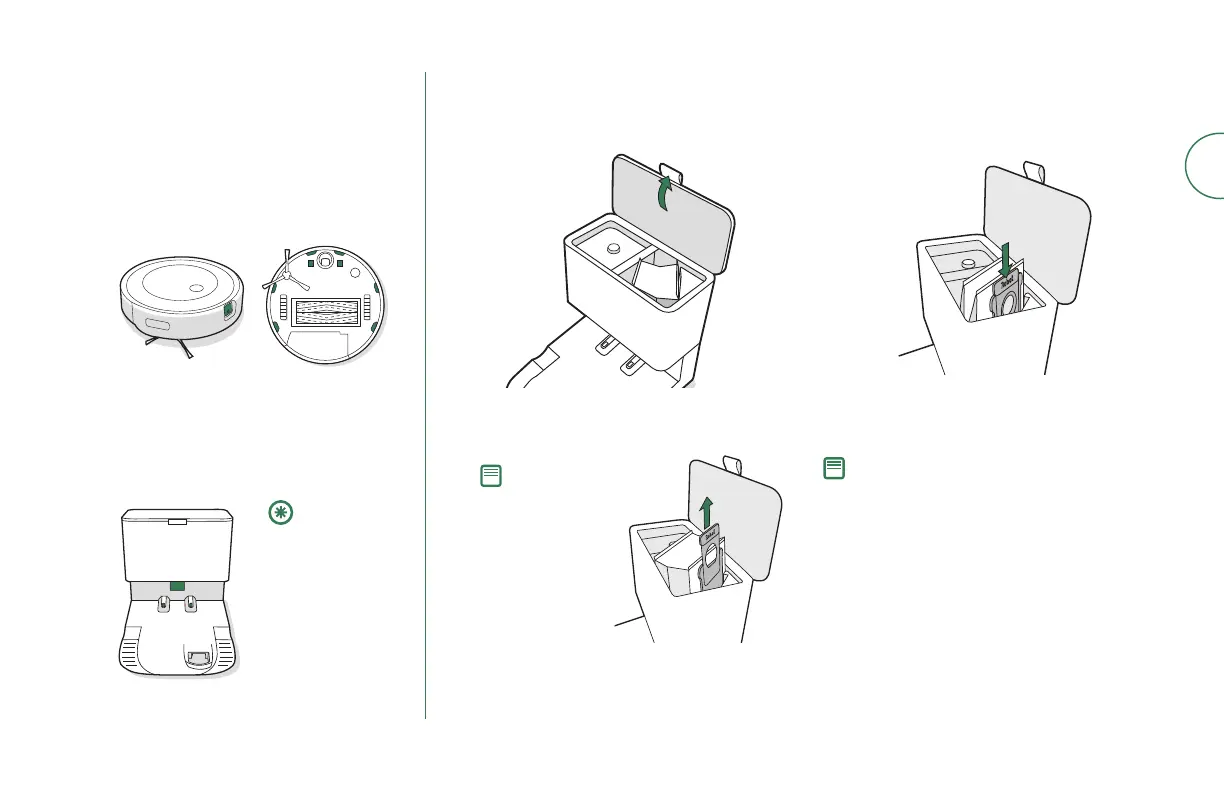
Inspect the visual docking target and
charging contacts to make sure that
they are clear of debris. Wipe with a
clean, dry cloth.
Note: To achieve optimal performance with your
robot and automatic dirt disposal, clean and/or
replace your robot’s lter as needed.
Install a new bag, sliding the plastic card
into the guide rails.
Discard the used bag.
Press down on the lid making sure that it
is completely closed.
4
3
5
Note: This will seal
the bag so dust
and debris cannot
escape.
Replacing the Bag
Pull up on the plastic card to remove the
bag from the canister.
Lift up on the canister lid to open.
1
2
Cleaning the Visual Docking Target
Sensors and Charging Contacts
Wipe sensors and charging contacts with
a clean dry cloth. You can alternately use
a pad of melamine foam to remove built
up debris on the robot and CleanBase
charging contacts.
Note: Do not
spray cleaning
solution
directly onto
sensors or
into sensor
openings.
2
1





 To Next Page